
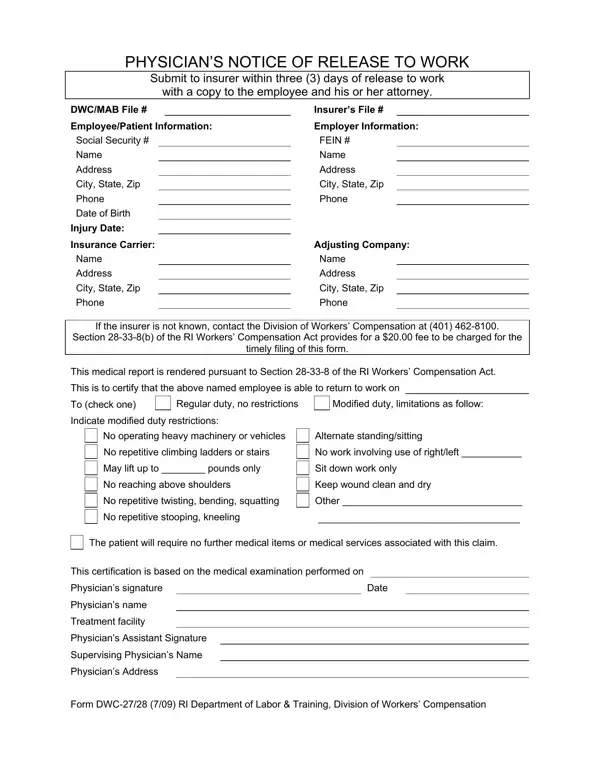
Form Dwc 27 28 PDF Details

When an employee is ready to return to work after sustaining an injury, the DWC 27 28 form plays a pivotal role in the transition process. This form, known as the Physician’s Notice of Release to Work, requires submission to the insurer within three days of the employee being cleared to resume employment, ensuring all parties involved— the employee, their attorney, and the insurer—are well-informed. It carries critical information including the employee and employer details, along with the specifics of the injury and the physician’s assessment regarding the employee's capability to return to work, which may indicate whether the return is to regular duty without restrictions or to modified duty with certain limitations. These limitations could range from restricted heavy lifting to prohibitions on repetitive physical activities, tailored to the employee's medical condition and recovery progress. Additionally, the form serves as a certification that the employee does not require further medical items or services related to the injury. This document, mandated by Section 28-33-8(b) of the RI Workers’ Compensation Act, not only facilitates the smooth reintroduction of an employee into the workplace but also upholds their rights to a safe and adjusted work environment, if necessary. Through this form, the Division of Workers’ Compensation enforces a structured approach to handling work-related injuries, ensuring clarity and protection for all parties engaged in the workers’ compensation system.

QuestionAnswer
Form NameForm Dwc 27 28
Form Length1 pages
Fillable?No
Fillable fields0
Avg. time to fill out15 sec
Other namesSupervising, repetitive, stooping, release to work form

How to Edit Form Dwc 27 28 Online for Free

RI can be completed easily. Just open FormsPal PDF editor to accomplish the job right away. To have our tool on the forefront of practicality, we work to adopt user-driven features and improvements regularly. We are at all times looking for suggestions - play a vital part in reshaping the way you work with PDF documents. Starting is easy! All that you should do is follow these simple steps below:

Step 1: Click on the "Get Form" button at the top of this page to access our editor.

Step 2: The tool will let you change PDF files in various ways. Enhance it by including personalized text, correct what's already in the file, and place in a signature - all within a few mouse clicks!

It will be simple to complete the document using out detailed tutorial! This is what you have to do:

1. Firstly, once completing the RI, start out with the form section that features the next blanks:

Part # 1 of filling out squatting

2. The third stage would be to fill in the following fields: Indicate modified duty restrictions, No operating heavy machinery or, No work involving use of, May lift up to pounds only, Sit down work only, No reaching above shoulders, Keep wound clean and dry, No repetitive twisting bending, Other, No repetitive stooping kneeling, The patient will require no, This certification is based on the, Date, Physicians signature, and Physicians name.

How you can prepare squatting stage 2

Be really mindful when completing This certification is based on the and No repetitive twisting bending, as this is the part in which most people make errors.

Step 3: After you've glanced through the information entered, simply click "Done" to conclude your form. Go for a free trial plan at FormsPal and obtain direct access to RI - with all transformations preserved and available from your personal cabinet. FormsPal is devoted to the personal privacy of all our users; we make sure all information coming through our system is confidential.