
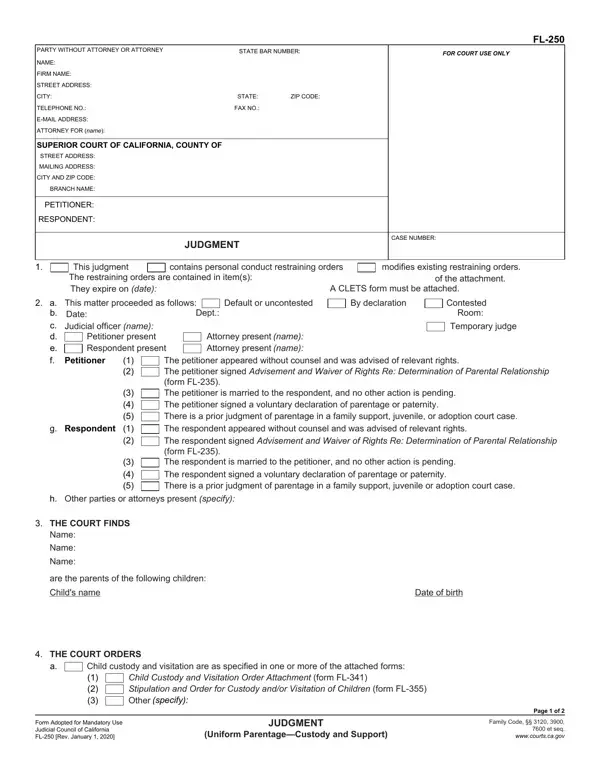
Form Fl 250 PDF Details

When navigating the complexities of family law, particularly involving matters of parentage, custody, and support, the FL-250 form serves as a critical component in formally establishing judgments in the state of California. This form, officially known as the Judgment (Uniform Parentage—Custody and Support) form, plays a vital role in the court's ability to make official decisions on several key areas. It encompasses aspects such as the modification or establishment of restraining orders, determinations of parentage, child custody and visitation arrangements, and child and legal support orders. The process outlined in the FL-250 form is comprehensive, requiring detailed information about the parties involved, including their legal representation and personal details. Furthermore, it delves into the procedural aspects of the court's findings and orders, touching on the presence and representation of both petitioners and respondents during proceedings, the judicial officer's rulings, and specific orders regarding child support, custody, and visitation. The form also addresses the necessity for attached documents that provide further details on the court’s orders, ensuring that all decisions regarding the child or children’s well-being are thoroughly documented and legally binding. Additionally, the FL-250 form prompts action from both parties post-judgment, such as the requirement to file a Child Support Case Registry Form, highlighting the ongoing responsibilities parents have following a court's decision. This document is a key piece in ensuring that parental rights, responsibilities, and the overall interests of children are legally recognized and upheld in the eyes of the court.

QuestionAnswer
Form NameForm Fl 250
Form Length2 pages
Fillable?No
Fillable fields0
Avg. time to fill out30 sec
Other namesjudgment uniform, uniform parentage custody, 2020 uniform form, judgment custody

How to Edit Form Fl 250 Online for Free

You'll be able to fill out judgment custody easily using our online tool for PDF editing. FormsPal expert team is relentlessly working to develop the editor and insure that it is much faster for clients with its many functions. Take your experience to a higher level with continuously developing and exceptional options available today! Here's what you will need to do to get started:

Step 1: Just click on the "Get Form Button" in the top section of this webpage to open our pdf editor. There you'll find all that is necessary to work with your document.

Step 2: This tool grants the opportunity to work with your PDF document in many different ways. Improve it by writing your own text, adjust original content, and include a signature - all possible in minutes!

To be able to fill out this document, be sure you type in the information you need in each and every field:

1. Complete your judgment custody with a number of necessary blanks. Consider all the necessary information and make certain nothing is forgotten!

2020 parentage conclusion process outlined (portion 1)

2. Right after filling out this part, go to the subsequent step and fill out the necessary particulars in these fields - The restraining orders are, A CLETS form must be attached, a b, c d e, This matter proceeded as follows, Petitioner, Respondent, Dept, Default or uncontested, By declaration, Contested Room, Temporary judge, Attorney present Attorney present, name name, and The petitioner appeared without.

Writing segment 2 in 2020 parentage

A lot of people frequently make errors while completing This matter proceeded as follows in this area. Be certain to go over whatever you enter here.

3. The following section focuses on THE COURT ORDERS, Child custody and visitation are, Child Custody and Visitation Order, specify, Form Adopted for Mandatory Use, JUDGMENT, Uniform ParentageCustody and, Page of, and Family Code et seq - type in every one of these empty form fields.

Child custody and visitation are, THE COURT ORDERS, and Uniform ParentageCustody and in 2020 parentage

4. Filling out THE COURT FURTHER ORDERS, Child support is as stated in one, Child Support Information and, specify, Both parties must complete and, The form Notice of Rights and, The last names of the children are, specify, The birth certificates must be, adding changing the last name of, the following parents name, Attorney fees and costs are as, Reasonable expenses of pregnancy, and Other specify is essential in the next step - make sure you don't hurry and fill in every field!

Filling in section 4 in 2020 parentage

5. As a final point, this final section is what you need to wrap up before closing the document. The blanks under consideration include the following: Continued on Attachment h, Number of pages attached, Date, TYPE OR PRINT NAME, JUDICIAL OFFICER, SIGNATURE FOLLOWS LAST ATTACHMENT, NOTICE Any party required to pay, FL Rev January, JUDGMENT, Uniform ParentageCustody and, Page of, For your protection and privacy, Print this form, Save this form, and Clear this form.

Step # 5 in submitting 2020 parentage

Step 3: Soon after going through your entries, press "Done" and you are good to go! Download the judgment custody after you sign up at FormsPal for a 7-day free trial. Immediately use the form from your FormsPal account, together with any modifications and changes being conveniently kept! FormsPal ensures your data privacy by using a secure method that never records or shares any personal information typed in. Be assured knowing your paperwork are kept safe whenever you use our services!