
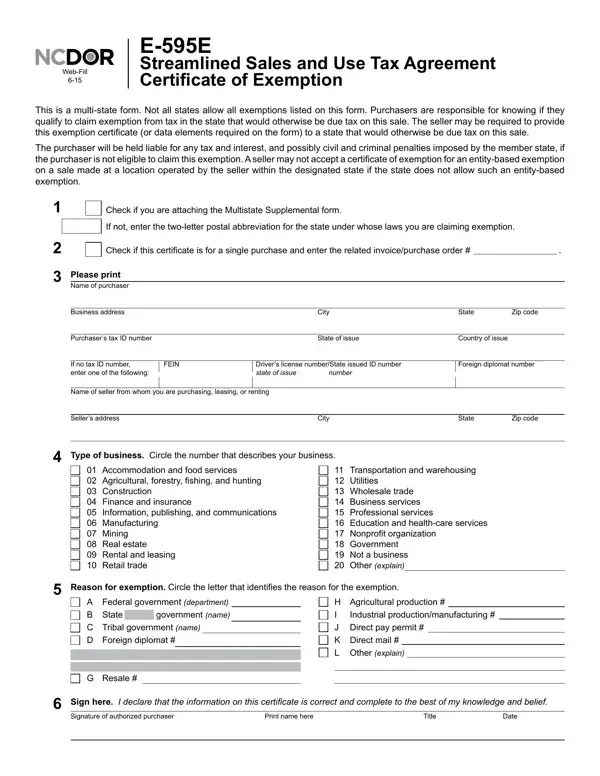
Understanding the comprehensive nature of the E-595E Streamlined Sales and Use Tax Agreement Certificate of Exemption requires examining its multifaceted functions and obligations for both purchasers and sellers. This form acts as a tool for businesses and organizations to claim tax exemptions on purchases that would otherwise be taxable, under specific conditions recognized by the applicable state laws. The form, which serves multiple states, mandates purchasers to be knowledgeable about their eligibility to claim such exemptions, ensuring they comply with the tax laws of the state where the tax is due. It is critical for purchasers to provide accurate and complete information to avoid potential tax, interest, and penalty liabilities. Sellers, on the other hand, are obligated to collect and maintain proper documentation of the exempt transactions, which could either be this form or the required data elements captured in an alternative format. The form also highlights the importance of the multistate supplemental form for businesses operating in multiple states, adding a layer of complexity to maintaining compliance with the Streamlined Sales and Use Tax Agreement (SSUTA). Notably, the form advises both parties of the consequences of failing to adhere to the guidelines, including possible civil and criminal penalties for purchasers and the conditions under which sellers are relieved from the responsibility of collecting tax on exempt sales.
| Question | Answer |
|---|---|
| Form Name | Ncdor E 595E Form |
| Form Length | 4 pages |
| Fillable? | No |
| Fillable fields | 0 |
| Avg. time to fill out | 1 min |
| Other names | e 595e form, form e 595e, printable north carolina tax exempt certificate, 595e |
Ncdor E 595E Form isn’t the one you’re looking for?