
Form Fw 003 PDF Details

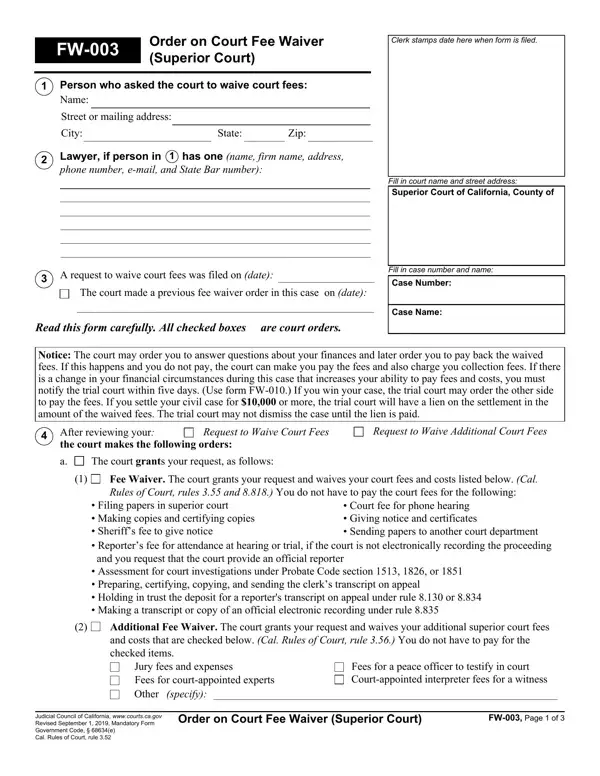
The Order on Court Fee Waiver, designated as FW-003 for the Superior Court, plays a critical role in the judicial system, especially for individuals who are unable to bear the costs associated with legal proceedings. This document outlines the process and criteria that courts use to determine whether an individual's request to waive court fees can be granted or denied. It details the necessary information that applicants must provide, including personal and attorney information, the basis for the fee waiver request, and the specific court fees and costs they seek to waive. The form also warns applicants that the court may later require them to justify their financial situation or repay waived fees under certain circumstances, such as a change in their financial condition or if they prevail in their case. Furthermore, it informs applicants about the possible outcomes of their requests, including the potential for a court-ordered hearing to further evaluate their eligibility for fee waivers. The structured approach to assessing these requests ensures that applicants are aware of their obligations, the criteria for assessment, and the implications of the court's decision. By detailing the conditions under which court fees may be waived and the process for appealing decisions or providing additional information, the FW-003 form serves as an essential guide for individuals seeking financial relief in legal matters.

QuestionAnswer
Form NameForm Fw 003
Form Length3 pages
Fillable?No
Fillable fields0
Avg. time to fill out45 sec
Other namesyour order fw, court fee waiver, fw 003 gc, ca fee waiver

How to Edit Form Fw 003 Online for Free

You may prepare ca fee waiver without difficulty using our online PDF editor. We at FormsPal are aimed at providing you the ideal experience with our editor by continuously presenting new capabilities and enhancements. With all of these updates, working with our tool gets better than ever before! It merely requires a few basic steps:

Step 1: Press the "Get Form" button in the top area of this webpage to get into our tool.

Step 2: With the help of our handy PDF tool, it is easy to do more than merely fill out blanks. Edit away and make your forms seem professional with custom textual content incorporated, or tweak the file's original content to perfection - all that comes with an ability to insert any pictures and sign the PDF off.

For you to fill out this PDF document, make sure you enter the necessary information in every blank:

1. While completing the ca fee waiver, make certain to incorporate all necessary fields in the relevant form section. It will help facilitate the process, enabling your information to be handled fast and correctly.

Stage # 1 in submitting your order fw

2. Once your current task is complete, take the next step – fill out all of these fields - Notice The court may order you to, After reviewing your the court, Request to Waive Court Fees, The court grants your request as, Request to Waive Additional Court, Fee Waiver The court grants your, Filing papers in superior court, Court fee for phone hearing, Additional Fee Waiver The court, Jury fees and expenses Fees for, specify, Fees for a peace officer to, Judicial Council of California, Order on Court Fee Waiver Superior, and FW Page of with their corresponding information. Make sure to double check that everything has been entered correctly before continuing!

your order fw completion process outlined (part 2)

Regarding After reviewing your the court and Order on Court Fee Waiver Superior, make certain you take another look in this current part. Those two are viewed as the most significant ones in the page.

3. The following segment should be relatively simple, Your name, The court denies your fee waiver, Case Number, Warning If you miss the deadline, Your request is incomplete You, Pay your fees and costs or File a, Below, On Attachment b, The information you provided on, On Attachment b, and Below - all these form fields needs to be completed here.

your order fw conclusion process outlined (stage 3)

4. You're ready to fill in this fourth section! Here you have these The court has enclosed a blank, Pay your fees and costs in full or, The court needs more information, Below, On Attachment c, Bring the items of proof to, Below, and On Attachment c blank fields to complete.

Completing part 4 in your order fw

5. The final section to conclude this document is crucial. Make certain to fill out the required fields, which includes Rev September, Order on Court Fee Waiver Superior, FW Page of, and This is a Court Order, before using the file. If not, it could end up in an unfinished and probably nonvalid paper!

Rev September, FW Page  of, and Order on Court Fee Waiver Superior of your order fw

Step 3: When you've glanced through the details entered, just click "Done" to finalize your FormsPal process. Get the ca fee waiver the instant you subscribe to a 7-day free trial. Readily use the pdf inside your FormsPal account, along with any edits and adjustments all synced! FormsPal guarantees safe form tools without personal data recording or sharing. Feel comfortable knowing that your details are in good hands here!