
Form G 4 Georgia PDF Details

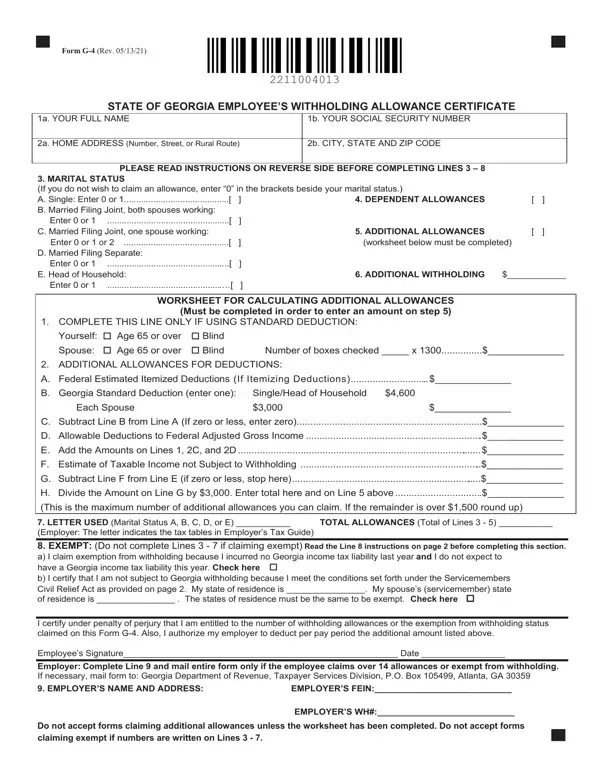
The Form G-4, an essential document for individuals employed in the state of Georgia, serves as an Employee’s Withholding Allowance Certificate, requiring meticulous completion to ensure appropriate state income tax withholdings from one's paycheck. Updated as of May 13, 2021, this form gathers fundamental personal information, including full name, social security number, and address. It also necessitates an understanding of one's marital status and allows the employee to declare the number of dependents and additional allowances for a more tailored tax withholding calculation, aiming to closely match the eventual tax liability. Particularly noteworthy is the form’s detailed worksheet, designed to assist in accurately calculating additional allowances, which could include deductibles such as the federal estimated itemized deductions, allowable deductions to federal adjusted gross income, and exemptions for those 65 or older or blind. The significance of accurately completing this form extends beyond individual tax obligations; it encompasses understanding potential exemptions, notably for non-residents under the Servicemembers Civil Relief Act, and implications for employers, especially in cases where more than 14 allowances are claimed or an exemption is declared. Employers are tasked with the responsibility of forwarding such forms to the Georgia Department of Revenue, underscoring the importance of accuracy and completeness in ensuring compliance with state tax laws. By guiding taxpayers through these selections, the Form G-4 facilitates a balance between withholdings and actual tax liabilities, aiming to avoid underpayment penalties or significant overpayments that would otherwise be refunded after filing a state income tax return.

QuestionAnswer
Form NameForm G 4 Georgia
Form Length2 pages
Fillable?No
Fillable fields0
Avg. time to fill out30 sec
Other namesg4 form, g 4 form 2019, georgia g4 form 2019, form g 4 2020

How to Edit Form G 4 Georgia Online for Free

Handling PDF forms online is certainly easy using our PDF editor. You can fill out georgia g4 here with no trouble. In order to make our tool better and easier to use, we consistently develop new features, considering suggestions coming from our users. If you are looking to get started, here's what it requires:

Step 1: Open the PDF form in our editor by clicking on the "Get Form Button" above on this webpage.

Step 2: As you open the tool, you will get the document made ready to be completed. Other than filling in different blanks, you might also do many other things with the form, namely writing custom text, changing the original textual content, inserting illustrations or photos, placing your signature to the form, and a lot more.

It really is easy to complete the pdf using this practical guide! This is what you need to do:

1. The georgia g4 necessitates certain information to be typed in. Be sure that the subsequent blank fields are complete:

g 4 2020 conclusion process clarified (stage 1)

2. Now that the last segment is completed, you're ready include the required specifics in E Add the Amounts on Lines C and, F Estimate of Taxable Income not, G Subtract Line F from Line E if, H Divide the Amount on Line G by, This is the maximum number of, LETTER USED Marital Status A B C, TOTAL ALLOWANCES Total of Lines, idence must be the same to be, I certify under penalty of perjury, Employees Signature Date, Employer Complete Line and mail, EMPLOYERS NAME AND ADDRESS, EMPLOYERS FEIN, and EMPLOYERS WH so you can go to the third stage.

g 4 2020 completion process clarified (portion 2)

People who use this PDF frequently make errors when filling out G Subtract Line F from Line E if in this area. Be sure to review whatever you type in here.

Step 3: Right after going through the entries, press "Done" and you're done and dusted! Join FormsPal right now and easily access georgia g4, all set for downloading. All adjustments you make are saved , meaning you can modify the file later on as required. FormsPal is focused on the confidentiality of all our users; we always make sure that all information processed by our tool is kept protected.