
Form Gab 121 PDF Details

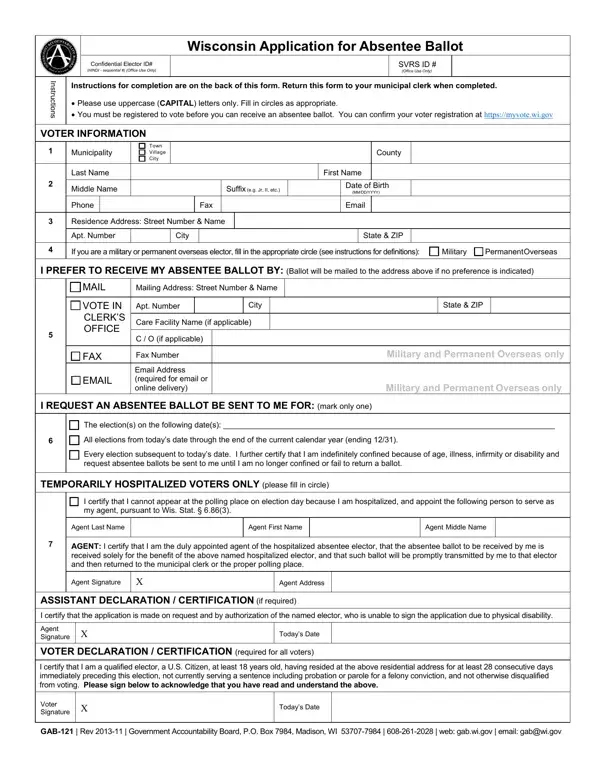
Voting is a cornerstone of democracy, enabling citizens to participate in shaping their government. The Wisconsin Application for Absentee Ballot, known as the GAB 121 form, plays a critical role in facilitating this right, especially for those unable to visit polling stations on Election Day. Tailored to ensure the inclusion of various voter groups, including military personnel, overseas citizens, and those confined due to health reasons, the form outlines specific procedures to obtain an absentee ballot. It mandates registrants to provide detailed personal information, choose their preferred method of ballot receipt—mail, fax, or email (with restrictions applicable to certain groups)—and specify the elections for which the absentee ballot is requested. Additionally, it caters to voters hospitalized at the time of elections, allowing them to designate an agent for ballot collection and submission. Completing and signing this form, thereby certifying the eligibility criteria as per Wisconsin law, is a crucial step for voters aiming to exercise their franchise. It is essential for applicants to carefully review the instructions and submit the GAB-121 form to their municipal clerk, ensuring their participation in the democratic process is unhindered.

QuestionAnswer
Form NameForm Gab 121
Form Length2 pages
Fillable?No
Fillable fields0
Avg. time to fill out30 sec
Other namesform gab app, wi absentee, ballot absentee wisconsin, how to wisconsin absentee

How to Edit Form Gab 121 Online for Free

You'll be able to fill in form gab app effortlessly with our online PDF tool. To make our editor better and simpler to use, we consistently work on new features, with our users' feedback in mind. All it takes is a few simple steps:

Step 1: Press the "Get Form" button above. It is going to open our tool so you could begin filling in your form.

Step 2: With the help of this advanced PDF file editor, you are able to accomplish more than simply complete blanks. Edit away and make your documents look professional with customized textual content added, or fine-tune the original content to excellence - all that accompanied by an ability to insert stunning pictures and sign it off.

This document will require particular details to be entered, so be certain to take some time to enter exactly what is requested:

1. You will need to fill out the form gab app accurately, therefore be attentive when filling out the areas that contain these blanks:

Writing segment 1 in how to wisconsin absentee

2. When the first part is completed, proceed to type in the suitable information in these: EMAIL, Email Address required for email, Military and Permanent Overseas, I REQUEST AN ABSENTEE BALLOT BE, The elections on the following, TEMPORARILY HOSPITALIZED VOTERS, I certify that I cannot appear at, Agent Last Name, Agent First Name, Agent Middle Name, AGENT I certify that I am the duly, Agent Signature, Agent Address, ASSISTANT DECLARATION, and I certify that the application is.

how to wisconsin absentee writing process outlined (part 2)

3. This subsequent part is relatively easy, I certify that I am a qualified, Voter Signature, Todays Date, and GAB Rev Government - these empty fields has to be filled out here.

Filling out section 3 of how to wisconsin absentee

Lots of people generally make mistakes while filling out Todays Date in this section. You need to review what you enter here.

4. All set to proceed to this fourth portion! In this case you have all of these Assistant Signature, Voter Signature, In the situation where the elector, By signing and dating this form, and GAB Rev Government form blanks to complete.

how to wisconsin absentee conclusion process explained (stage 4)

Step 3: Reread all the information you have entered into the blank fields and click on the "Done" button. Get your form gab app the instant you join for a free trial. Conveniently gain access to the pdf document within your FormsPal account page, along with any modifications and changes automatically synced! When using FormsPal, you can certainly fill out documents without having to worry about data breaches or data entries being distributed. Our protected system helps to ensure that your personal data is kept safe.