

HR-BEN-070 at a glance
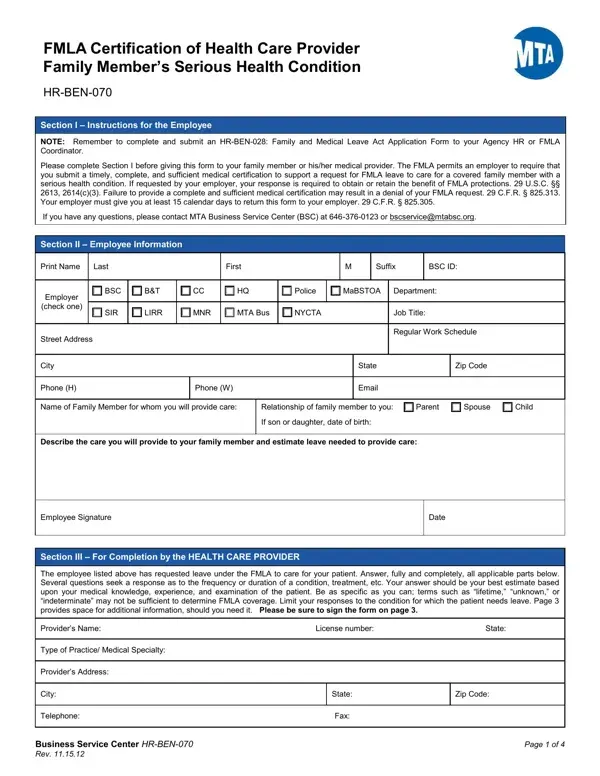
What it is: HR-BEN-070 is the FMLA Certification of Health Care Provider Family Member's Serious Health Condition.
Who signs: The health care provider signs the form on page 4, in Section 6 - Signature of Health Care Provider.
Section 1 - Information and Instructions. The purpose of this form is to submit the required documentation for your FMLA request.
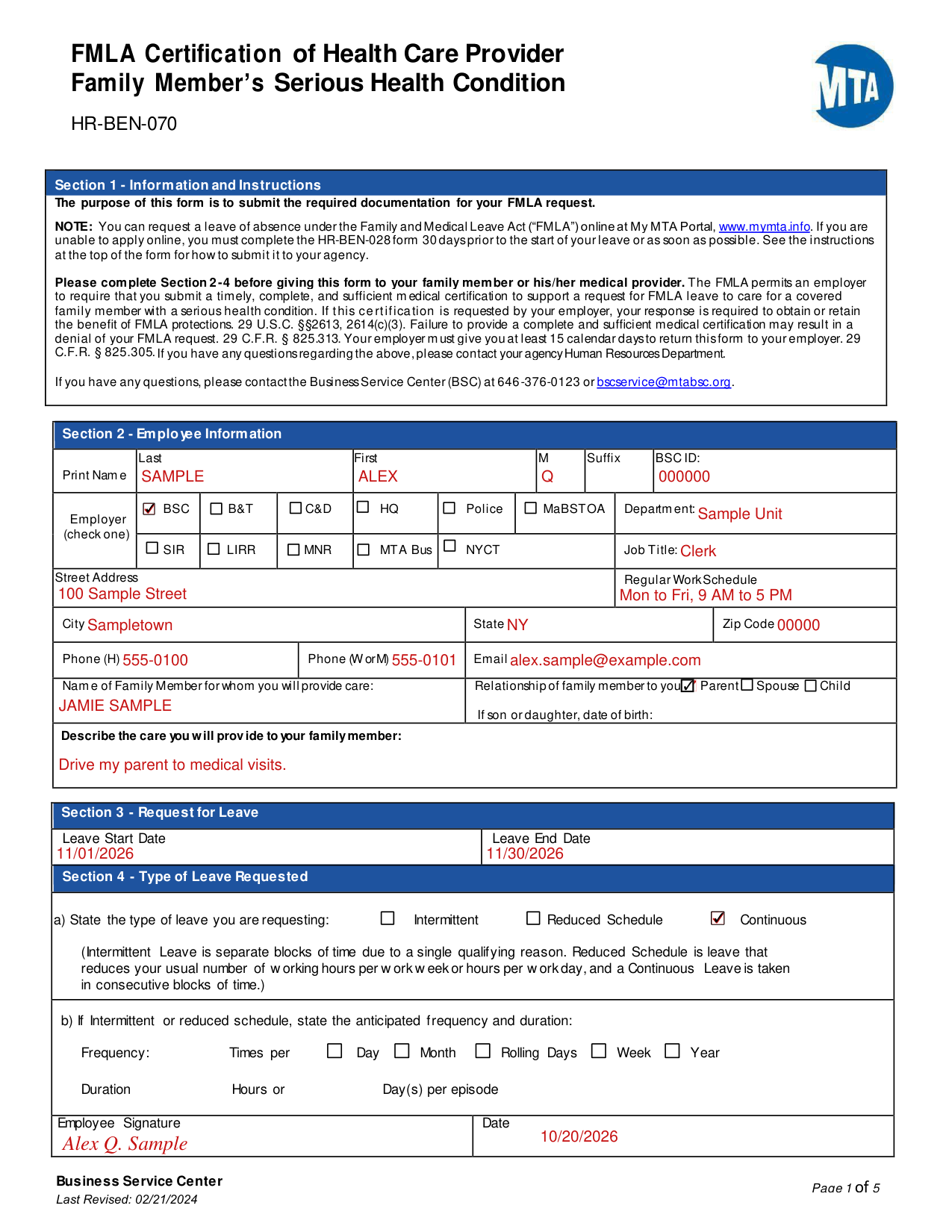
A filled-in HR-BEN-070 example: an employee requests leave to care for a parent
How to fill out HR-BEN-070, box by box
Section 1 - Information and Instructions
Please complete Section 2-4 before giving this form to your family member or his/her medical provider. The FMLA permits an employer to require that you submit a timely, complete, and sufficient medical certification to support a request for FMLA leave to care for a covered family member with a serious health condition. If this certification is requested by your employer, your response is required to obtain or retain the benefit of FMLA protections. 29 U.S.C. §§2613, 2614(c)(3). Failure to provide a complete and sufficient medical certification may result in a denial of your FMLA request. 29 C.F.R. § 825.313. Your employer must give you at least 15 calendar days to return this form to your employer. 29 C.F.R. § 825.305. If you have any questions regarding these certification requirements, please contact your agency Human Resources Department.
Section 2 - Employee Information
Under Print Name, enter Last, First, M, Suffix and BSC ID.
Enter the Department, Job Title and Regular Work Schedule.
Enter the Street Address, City, State, Zip Code, Phone (H), Phone (W or M) and Email.
Enter the Name of Family Member for whom you will provide care.
Describe the care you will provide to your family member.
Employer (check one)
Employer (check one): BSC, B&T, C&D HQ, Police, MaBSTOA, SIR, LIRR, MNR, MTA Bus or NYCT.
Relationship of family member to you
Relationship of family member to you: Parent, Spouse or Child.
If son or daughter, enter the date of birth.
Section 3 - Request for Leave
Enter the Leave Start Date and the Leave End Date.
Section 4 - Type of Leave Requested
State the type of leave you are requesting: Intermittent, Reduced Schedule or Continuous. Intermittent Leave is separate blocks of time due to a single qualifying reason. Reduced Schedule is leave that reduces your usual number of working hours per work week or hours per workday, and a Continuous Leave is taken in consecutive blocks of time.
If Intermittent or reduced schedule, state the anticipated frequency and duration. Frequency: Times per Day, Month, Rolling Days, Week or Year. Duration: Hours or Day(s) per episode.
Enter the Employee Signature and the Date.
Section 5 - To be completed by the HEALTH CARE PROVIDER
Section 5 is to be completed by the HEALTH CARE PROVIDER.
The employee has requested leave under the FMLA to care for your patient. Answer, fully and completely, all applicable parts.
Be as specific as you can; terms such as “lifetime,” “unknown,” or “indeterminate” may not be sufficient to determine FMLA coverage.
Do not provide information about the manifestation of disease or disorder in the employee's family members, 29 C.F.R. § 1635.3(b), genetic services, as defined in 29 C.F.R. § 1635.3(e), or genetic tests, as defined in 29 C.F.R. § 1635.3(f).
Enter the Provider's Name, License Number, State, Type of Practice/ Medical Specialty, Provider's Address, City, State, Zip Code, Telephone and Fax.
PART A: MEDICAL FACTS
Enter the Approximate date condition commenced and the Probable duration of condition.
Was the patient admitted for an overnight stay in a hospital, hospice, or residential medical care facility? (No or Yes) If so, enter the dates of admission. Enter the Date(s) you treated the patient for condition.
Was medication, other than over-the-counter medication, prescribed? (No or Yes) Will the patient need to have treatment visits at least twice per year due to the condition? (No or Yes)
Was the patient referred to other health care provider(s) for evaluation or treatment (e.g., physical therapist)? (No or Yes) If so, state the nature of such treatments and expected duration of treatment.
Is the medical condition pregnancy? (No or Yes) If so, enter the expected delivery date.
Describe other relevant medical facts, if any, related to the condition for which the patient needs care (such medical facts may include symptoms, diagnosis, or any regimen of continuing treatment such as the use of specialized equipment).
PART B: AMOUNT OF CARE NEEDED
When answering these questions, keep in mind that your patient's need for care by the employee seeking leave may include assistance with basic medical, hygienic, nutritional, safety or transportation needs, or the provision of physical or psychological care.
Will the patient be incapacitated for a single continuous period of time, including any time for treatment and recovery? (No or Yes) If so, estimate the beginning and ending dates for the period of incapacity: Begin Date and End Date. During this time, will the patient need care? (No or Yes) If so, explain the care needed by the patient and why such care is medically necessary.
Will the patient require follow-up treatments, including any time for recovery? (No or Yes) Estimate treatment schedule, if any, including the dates of any scheduled appointments and the time required for each appointment, including any recovery period.
Will the patient require care on an intermittent or reduced schedule basis, including any time for recovery? (No or Yes) If so, estimate the hours the patient needs care on an intermittent basis, if any: Hour(s) per day; days per week from through.
Will the condition cause episodic flare-ups periodically preventing the patient from participating in normal daily activities? (No or Yes) Based upon the patient's medical history and your knowledge of the medical condition, estimate the frequency of flare-ups and the duration of related incapacity that the patient may have over the next 6 months (e.g., 1 episode every 3 months lasting 1-2 days). Does the patient need care during these flare-ups? (No or Yes)
Frequency: Times per week(s), month(s), day(s). Duration: Hours or per episode.
Explain the care needed by the patient, and why such care is medically necessary.
ADDITIONAL INFORMATION: IDENTIFY QUESTION NUMBER(S) WITH YOUR ADDITIONAL ANSWER.
Section 6 - Signature of Health Care Provider
The health care provider signs the form on page 4, in Section 6 - Signature of Health Care Provider.
I do hereby certify that to the best of my knowledge the information on this form is true and correct. Enter the Signature and the Date.
Section 7 - Agency Contact
Check the box for your agency.
Submit this form to your Agency representative listed in Section 7. Agency representative: MTA HQ Occupational Health Services 420 Lexington Avenue, Suite 2201 New York, NY 10170 Attn: Nurse Manager Email: FMLA@MTAHQ.ORG Fax: 212-656-1368
Agency representative: MTA Bridges and Tunnels Human Resources Department 1 Robert Moses Building Randall's Island, NY 10035 Attn: Leave Administration Fax: 646-252-7911 Phone: 212-360-2946/2950
Agency representative: MTA Long Island Rail Road Resources Department 93-02 Sutphin Boulevard Jamaica, NY 11435 Attention: FMLA Administrator Fax: 718-558-6824 Email: fmla@lirr.org
Agency representative: MTA Metro-North Railroad FMLA Administrator Human Resources Department 420 Lexington Avenue, 12th Floor New York, NY 10170 Attention: FMLA Administrator Phone: 212-340-2112 Fax: 212-340-2045 Email: mnrfmla@mnr.org
Agency representative: MTA NYCT/MaBSTOA /SIRTOA/MTA BUS New York City Transit FMLA-PFL-STD Floor 8th, Rm 8000.43 300 Cadman Plaza West Brooklyn, NY 11201 E-Fax: 718-744-2671 Email: Complianceandsupport@nyct.com
Before you go
You can request a leave of absence under the Family and Medical Leave Act (“FMLA”) online at My MTA Portal, www.mymta.info. If you are unable to apply online, you must complete the HR-BEN-028 form 30 days prior to the start of your leave or as soon as possible.
If you have any questions, please contact the Business Service Center (BSC) at 646-376-0123 or bscservice@mtabsc.org.
Sources
[1] HR-BEN-070 (Last Revised 02/21/2024), FMLA Certification of Health Care Provider Family Member's Serious Health Condition, Business Service Center, MTA (the Official source link on this page).