
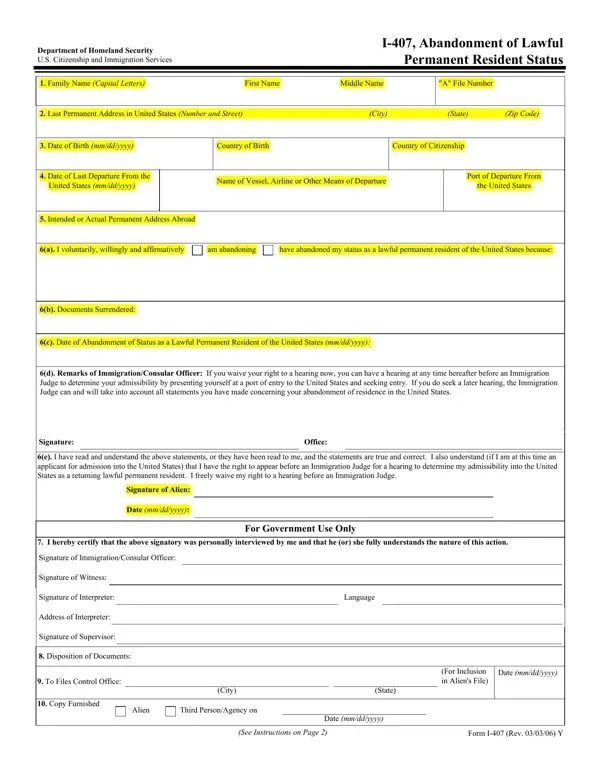

Form I-407 at a glance
What it is: Form I-407 is the Record of Abandonment of Lawful Permanent Resident Status.
Who signs: Sign with your signature (or the signature of the parent, custodial parent, or legal guardian, if applicable) and enter the Date of Signature (mm/dd/yyyy). If you used anyone as an interpreter to read the Instructions and questions on this form to you in a language in which you are fluent, the interpreter must fill out this section and sign and date the form. The person who completed your form, if other than the applicant, must sign Part 3.
A filled-in Form I-407 example: a permanent resident abroad mails the form
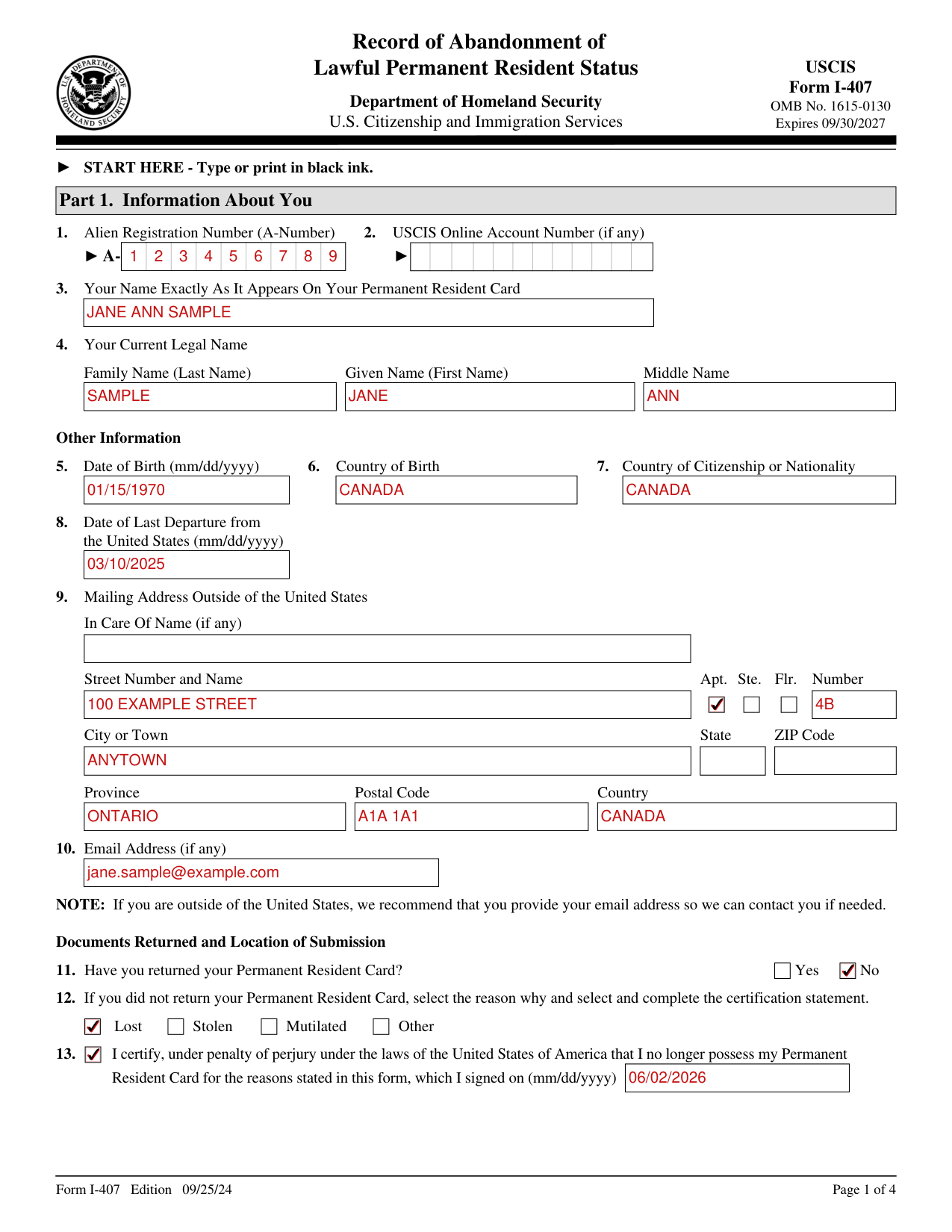
How to fill out Form I-407, box by box
Your A-Number, account number and name
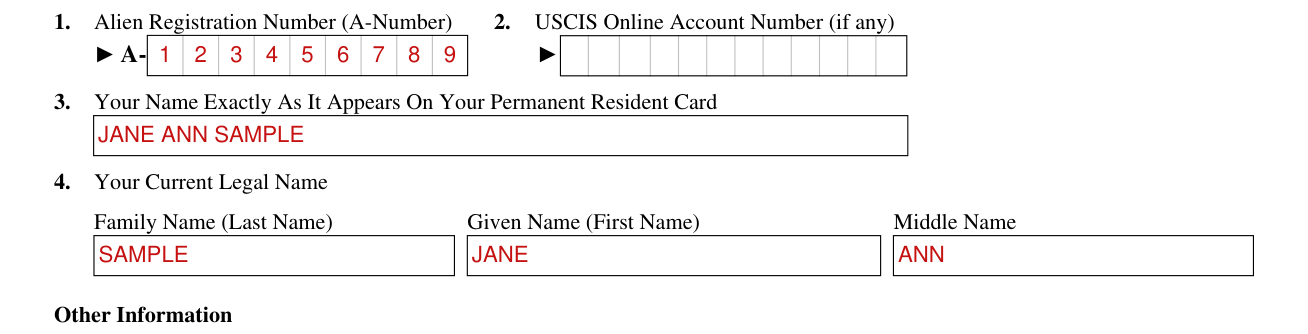
Enter your Alien Registration Number (A-Number).
Enter your USCIS Online Account Number (if any).
Enter your name exactly as it appears on your Permanent Resident Card.
Enter your current legal name: Family Name (Last Name), Given Name (First Name) and Middle Name.
Other Information
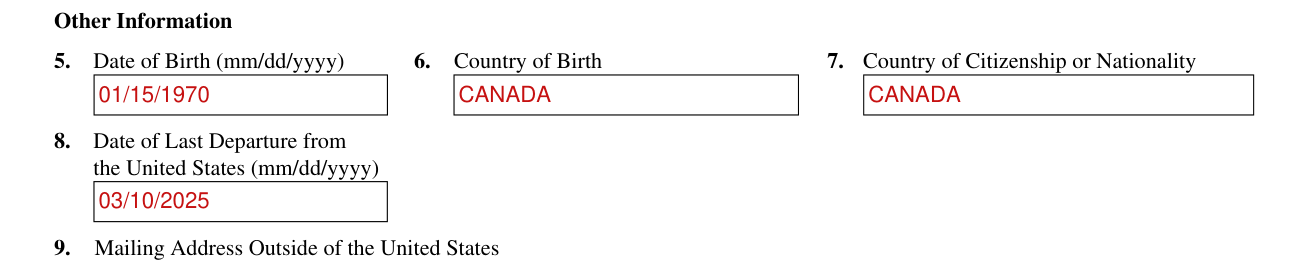
Under Other Information, enter your Date of Birth (mm/dd/yyyy), Country of Birth, and Country of Citizenship or Nationality.
Enter the Date of Last Departure from the United States (mm/dd/yyyy).
Mailing address outside of the United States
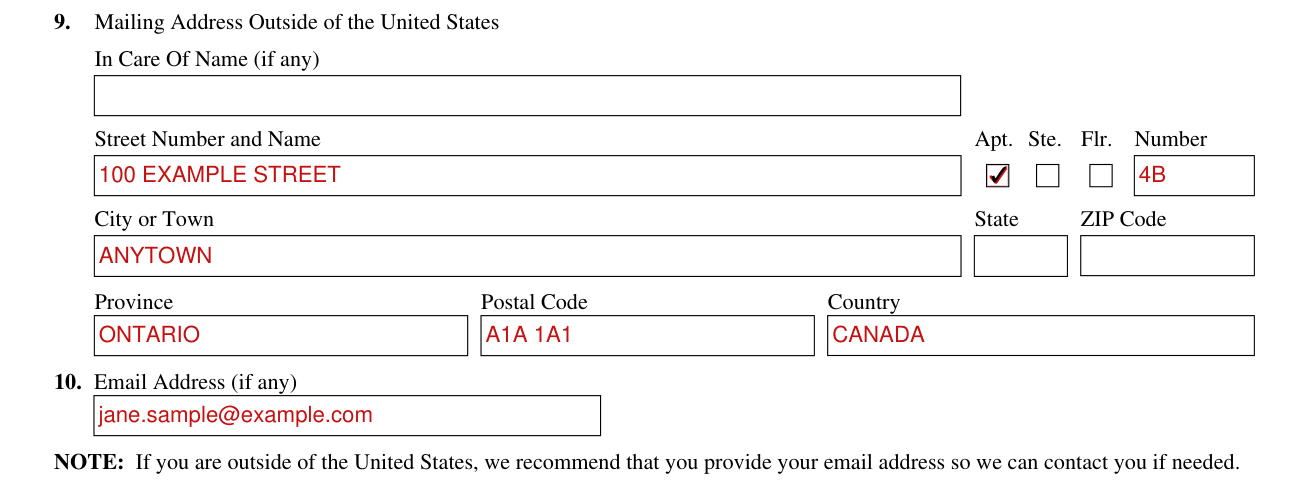
Under Mailing Address Outside of the United States, enter the In Care Of Name (if any).
Enter the Street Number and Name, and the Apt. Ste. Flr. Number.
Enter the City or Town, State, ZIP Code, Postal Code, Province and Country.
Enter your Email Address (if any). If you are outside of the United States, the Department of Homeland Security U.S. Citizenship and Immigration Services recommends that you provide your email address so it can contact you if needed.
Documents Returned: your Permanent Resident Card
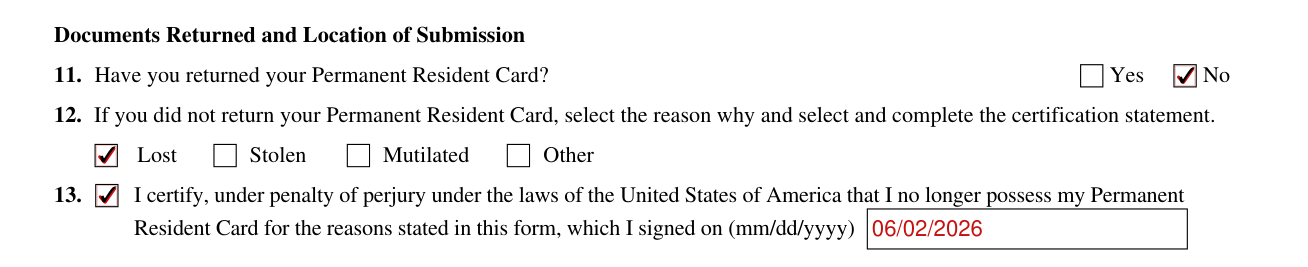
Under Documents Returned and Location of Submission, select No or Yes for "Have you returned your Permanent Resident Card?". If you did not return your Permanent Resident Card, select the reason why (Lost, Stolen, Mutilated or Other) and select and complete the certification statement.
13. Certify, under penalty of perjury under the laws of the United States of America, that you no longer possess your Permanent Resident Card for the reasons stated in this form, which you signed on (mm/dd/yyyy).
Documents returned: other documents

List other documents you returned (if any).
Where you are submitting Form I-407

The box "I am submitting Form I-407 from outside of the United States in-person." is for submitting in-person from outside of the United States.
16. The box "I am submitting Form I-407 from outside of the United States by mail." is for submitting by mail from outside of the United States.
The box "I am submitting Form I-407 at a U.S. Port of Entry." is for submitting at a U.S. Port of Entry.
The box "I am submitting Form I-407 from inside the United States to document that I abandoned my lawful permanent resident (LPR) status in the past." is for submitting from inside the United States to document that you abandoned your LPR status in the past.
For that box, you already abandoned your prior LPR status by leaving the United States intending to make your permanent home abroad, you did not retain your LPR status, and you have since returned to the United States through a port of entry by being admitted as a nonimmigrant or by being paroled.
Certification
Declare that you currently have no intention of residing permanently in the United States, and that by signing and submitting this form, you intend to record the fact that you have knowingly and willingly abandoned your LPR status in the United States.
You have reviewed the form and its instructions, and you have been informed of and understand your rights to a hearing before an immigration judge about whether you have abandoned your LPR status in the United States. By signing and submitting this form, you waive your rights to such a hearing.
Or declare that you are submitting this Form I-407 to document that you abandoned your prior LPR status.
You have reviewed the form and its instructions, and you have been informed, and understand, that had you not previously abandoned your LPR status, you would have a right to seek a hearing before an immigration judge to contest the abandonment of your LPR status. By signing and submitting this form, you waive your rights, if any, to such a hearing.
Consent of a parent, custodial parent, or legal guardian
And/or, for an incapacitated adult or a minor 14 years of age and younger (if applicable), the parent, custodial parent, or duly appointed legal guardian confirms they are the parent, custodial parent, or duly appointed legal guardian for the individual identified in Part 1. of this form and consents to the alien minor's/incapacitated adult's submission of this form.
If signed by a parent, custodial parent, or legal guardian, submit evidence to show parental, custodial parental, or legal guardianship responsibility of the minor or incapacitated adult.
Your name

Enter your name (or the name of the parent, custodial parent, or legal guardian, if applicable).
Part 2. The interpreter
The interpreter enters the Interpreter's Family Name (Last Name) and Given Name (First Name).
The interpreter enters the Interpreter's Business or Organization Name (if any).
Under Interpreter's Contact Information, enter the Interpreter's Daytime Telephone Number, Mobile Telephone Number (if any) and Email Address (if any).
The interpreter certifies, under penalty of perjury, that the interpreter is fluent in English and has interpreted every question on this form and Instructions and interpreted the applicant's answers to the questions in that language, and the applicant informed the interpreter that they understood every instruction, question, and answer on the form.
The interpreter enters the Interpreter's Signature and the Date of Signature (mm/dd/yyyy).
Part 3. The person preparing the form
The person who completed your form, if other than the applicant, must sign Part 3.
If the same individual acted as your interpreter and your preparer, then that person should complete both Part 2. and Part 3.
A stamped or typewritten name in place of a signature is not acceptable.
The preparer enters the Preparer's Family Name (Last Name) and Given Name (First Name).
The preparer enters the Preparer's Business or Organization Name (if any).
Preparer's Contact Information: the Preparer's Daytime Telephone Number, Preparer's Mobile Telephone Number (if any) and Preparer's Email Address (if any).
The preparer certifies, under penalty of perjury, that the preparer prepared this form for the applicant at their request and with express consent and that all of the responses and information contained in and submitted with the application is complete, true, and correct and reflects only information provided by the applicant.
The preparer enters the Preparer's Signature and the Date of Signature (mm/dd/yyyy).
More rules for Form I-407
You may request a hearing before an immigration judge if you disagree with a U.S. Department of Homeland Security (DHS) claim that you have abandoned your lawful permanent resident status.
Common questions about Form I-407
Is Form I 407 mandatory?
Submission of Form I-407 is voluntary. U.S. law does not require you to complete, sign, or submit this Form I-407.
What are the instructions for filing form I-407?
Type or print in black ink. In 15 to 18, mark the box for how you are submitting Form I-407: from outside of the United States in-person (15), from outside of the United States by mail (16), at a U.S. Port of Entry (17), or from inside the United States to document that you abandoned your lawful permanent resident (LPR) status in the past (18). Sign with your signature (or the signature of the parent, custodial parent, or legal guardian, if applicable) and enter the Date of Signature (mm/dd/yyyy).
Sources
[1] Form I-407 (Edition 09/25/24), Record of Abandonment of Lawful Permanent Resident Status, U.S. Citizenship and Immigration Services (the Official source link on this page).