
Form Inv 26 15 PDF Details

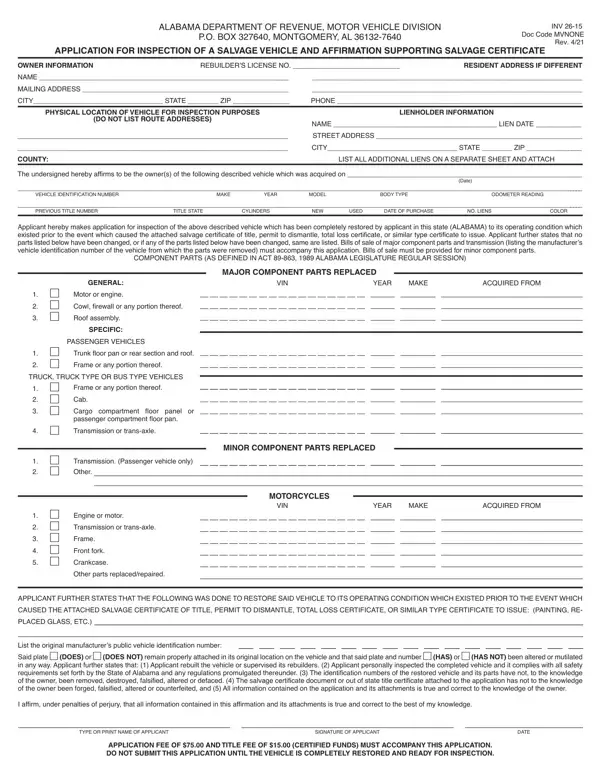
Understanding the Inv 26 15 form, issued by the Alabama Department of Revenue, Motor Vehicle Division, is crucial for individuals and entities involved in restoring salvage vehicles within Alabama. This form serves as an application for the inspection of a salvage vehicle and supports the acquisition of a salvage certificate. It gathers detailed information about the vehicle owner, including their address and contact details, alongside the vehicle's specific information such as the Vehicle Identification Number (VIN), make, year, model, body type, and odometer reading. Furthermore, it requires disclosing information about any lienholders. The form meticulously outlines the major and minor component parts replaced or repaired during restoration, adhering to the specifications set forth in Act 89-863 of the 1989 Alabama Legislature Regular Session. Affirmations within the form include statements about the vehicle's condition, the authenticity of identification numbers, compliance with safety requirements, and the integrity of the attached title or salvage certificates. Applicants must affirm that all information provided is accurate under penalty of perjury and are reminded of the associated fees required with the submission of the application. This document is paramount for owners rebuilding salvage vehicles, ensuring that the restoration process aligns with state regulations and safety standards, ultimately facilitating the inspection process required to legitimize the vehicle’s operational status post-restoration.

QuestionAnswer
Form NameForm Inv 26 15
Form Length2 pages
Fillable?No
Fillable fields0
Avg. time to fill out30 sec
Other names ALABAMA DEPARTMENT OF REVENUE, MOTOR VEHICLE ...

How to Edit Form Inv 26 15 Online for Free

When you need to fill out MOTOR VEHICLE ..., it's not necessary to download any sort of software - just make use of our online PDF editor. The editor is consistently updated by our staff, acquiring handy features and becoming a lot more convenient. In case you are seeking to start, here is what it's going to take:

Step 1: Click the "Get Form" button above. It'll open our pdf tool so you could begin completing your form.

Step 2: This tool allows you to work with your PDF document in many different ways. Modify it by adding any text, correct what's originally in the PDF, and add a signature - all close at hand!

It's straightforward to finish the form adhering to our detailed tutorial! Here's what you have to do:

1. You should fill out the MOTOR VEHICLE ... properly, thus be mindful while filling in the segments comprising all of these blank fields:

Filling in segment 1 of Form Inv 26 15

2. After filling in this section, go to the next part and enter all required details in all these blank fields - MINOR COMPONENT PARTS REPLACED, MOTORCYCLES, VIN, YEAR, MAKE, ACQUIRED FROM, Trunk floor pan or rear section, TRUCK TRUCK TYPE OR BUS TYPE, floor panel or, passenger compartment floor pan, Transmission or transaxle, Transmission Passenger vehicle, Engine or motor Transmission, Other parts replacedrepaired, and APPLICANT FURTHER STATES THAT THE.

A way to fill out Form Inv 26 15 part 2

3. The following section is typically rather simple, I affirm under penalties of, TYPE OR PRINT NAME OF APPLICANT, SIGNATURE OF APPLICANT, DATE, and APPLICATION FEE OF AND TITLE FEE - all of these blanks will have to be filled out here.

TYPE OR PRINT NAME OF APPLICANT, I affirm under penalties of, and APPLICATION FEE OF  AND TITLE FEE of Form Inv 26 15

Always be extremely mindful when completing TYPE OR PRINT NAME OF APPLICANT and I affirm under penalties of, since this is the section in which many people make a few mistakes.

Step 3: After you've looked over the information provided, click on "Done" to finalize your document generation. After creating afree trial account with us, you'll be able to download MOTOR VEHICLE ... or send it via email directly. The document will also be easily accessible in your personal account page with all of your changes. FormsPal ensures your information confidentiality with a protected system that never saves or shares any type of private information used in the PDF. Be assured knowing your paperwork are kept confidential whenever you use our tools!