
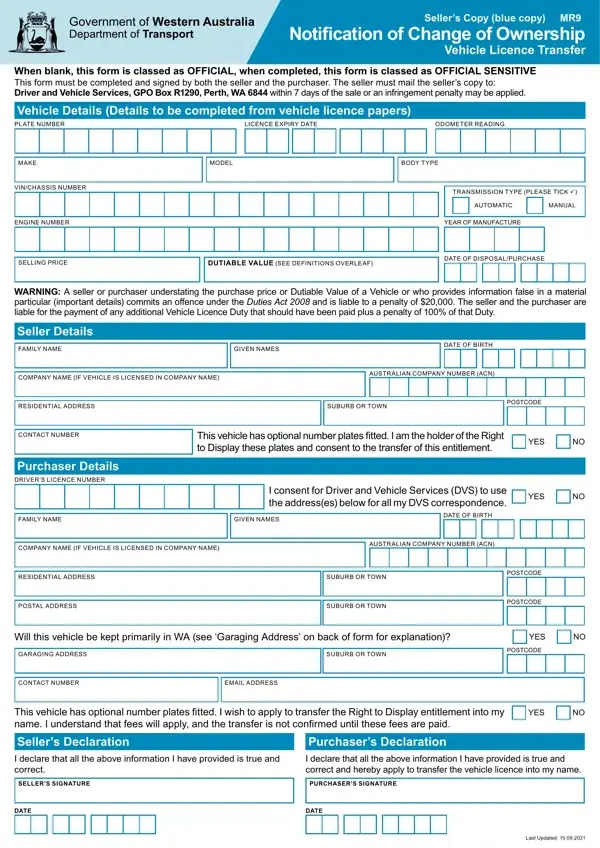
Whenever you intend to fill out Form Mr9, you don't need to download any kind of applications - simply make use of our online PDF editor. Our tool is consistently developing to present the best user experience achievable, and that is thanks to our commitment to continual enhancement and listening closely to testimonials. With just a couple of simple steps, you are able to start your PDF journey:
Step 1: Just click the "Get Form Button" at the top of this webpage to launch our pdf form editing tool. This way, you'll find everything that is required to work with your file.
Step 2: With the help of our handy PDF tool, you are able to do more than just fill out forms. Edit away and make your forms appear great with custom textual content added, or optimize the file's original input to perfection - all comes with an ability to incorporate your personal graphics and sign the document off.
Concentrate while completing this document. Ensure every single field is done correctly.
1. Start filling out your Form Mr9 with a group of essential blanks. Gather all of the required information and make sure absolutely nothing is overlooked!
2. Once the previous section is complete, it's time to add the needed particulars in CONTACT NUMBER, Purchaser Details DRIVERS LICENCE, This vehicle has optional number, YES, FAMILY NAME, GIVEN NAMES, DATE OF BIRTH, I consent for Driver and Vehicle, YES, COMPANY NAME IF VEHICLE IS, AUSTR ALIAN COMPANY NUMBER ACN, RESIDENTIAL ADDRESS, POSTAL ADDRESS, SUBURB OR TOWN, and SUBURB OR TOWN so you're able to move forward further.
3. This next portion focuses on I declare that all the above, I declare that all the above, SELLERS SIGNATURE, PURCHASERS SIGNATURE, DATE, DATE, and Last Updated - type in all these blank fields.
4. You're ready to begin working on this next form section! Here you'll get all of these Vehicle Details Details to be, LICENCE EXPIRY DATE, ODOMETER READING, MAKE, MODEL, BODY TYPE, VINCHASSIS NUMBER, ENGINE NUMBER, TR ANSMISSION TYPE PLEASE TICK ü, AUTOMATIC, MANUAL, YEAR OF MANUFACTURE, SELLING PRICE, DUTIABLE VALUE SEE DEFINITIONS, and DATE OF DISPOSALPURCHASE fields to do.
Be extremely careful while filling in LICENCE EXPIRY DATE and TR ANSMISSION TYPE PLEASE TICK ü, because this is the section in which most users make errors.
5. While you come close to the completion of your document, you'll notice just a few extra requirements that must be met. Notably, COMPANY NAME IF VEHICLE IS, AUSTR ALIAN COMPANY NUMBER ACN, RESIDENTIAL ADDRESS, SUBURB OR TOWN, POSTCODE, CONTACT NUMBER, Purchaser Details DRIVERS LICENCE, This vehicle has optional number, YES, FAMILY NAME, GIVEN NAMES, DATE OF BIRTH, I consent for Driver and Vehicle, YES, and COMPANY NAME IF VEHICLE IS should be filled in.
Step 3: When you have glanced through the details in the blanks, just click "Done" to conclude your FormsPal process. Get the Form Mr9 after you sign up for a free trial. Easily access the pdf file within your personal account, along with any modifications and changes all synced! FormsPal is focused on the personal privacy of our users; we make sure that all personal information coming through our system stays secure.
