
Form Mv 41A PDF Details

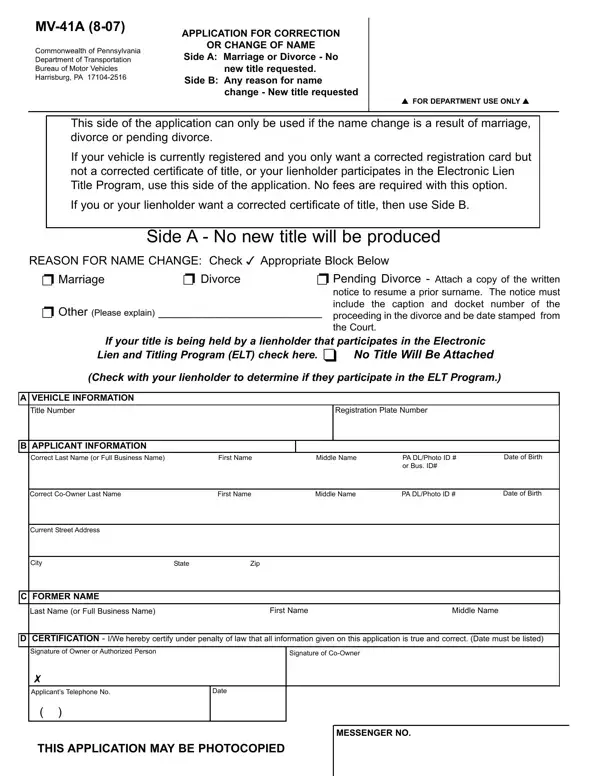
Navigating the complexities of vehicle title changes in the event of marriage, divorce, or pending divorce in Pennsylvania is facilitated through the MV-41A form issued by the Commonwealth of Pennsylvania Department of Transportation Bureau of Motor Vehicles. This specialized form offers a streamlined process for individuals seeking to correct or change their name on vehicle documentation without requiring a new title, under specific conditions as outlined on Side A of the application. For those whose circumstances necessitate the issuance of a new title reflecting a name change for reasons beyond marriage or divorce, Side B of the form comes into play, detailing the documentation and fees required. Whether participants are dealing with a simple registration card correction or the intricate coordination with lienholders participating in the Electronic Lien and Titling (ELT) Program, the MV-41A form provides a comprehensive guide. Additionally, it highlights essential steps for those with titles affected by liens or needing to navigate the duplicate title process due to loss, theft, or destruction of the original document. The form's meticulous structure, requiring applicant details, vehicle information, and certification of truthfulness, ensures that all parties involved – from vehicle owners to lienholders and co-owners – understand their responsibilities and the legal implications of the information they provide.

QuestionAnswer
Form NameForm Mv 41A
Form Length2 pages
Fillable?No
Fillable fields0
Avg. time to fill out30 sec
Other nameslienholder, title, pa mv41a, Pennsylvania

How to Edit Form Mv 41A Online for Free

You are able to work with name easily in our online tool for PDF editing. Our editor is consistently evolving to deliver the best user experience achievable, and that is thanks to our commitment to continuous improvement and listening closely to testimonials. Here's what you will have to do to get going:

Step 1: Firstly, open the pdf tool by clicking the "Get Form Button" in the top section of this page.

Step 2: The editor gives you the capability to change most PDF files in various ways. Transform it with your own text, correct what's originally in the file, and place in a signature - all manageable in minutes!

This PDF form requires particular data to be entered, hence be sure to take your time to provide precisely what is required:

1. To begin with, when filling out the name, start out with the page containing next fields:

with completion process described (stage 1)

2. Once the last section is completed, go to enter the applicable details in these - Last Name or Full Business Name, First Name, Middle Name, D CERTIFICATION IWe hereby, Signature of Owner or Authorized, Signature of CoOwner, cid Applicants Telephone No, Date, THIS APPLICATION MAY BE PHOTOCOPIED, and MESSENGER NO.

Last Name or Full Business Name, Date, and cid Applicants Telephone No of with

3. Completing REASON FOR NAME CHANGE Check cid, Side B New title will be produced, cid Marriage cid Divorce cid, cid Court Order cid Other Please, number of the proceeding in the, cid If the title is not attached, original title has a lien recorded, If your title is being held by a, No Title Will Be Attached, cid, Check with your lienholder to, A VEHICLE INFORMATION, Title Number, Registration Plate Number, and B APPLICANT INFORMATION is essential for the next step, make sure to fill them out in their entirety. Don't miss any details!

Completing part 3 of with

4. To move ahead, this fourth part requires filling out a handful of blank fields. Included in these are Last Name or Full Business Name, First Name, Middle Name, D APPLICATION FOR DUPLICATE TITLE, APPROPRIATE BLOCK MUST BE CHECKED, cid LostDestroyed, cid Stolen, cid Defaced, Certificate must be attached, cid Never Received, Complete address above, E CERTIFICATION IWe hereby, Signature of Owner or Authorized, Signature of Coowner, and Date, which you'll find vital to going forward with this particular document.

Step no. 4 for submitting with

It is easy to get it wrong when filling in the D APPLICATION FOR DUPLICATE TITLE, so ensure that you look again before you finalize the form.

Step 3: Proofread all the details you have entered into the form fields and then hit the "Done" button. Acquire your name once you sign up for a 7-day free trial. Easily gain access to the pdf form within your FormsPal account, with any edits and adjustments all preserved! FormsPal guarantees your data privacy via a secure system that in no way records or shares any kind of private information involved. Rest assured knowing your files are kept safe when you use our service!