
Form Mv 46A PDF Details

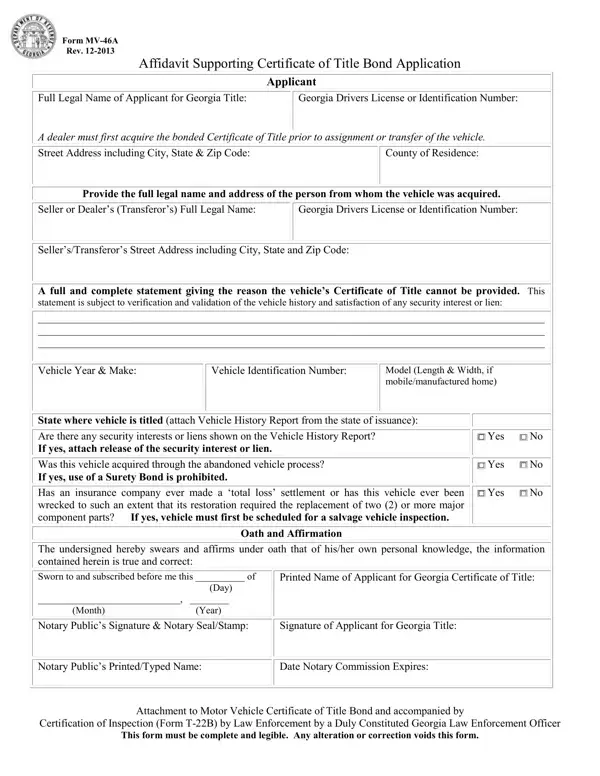
The MV-46A form is a critical document for residents of Georgia navigating the process of obtaining a bonded Certificate of Title for a vehicle. It serves as an affidavit supporting a Certificate of Title Bond Application, a necessary step when the original title cannot be produced at the time of transfer or assignment of a vehicle. Designed for both dealers and private citizens, the form requires detailed information about the applicant, including their full legal name, Georgia Driver's License or Identification Number, and comprehensive contact details. It extends to encompass specifics about the vehicle in question—year, make, model, Vehicle Identification Number (VIN), and the state where it was originally titled. Moreover, the form necessitates disclosure regarding any underlying issues that might complicate title transfer, such as unresolved security interests, liens, or histories of significant damage. Accompanying these requirements, the form includes sections for an oath and affirmation, verifying the veracity of the provided information through notarization. Completing the MV-46A with accuracy and honesty is not just about adhering to a procedural requirement; it's about ensuring the lawful and smooth transition of vehicle ownership under circumstances that deviate from the norm.

QuestionAnswer
Form NameForm Mv 46A
Form Length1 pages
Fillable?No
Fillable fields0
Avg. time to fill out15 sec
Other namesga 46a, ga 46a form, georgia mv 46a, mv 46a affidavit

How to Edit Form Mv 46A Online for Free

Should you need to fill out mv 46a, you don't have to install any software - simply give a try to our online PDF editor. Our tool is continually evolving to give the best user experience possible, and that is thanks to our dedication to constant enhancement and listening closely to feedback from users. All it requires is several easy steps:

Step 1: Press the "Get Form" button at the top of this page to get into our tool.

Step 2: Once you access the editor, you will see the form ready to be filled in. In addition to filling out different blanks, you may also do many other things with the form, specifically adding any text, editing the original text, inserting images, signing the document, and a lot more.

This PDF form will require some specific information; in order to ensure correctness, you should take into account the tips directly below:

1. The mv 46a will require specific details to be inserted. Be sure the next blank fields are completed:

Step no. 1 in submitting mv46a

2. Once your current task is complete, take the next step – fill out all of these fields - Model Length Width if, State where vehicle is titled, Are there any security interests, Was this vehicle acquired through, Has an insurance company ever made, Yes No, Yes No, Yes No, The undersigned hereby swears and, Oath and Affirmation, Sworn to and subscribed before me, Notary Publics Signature Notary, Printed Name of Applicant for, and Signature of Applicant for Georgia with their corresponding information. Make sure to double check that everything has been entered correctly before continuing!

Part no. 2 in filling out mv46a

3. This next segment is all about Notary Publics PrintedTyped Name, Date Notary Commission Expires, Attachment to Motor Vehicle, Certification of Inspection Form, and This form must be complete and - complete these blanks.

Filling out section 3 of mv46a

You can potentially make an error when filling out your Notary Publics PrintedTyped Name, so ensure that you reread it before you finalize the form.

Step 3: Be certain that the details are accurate and then just click "Done" to proceed further. Join us today and easily access mv 46a, set for downloading. Every last change you make is handily saved , so that you can edit the form at a later stage when necessary. FormsPal guarantees your data confidentiality with a protected system that in no way saves or shares any kind of private information typed in. Feel safe knowing your paperwork are kept protected whenever you use our tools!