
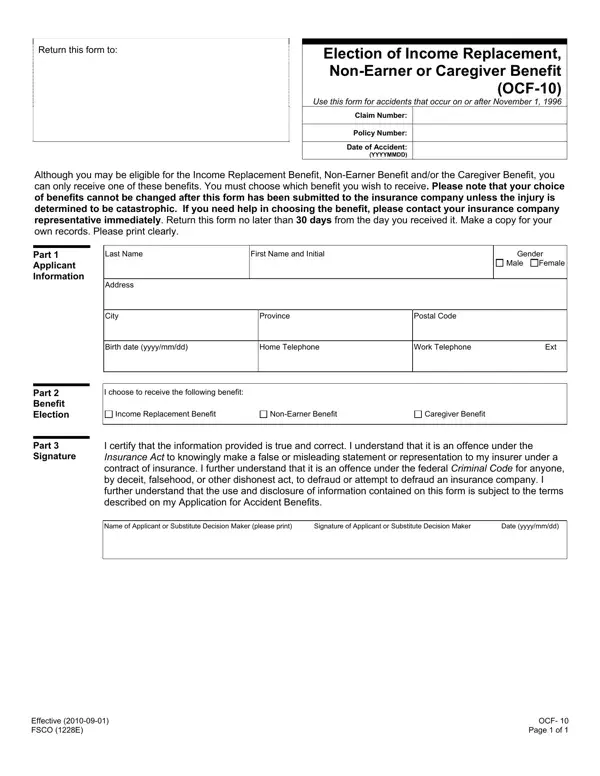
After experiencing an accident, navigating the path to recovery includes not just dealing with injuries but also handling the financial implications that follow. Among the crucial steps to take is selecting the appropriate benefit that aligns with your current needs and situation. The OCF-10 form, formally known as the Election of Income Replacement, Non-Earner or Caregiver Benefit, serves as a key document in this process for those involved in accidents on or after November 1, 1996. This form presents individuals with a choice among three types of benefits they might be eligible for: Income Replacement Benefit, Non-Earner Benefit, and Caregiver Benefit. However, it's imperative to understand that once a decision is made and the form is submitted to the insurance company, changing your choice of benefit is generally not permitted unless the injury is classified as catastrophic. The urgency in making an informed decision cannot be understated, especially considering the requirement to return the completed form no later than 30 days from receipt. With spaces to fill personal details and the benefit election choice, the form also emphasizes the importance of honesty in the information provided. It forewarns about the legal repercussions of submitting false or misleading statements, underlining the seriousness with which this document should be approached. Whether you're leaning towards replacing lost income, acknowledging the inability to perform any occupation for profit, or compensating for an inability to provide care to dependents, the OCF-10 form is a starting point in the journey towards financial recuperation post-accident.
| Question | Answer |
|---|---|
| Form Name | Form Ocf 10 |
| Form Length | 1 page |
| Fillable? | Yes |
| Fillable fields | 34 |
| Avg. time to fill out | 15 sec |
| Other names | OCF-10, AF-128E, Election of Income Replacement, Non-Earner or Caregiver Benefit |
Form Ocf 10 isn’t the one you’re looking for?