Form Request Appellate PDF Details

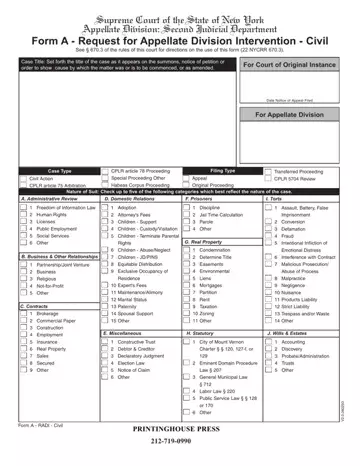
Navigating the legal landscape requires a clear understanding of the processes involved in seeking justice or asserting one's rights, especially in the appellate arena. The Supreme Court of the State of New York, Appellate Division: Second Judicial Department, provides a structured pathway for those seeking appellate intervention through its Form A - Request for Appellate Division Intervention - Civil. This form is a pivotal tool designed for litigants wishing to escalate their civil legal matters, offering a methodical approach to appeal against decisions from lower courts or to initiate specific proceedings directly within the appellate jurisdiction. It embodies various filing types like Civil Actions, Special Proceedings, CPLR article 78 Proceedings, and more, tailored to cater to a wide range of civil legal disputes including—but not limited to—administrative review, domestic relations, real property issues, and torts. The form instructs on how to succinctly present the case title, nature of the suit by checking relevant categories, details about the court of original instance, and comprehensive information on the appeal or proceeding in question. It requires a detailed description of the appeal, including the paper appealed from, the relief requested, the amount awarded in case of a money judgment, and the issues proposed to be raised. Furthermore, the form necessitates the inclusion of party and attorney information to ensure proper representation and communication throughout the appellate process. Amidst its technical requirements, the form underscores the judicial system's commitment to accessibility, offering a structured yet flexible framework for navigating the complex appellate procedure.

QuestionAnswer
Form NameForm Request Appellate
Form Length6 pages
Fillable?Yes
Fillable fields390
Avg. time to fill out39 min 47 sec
Other namesradi form second department fill in, radi fillable form, form request appellate, radi appellate division second department

How to Edit Form Request Appellate Online for Free

The radi form completing course of action is effortless. Our software allows you to work with any PDF file.

Step 1: You should select the orange "Get Form Now" button at the top of this webpage.

Step 2: Now you can edit your radi form. This multifunctional toolbar allows you to add, eliminate, improve, and highlight content material or undertake similar commands.

Enter the details requested by the software to fill out the document.

appellate division second department fields to complete

Write down the appropriate details in Jail, Time, Calculation Imprisonment, Human, Rights Licenses, Public, Employment Social, Services Other, Attorneys, Fees Children, Support Children, Custody, Visitation Children, Terminate, Parental Parole, Other, B, Business, Other, Relationships and Children, JD, PINS part.

JailTimeCalculation, Imprisonment, HumanRights, Licenses, PublicEmployment, SocialServices, Other, AttorneysFees, ChildrenSupport, ChildrenCustodyVisitation, ChildrenTerminateParental, Parole, Other, BBusinessOtherRelationships, and ChildrenJDPINS in appellate division second department

The application will demand for further details as a way to effortlessly fill out the section Other, Form, A, RADI, Civil and PRINTING, HOUSE, PRESS

appellate division second department Other, FormARADICivil, and PRINTINGHOUSEPRESS blanks to fill

Inside of paragraph Paper, Appealed, From, check, one, only Amended, Decree Amended, Judgment Amended, Order Decision, Decree, Court, Dated, Judge, name, in, full Determination, Finding, Interlocutory, Decree Interlocutory, Judgment Judgment, and Order, state the rights and obligations.

appellate division second department PaperAppealedFromcheckoneonly, AmendedDecree, AmendedJudgment, AmendedOrder, Decision, Decree, Court, Dated, Judgenameinfull, Determination, Finding, InterlocutoryDecree, InterlocutoryJudgment, Judgment, and Order fields to fill

End by reading the following fields and preparing them accordingly: Court, Judge, name, in, full Court, Judge, name, in, full County, Order, of, Transfer, Date CP, LR, Review, of, Ex, Parte, Order County, Dated, and Amount, Issues

part 5 to filling out appellate division second department

Step 3: Select the Done button to confirm that your completed form may be exported to each electronic device you decide on or delivered to an email you specify.

Step 4: Prepare a minimum of two or three copies of the document to prevent any sort of potential future concerns.

Please rate Form Request Appellate

1 Votes
If you believe this page is infringing on your copyright, please familiarize yourself with and follow our DMCA notice and takedown process - click here to proceed .
