Form Saps 520 PDF Details

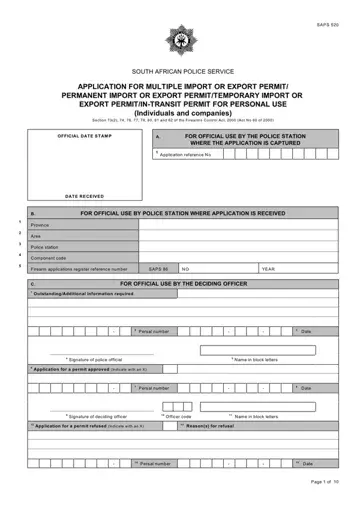
Navigating the complexities of firearm importation and exportation in South Africa requires a thorough understanding of the SAPS 520 form. This critical document is designed for both individuals and companies looking to obtain various permits, including multiple import or export, permanent import or export, temporary import or export, and in-transit permits for personal use. Under the guidance of Sections 73(2), 74, 76, 77, 78, 80, 81, and 82 of the Firearms Control Act, 2000 (Act No 60 of 2000), the form serves as a gateway to legal compliance in firearm transactions. It encompasses detailed sections for official use, including application tracking by police stations and decisions by relevant officers. Applicants must navigate through sections outlining types of permits, personal particulars, details of the firearm's current owner, and import/export specifics. Additionally, the form covers transporter details and ammunition, underscoring its comprehensive nature in ensuring accountable firearm movement. With legal and safety implications at stake, accurate completion of the SAPS 520 is paramount, offering a structured process to secure the necessary permits for firearm transportation.

QuestionAnswer
Form NameForm Saps 520
Form Length10 pages
Fillable?Yes
Fillable fields448
Avg. time to fill out30 min 42 sec
Other namessaps 520 fillable form, sap520, za form saps, sap 520 form

How to Edit Form Saps 520 Online for Free

Submitting documents together with our PDF editor is more straightforward in comparison with nearly anything. To modify saps 520 form the file, there's nothing you will do - just stick to the steps listed below:

Step 1: First, pick the orange "Get form now" button.

Step 2: Once you access the saps 520 form editing page, you will find all of the actions you can undertake regarding your file in the upper menu.

To be able to prepare the saps 520 form PDF, provide the content for all of the segments:

part 1 to completing sap520

Note the data in Per, sal, number Date, Signature, of, police, official Name, in, block, letters Per, sal, number Date, Signature, of, deciding, officer Officer, code Name, in, block, letters Reasons, for, refusal Per, sal, number and Date.

sap520 Persalnumber, Date, Signatureofpoliceofficial, Nameinblockletters, Persalnumber, Date, Signatureofdecidingofficer, Officercode, Nameinblockletters, Reasonsforrefusal, Persalnumber, and Date blanks to fill

Describe the considerable information about the SAPS, Signature, of, deciding, officer Officer, code Name, in, block, letters TYPE, OF, PERMIT, Indicate, with, an, X Multiple, import, or export, permit Import, permit Export, permit In, transit permit, Temporaryimportorexport, permit PARTICULARS, OF, APPLICANT NATURAL, PERSONS, DETAILS and Type, of, identification, Indicate, with, an, X box.

Filling in sap520 step 3

The Postal, address Postal, Code If, self, employed, specify Postal, Code Postal, Code Home, Work, Fax, Married, Divorced, Widow, Widower, Trade, or, profession Name, of, employer, company and Business, address section has to be used to note the rights or obligations of both sides.

Finishing sap520 stage 4

Finish by looking at the next fields and filling them out as required: Identity, number, of, spouse, partner Passport, number, of, spouse, partner Full, Name, and, Surname JURIST, IC, PERSONS, DETAILS and Page, of

Filling out sap520 part 5

Step 3: Choose the Done button to make certain that your finished file may be transferred to every electronic device you end up picking or sent to an email you specify.

Step 4: It is simpler to have copies of your file. You can be sure that we will not display or view your data.

Watch Form Saps 520 Video Instruction

Please rate Form Saps 520

2 Votes
If you believe this page is infringing on your copyright, please familiarize yourself with and follow our DMCA notice and takedown process - click here to proceed .
