
Form Sf 33 PDF Details

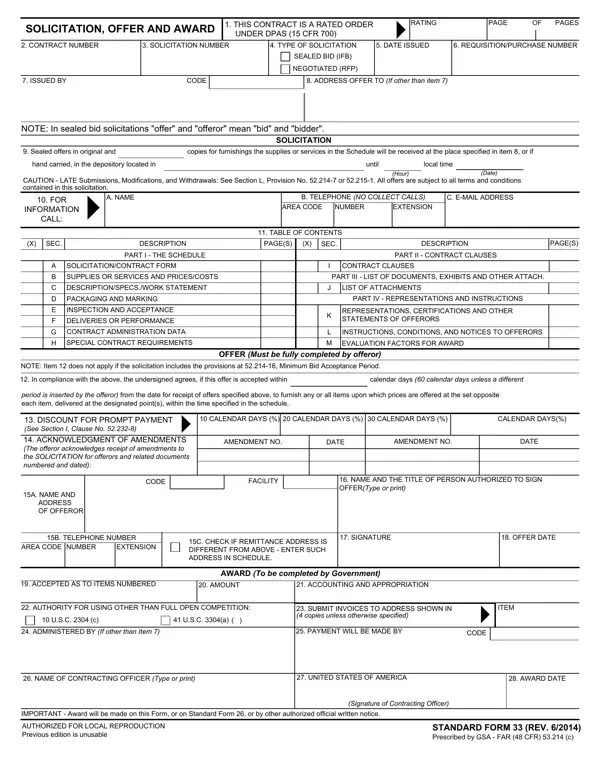
When diving into the realm of government contracts, the Standard Form 33 (SF 33), Solicitation, Offer and Award form, plays a pivotal role in the procurement process. This document, essential for both the federal government and contractors, serves as a comprehensive tool for soliciting offers, presenting bids, and finalizing contracts. Its structure is meticulously designed to ensure transparency, fairness, and clarity in the competitive bidding process. The form covers critical aspects such as the nature of the solicitation—distinguishing between sealed bids (IFB) and negotiated proposals (RFP), key dates, and instructions for submission. It outlines the specifics of the offer, including terms, conditions, instructions, and the mechanism for acknowledgment of amendments to solicitations. Furthermore, the SF 33 delineates the schedule for supplying the goods or services, contract clauses, and the criteria for evaluation and awarding. This rigorous framework underscores the government’s commitment to a thorough and fair selection process, ensuring that all offers are evaluated equitably and that the award is made based on predetermined, merit-based factors. For anyone stepping into the government contracting field, understanding the SF 33 is not just about mastering a form; it's about navigating the intricate dance of procurement that keeps the government supplied and services running smoothly.

QuestionAnswer
Form NameForm Sf 33
Form Length1 pages
Fillable?No
Fillable fields0
Avg. time to fill out15 sec
Other namessf33, sf 33, how to standard form 33, sf 1442

How to Edit Form Sf 33 Online for Free

Using PDF documents online is definitely a piece of cake with this PDF tool. You can fill in how to 33 offer here with no trouble. The editor is consistently improved by us, receiving useful features and growing to be better. Starting is effortless! All you should do is adhere to the next simple steps directly below:

Step 1: Firstly, open the editor by pressing the "Get Form Button" at the top of this page.

Step 2: When you access the PDF editor, you will notice the form made ready to be filled in. Besides filling out various blank fields, you could also do several other things with the form, particularly putting on any text, editing the original text, adding images, affixing your signature to the PDF, and more.

With regards to the fields of this particular document, here is what you need to know:

1. Whenever filling in the how to 33 offer, make certain to incorporate all of the essential blanks within the associated area. It will help speed up the work, which allows your details to be processed quickly and correctly.

Stage no. 1 of filling out offer form standard

2. When the previous part is finished, you need to include the needed specifics in PACKAGING AND MARKING, INSPECTION AND ACCEPTANCE, DELIVERIES OR PERFORMANCE, CONTRACT ADMINISTRATION DATA, SPECIAL CONTRACT REQUIREMENTS, PART IV REPRESENTATIONS AND, REPRESENTATIONS CERTIFICATIONS AND, INSTRUCTIONS CONDITIONS AND, M EVALUATION FACTORS FOR AWARD, NOTE Item does not apply if the, OFFER Must be fully completed by, In compliance with the above the, calendar days calendar days, period is inserted by the offeror, and DISCOUNT FOR PROMPT PAYMENT See so that you can proceed further.

INSPECTION AND ACCEPTANCE, DELIVERIES OR PERFORMANCE, and DISCOUNT FOR PROMPT PAYMENT See of offer form standard

3. In this specific stage, check out AUTHORITY FOR USING OTHER THAN, USC c, USC a, SUBMIT INVOICES TO ADDRESS SHOWN, ITEM, ADMINISTERED BY If other than, PAYMENT WILL BE MADE BY, CODE, NAME OF CONTRACTING OFFICER Type, UNITED STATES OF AMERICA, AWARD DATE, IMPORTANT Award will be made on, Signature of Contracting Officer, AUTHORIZED FOR LOCAL REPRODUCTION, and STANDARD FORM REV Prescribed by. Each one of these should be taken care of with greatest precision.

Stage number 3 for filling out offer form standard

It's very easy to make a mistake while filling in your USC c, therefore be sure you look again prior to deciding to finalize the form.

Step 3: After you've looked over the details you given, click on "Done" to complete your form. After creating afree trial account at FormsPal, you'll be able to download how to 33 offer or email it immediately. The PDF file will also be easily accessible via your personal account with your each and every change. Here at FormsPal, we aim to be certain that all your details are maintained protected.