
Form Soc 310 PDF Details

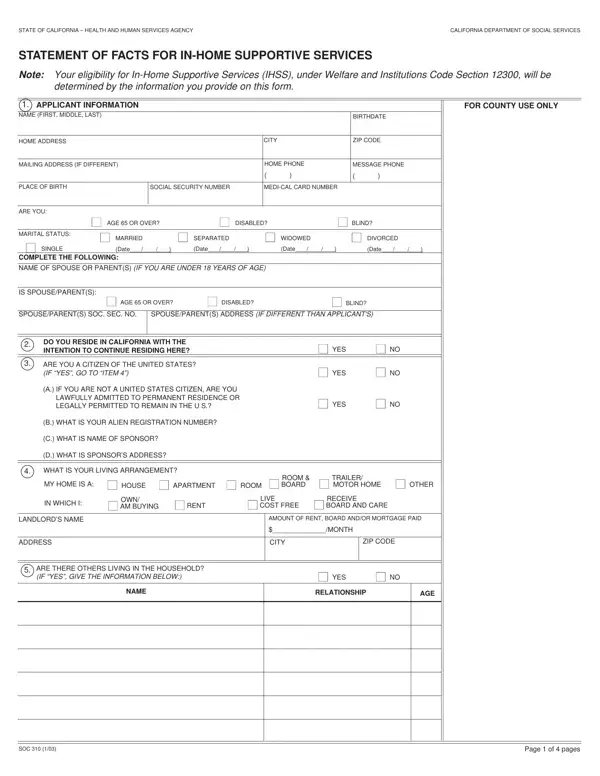
In the State of California, navigating the pathway to securing In-Home Supportive Services (IHSS) necessitates a thorough understanding of various forms and procedures, among which the SOC 310 form plays a crucial role. This form acts as a comprehensive statement of facts, crafted to assess the eligibility of applicants under the Welfare and Institutions Code Section 12300. By meticulously gathering information ranging from personal details, residency, financial resources, to household composition and medical insurance, the SOC 310 form enables the California Department of Social Services to make informed decisions regarding an applicant's need for in-home care. This form not only delves into the applicant's living arrangement and assets but also scrutinizes income sources, employment status, and property ownership. Furthermore, it addresses specific queries related to disabilities, thereby ensuring that those with special needs are considered carefully. The meticulousness of the form underscores the state's commitment to providing tailored supportive services, ensuring that assistance is rendered to those genuinely in need. To navigate this process successfully, an accurate and complete provision of requested information is imperative, as is an understanding of the responsibilities and potential repercussions, including the recovery of Medi-Cal benefits under specified conditions. Thus, the SOC 310 form stands as a foundational step in the journey toward acquiring essential in-home supportive care for eligible California residents, highlighting the nuanced interplay between personal circumstances and state-provided health services.

QuestionAnswer
Form NameForm Soc 310
Form Length4 pages
Fillable?No
Fillable fields0
Avg. time to fill out1 min
Other namesBIRTHDATE, SHAREOFCOST, CHAMPUS, california department of social services forms

How to Edit Form Soc 310 Online for Free

If you wish to fill out CALIFORNIA, you don't need to download and install any programs - simply give a try to our online PDF editor. Our expert team is ceaselessly endeavoring to enhance the editor and insure that it is much better for people with its extensive features. Bring your experience one stage further with constantly developing and interesting possibilities available today! It merely requires just a few easy steps:

Step 1: First, open the pdf tool by pressing the "Get Form Button" above on this site.

Step 2: With this handy PDF editing tool, you can actually accomplish more than just fill out blank fields. Express yourself and make your docs look professional with customized text added in, or optimize the original input to perfection - all comes along with the capability to insert stunning pictures and sign the PDF off.

It is easy to fill out the form with our practical tutorial! Here is what you want to do:

1. The CALIFORNIA usually requires certain information to be entered. Ensure the subsequent blanks are finalized:

Part no. 1 for completing california department of social services forms

2. After finishing this step, head on to the subsequent step and complete all required particulars in these blank fields - A IF YOU ARE NOT A UNITED STATES, B WHAT IS YOUR ALIEN REGISTRATION, C WHAT IS NAME OF SPONSOR, D WHAT IS SPONSORS ADDRESS, YES, WHAT IS YOUR LIVING ARRANGEMENT, MY HOME IS A, HOUSE, APARTMENT, ROOM, ROOM BOARD, TRAILER, MOTOR HOME, OTHER, and IN WHICH I.

Part # 2 of filling out california department of social services forms

3. This next stage will be straightforward - complete all of the empty fields in SOC, and Page of pages to conclude this segment.

california department of social services forms completion process explained (stage 3)

Those who use this PDF often make mistakes while completing Page of pages in this section. Be certain to review everything you enter right here.

4. Filling in DO YOU YOUR SPOUSE OR YOUR PARENTS, YES, FOR COUNTY USE ONLY, ADDRESS, STATE, ASSESSED VALUE, ANNUAL TAXES, CITY, COUNTY, ZIP CODE, PARCEL NUMBER, TOTAL AMOUNT OWED ON MORTGAGES, MONTHLY PAYMENT, ANNUAL INSURANCE, and ANNUAL ASSESSMENTS is paramount in this form section - be certain to take the time and take a close look at each and every blank!

Completing segment 4 in california department of social services forms

5. The last stage to complete this form is pivotal. You'll want to fill in the required blank fields, particularly LIQUID RESOURCES, IF NONE, ENTER VALUE UNDER OWNER, SELF, SPOUSEPARENTS, JOINTLY, FOR BURIAL, CASH ON HAND ANDOR MONEY KEPT IN, CHECKING ACCOUNT, SAVINGS ACCOUNT CREDIT UNION TRUST, OTHER SPECIFY, DO YOU YOUR SPOUSE OR PARENTS IF, YES, DESCRIPTION, and CURRENT MARKET VALUE, prior to submitting. Neglecting to do this might produce a flawed and potentially unacceptable paper!

The best ways to fill out california department of social services forms portion 5

Step 3: Go through what you have typed into the blanks and then click on the "Done" button. Join FormsPal today and instantly gain access to CALIFORNIA, all set for download. Every single modification made is handily saved , which enables you to customize the form later if required. Here at FormsPal, we do everything we can to guarantee that all your information is stored private.