
Form Vtr 441 PDF Details

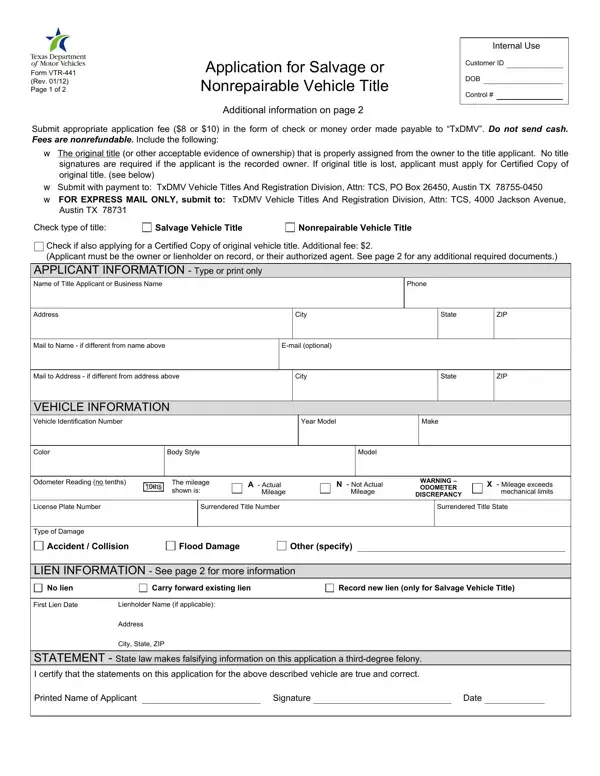
When individuals find themselves in possession of a vehicle severely damaged by accidents or natural disasters, navigating the complexities of its legal status becomes a priority. This is where the VTR-441 form enters the picture, serving as a crucial application for those seeking to classify their vehicle either as salvage or nonrepairable in the state of Texas. Effective from January 2012, this form demands careful completion and adherence to specific instructions to ensure the accurate reclassification of a vehicle, thereby affecting its future use and legalities surrounding ownership transfer. By providing details such as the vehicle's identification number, the extent and type of damage, and lien information, owners lay the groundwork for obtaining a title that reflects the vehicle's new status. Furthermore, the form delineates the requirements for those applying for a Certified Copy of the original vehicle title—adding another layer of procedure for those who no longer possess the original documentation. With nonrefundable fees, the necessity of submitting original titles or acceptable evidence of ownership, and legal implications of providing false information, the VTR-441 form encapsulates a process fraught with legal responsibilities and critical steps towards compliance. These procedures not only safeguard the interests of the vehicle owner but also ensure adherence to Texas Transportation Code regulations concerning salvage and nonrepairable motor vehicles, thereby underscoring the importance of this form in maintaining the integrity of vehicle documentation and ownership transfer processes.

QuestionAnswer
Form NameForm Vtr 441
Form Length2 pages
Fillable?No
Fillable fields0
Avg. time to fill out30 sec
Other namesvtr 441 vermont motor vehicle salvage title form

How to Edit Form Vtr 441 Online for Free

Form Vtr 441 can be completed online in no time. Simply try FormsPal PDF editing tool to complete the job fast. To maintain our tool on the forefront of convenience, we work to integrate user-oriented capabilities and improvements regularly. We're always glad to get feedback - join us in revolutionizing the way you work with PDF docs. To get started on your journey, consider these easy steps:

Step 1: Access the PDF form inside our tool by hitting the "Get Form Button" above on this page.

Step 2: The tool allows you to modify your PDF document in many different ways. Change it by including any text, correct what is originally in the document, and include a signature - all at your fingertips!

It's an easy task to fill out the pdf using this practical tutorial! Here's what you must do:

1. Complete the Form Vtr 441 with a selection of major blanks. Get all the necessary information and be sure not a single thing missed!

Part number 1 for filling out Form Vtr 441

2. Your next step is to fill out these particular fields: Mail to Name if different from, Email optional, Mail to Address if different from, City, State, ZIP, VEHICLE INFORMATION Vehicle, Year Model, Make, Color, Body Style, Model, Odometer Reading no tenths, ths, and The mileage shown is.

Writing segment 2 of Form Vtr 441

People who use this form frequently get some things incorrect while filling in Email optional in this part. Remember to revise whatever you enter here.

3. In this particular step, look at LIEN INFORMATION See page for, No lien, Carry forward existing lien, Record new lien only for Salvage, First Lien Date, Lienholder Name if applicable, Address, City State ZIP, STATEMENT State law makes, Printed Name of Applicant, Signature, and Date. All of these should be completed with greatest attention to detail.

Stage # 3 for filling in Form Vtr 441

Step 3: Ensure that your information is right and just click "Done" to proceed further. Obtain your Form Vtr 441 once you sign up for a free trial. Instantly access the form from your FormsPal cabinet, with any edits and adjustments conveniently kept! FormsPal guarantees your data confidentiality via a protected method that never saves or shares any kind of private data involved in the process. Be assured knowing your documents are kept protected each time you use our services!