Please rate Fs 6T Form

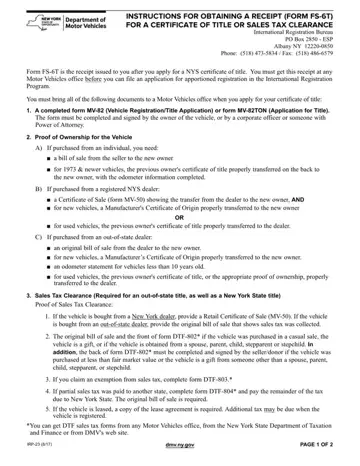
Navigating the paperwork required for vehicle registration and title applications in New York State can be a complex process, especially for those looking to obtain apportioned registration through the International Registration Program. One crucial step in this process involves securing a Form FS-6T, a receipt that serves as proof that an application for a certificate of title or sales tax clearance has been successfully submitted. This form is a prerequisite for anyone aiming to file an application for apportioned registration, mandating a visit to any Motor Vehicles office with a comprehensive array of documents in hand. These documents include a completed MV-82 or MV-82TON form, proof of ownership, sales tax clearance, evidence of identity or corporate status, alongside the submission of a $50 title processing fee. Each of these steps underscores the importance of the FS-6T form in the broader context of vehicle registration and title processing in the state, aiming to streamline what can often be seen as a daunting process for many. Furthermore, the instructions highlight various scenarios, including purchases from New York or out-of-state dealers, and detail the specific documents required for each situation, ensuring that applicants are well-informed about the correct forms and proofs needed to expedite their application process efficiently.
| Question | Answer |
|---|---|
| Form Name | Fs 6T Form |
| Form Length | 2 pages |
| Fillable? | No |
| Fillable fields | 0 |
| Avg. time to fill out | 30 sec |
| Other names | fs6 form ny, nys dmv fs 6t form, nys dmv form fs 6t, nys fs 6t |
Fs 6T Form isn’t the one you’re looking for?
Please rate Fs 6T Form
