Sales and Use Tax Return (ST-3) Instructions
**ATTENTION**
Effective date: This Form ST-3 is only effective for sales made during March 2017. It is due April 20, 2017. Taxpayers with sales sourced to the City of Atlanta may be required to enter data on Part B, Lines 3 through 5.
Sourcing: Generally, sales sourced to a jurisdiction include all sales of property in which the property is delivered to the purchaser in the jurisdiction and sales of services that are performed in the jurisdiction. Please refer to O.C.G.A. § 48-8-77 for specific sourcing rules.
Electronic filing: To file and pay electronically, please visit the Georgia Tax Center at https://gtc.dor.ga.gov. Additional information, instructional videos, and frequently asked questions about electronic filing can be found at http://dor.georgia.gov/georgia-tax-center-info.
General Instructions:
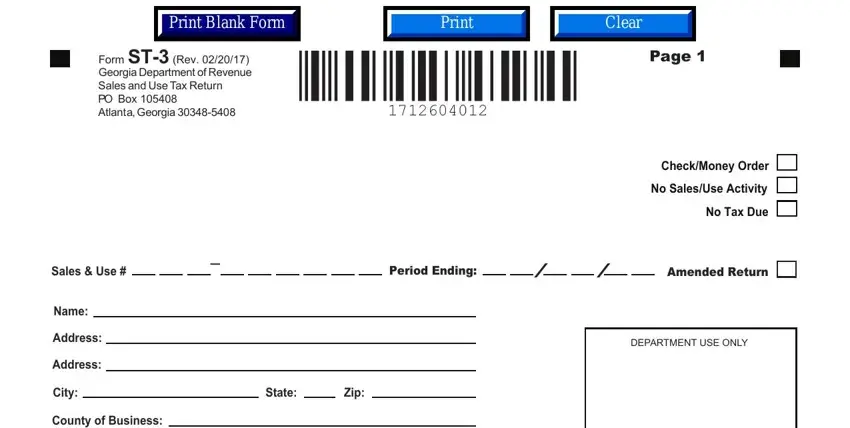
Record the Sales and Use Tax Number (STN), name, and address of the registered taxpayer. The Period Ending should be the end date (mm/dd/yy) of the reporting period. Check the Amended Return box if you are amending a previously filed return for the same period. Check the No Tax Due box if there were no taxable sales during this period. If there has been no sales and use tax activity during the period, do not complete this form. Please check the No Sales/Use Tax Activity box on Page 5, and complete and submit the payment voucher (Form PV-ST Sales and Use Tax Voucher) only.
Part A - Tax Summary
LINE
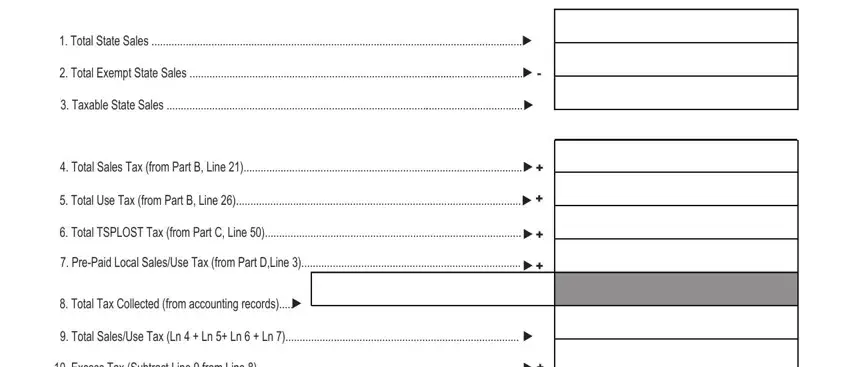
1Record Total State Sales (all sales sourced to the State of Georgia) including leases and rentals.
2Record Total Exempt State Sales including leases and rentals. Include all sales that are exempt from state sales tax, even if such sales are subject to local sales tax.
3Subtract Exempt State Sales (Line 2) from Total State Sales (Line 1) and record Taxable State Sales. Complete Part B and Part C.
4Record the Total SALES Tax Amount (from Part B, Line 21).
5Record the Total USE Tax Amount (from Part B, Line 26).
6Record the TSPLOST tax (from Part C, Line 50).
7Record the Pre-paid Local Sales/Use Tax for on-road motor fuel (from Form ST-3 Motor Fuel).
8Record Total Sales/Use Tax Collected for reporting period from taxpayer accounting records.
9Record the sum of Lines 4 – 7. (Add Line 4 + Line 5 + Line 6 + Line 7)
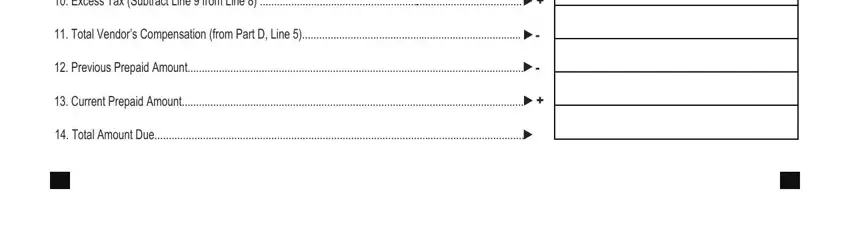
10Subtract Total Sales/Use Tax amount (Line 9) from Total Tax Collected (Line 8) amount and record the Excess Tax amount. Include the Excess tax amount in the appropriate sales/use category for vendor’s compensation.
11Record the Total Vendor’s Compensation (from Part D, Line 5).
12Record previous prepaid estimated tax, if applicable. Please reference your annual prepaid estimated tax letter.
13Record current prepaid estimated tax if applicable. Please reference your annual
Page 2
prepaid estimated tax letter.
14Add Lines 9 and 10, subtract Lines 11 and 12, and add Line 13 for the Total Amount Due.
Part B - Sales Tax Distribution Table
Do not report Transportation Local Option (TSPLOST) sales and use tax in Part B. Transportation Local Option (TSPLOST) sales and use tax will be reported in Part C.
LINE
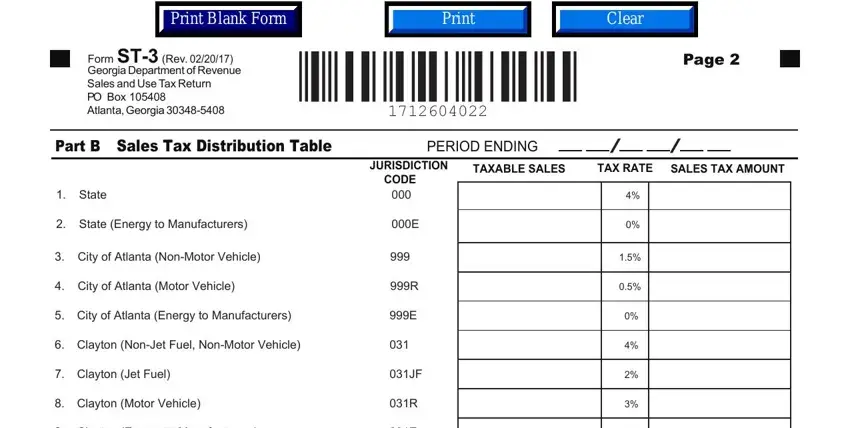
1Record the Taxable State Sales (total sales sourced to the State of Georgia LESS sales of energy to manufacturers and all other tax exempt sales). Multiply this amount by the rate indicated on the Part B Sales Tax Distribution Table and record the Sales Tax Amount for the State.
2Record ONLY total sales sourced to the State of Georgia of energy sold to manufacturers. Multiply this amount by the rate indicated on the Part B Sales Tax Distribution Table and record the Sales Tax Amount.
3Record taxable non-motor vehicle sales for the City of Atlanta (Total sales sourced to the City of Atlanta LESS sales of motor vehicles subject to sales tax, sales of energy to manufacturers, and all other tax exempt sales). These sales are also required to be included in county sales below (044 Dekalb County and/or 060 Fulton County). Multiply this amount by the rate indicated on the Part B Sales Tax Distribution Table and record the Sales Tax Amount.
4Record ONLY sales of motor vehicles subject to sales tax and sourced to the City of Atlanta. These sales are also required to be included in county sales below (044 Dekalb County and/or 060 Fulton County). Multiply this amount by the rate indicated on the Part B Sales Tax Distribution Table and record the Sales Tax Amount.
5Record ONLY Taxable Sales of energy sold to manufacturers that are sourced to the City of Atlanta. These sales are also required to be included in county sales of energy to manufacturers below (044E Dekalb County and/or 060E Fulton County). Multiply this amount by the rate indicated on the Part B Sales Tax Distribution Table and record the Sales Tax Amount.
6Record Taxable Sales for Clayton County (Total sales sourced to Clayton County LESS sales of jet fuel, sales of motor vehicles subject to sales tax, sales of energy to manufacturers, and all other tax exempt sales). Multiply this amount by the rate indicated on the Part B Sales Tax Distribution Table and record the Sales Tax Amount.
7Record ONLY Taxable Sales of jet fuel sourced to Clayton County. Multiply this amount by the rate indicated on the Part B Sales Tax Distribution Table and record Sales Tax Amount.
8Record ONLY sales of motor vehicles subject to sales tax and sourced to Clayton County. Multiply this amount by the rate indicated on the Part B Sales Tax Distribution Table and record Sales Tax Amount.
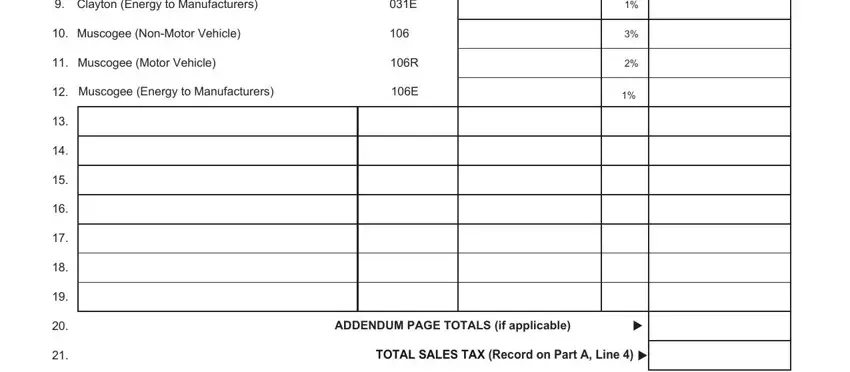
9Record ONLY Taxable Sales of energy sold to manufacturers in Clayton County. Multiply this amount by the rate indicated on the Part B Sales Tax Distribution Table and record the Sales Tax Amount.
10Record Taxable Sales for Muscogee County (total sales sourced to Muscogee County LESS sales of motor vehicles subject to sales tax, sales of energy to manufacturers, and all other tax exempt sales). Multiply this amount by the rate indicated on the Part B Sales Tax Distribution Table and record the Sales Tax Amount.
Page 3
11Record ONLY sales of motor vehicles subject to sales tax and sourced to Muscogee County. Multiply this amount by the rate indicated on the Part B Sales Tax Distribution Table and record Sales Tax Amount.
12Record ONLY Taxable Sales of energy sold to manufacturers that are sourced to
Muscogee County. Multiply this amount by the rate indicated on the Part B Sales Tax Distribution Table and record the Sales Tax Amount.
13-19 Use Lines 13-19 and additional addendum pages as needed to record taxable sales for all other counties. List the county name and corresponding county jurisdiction code (see Rate Chart) in which taxable sales were made. Record taxable sales, multiply this amount by the applicable county tax rate and record the Sales Tax Amount. NOTE: Energy sold to manufacturers must be recorded by county on a separate line item from other taxable sales (See Example).
Example: Taxpayer has $50,000 in total taxable sales for Cobb County which includes $10,000 in energy sold to a manufacturer. On Line 13 (or next available Line item in Part B or related addendum) list Cobb County (jurisdiction code 033), record $40,000 in total sales to Cobb County ($50,000 less $10,000 energy sales to a manufacturer), multiply this amount by the applicable tax rate for Cobb County and record the Sales Tax Amount. On Line 14 (or next available line) list Cobb County (jurisdiction code 033E), record total sales of energy to manufacturers of $10,000, multiply this amount by the applicable tax rate for Cobb County (for energy sold to manufacturers), and record the Sales Tax Amount.
Line |
Jurisdiction |
Jurisdiction |
Taxable |
Tax |
Sales Tax Amount |
|
|
Code |
Sales |
Rate |
|
13. |
Cobb |
033 |
40,000 |
2% |
800 |
|
|
|
|
|
|
14. |
Cobb |
033E |
10,000 |
1.00% |
100 |
|
|
|
|
|
|
Additional addendum pages (Form ST-3 Addendum Sales) may be found on the Department of Revenue’s website at http://dor.georgia.gov
20If additional addendum pages were completed, record the total Sales Tax Amount from all forms.
21Record the sum of Lines 1-20 as Total Sales Tax and record this amount on Part A, Line 4.
Part B – Use Tax Distribution Table
LINE
22-24 Use Lines 22-24 and additional addendum pages as needed to record State and Local Use Tax Amount by jurisdiction of use. Do not report Transportation Local Option (TSPLOST) use tax due in Part B. Transportation Local Option (TSPLOST) use tax will be reported in Part C. For each entry, record the jurisdiction of use code (county code), and reason code. Use Tax is due if applicable Georgia Sales Tax was not paid on an item purchased or leased and that item has been placed into “use” within Georgia. Jurisdiction of Use means the county in which the product/service was first used in Georgia. Use Tax Reason Codes are as follows:
Page 4
Code Reason
01Georgia Use – item purchased tax-paid in Georgia and used in another county having a higher local tax rate.
02 |
Georgia Withdrawal from Inventory. |
03Import-Use (State tax only). The jurisdiction “State” (000) must be used for this code.
04 |
Import-Use (Local tax only) |
Examples of taxable transactions, Jurisdiction of Use, and Reason Codes include:
A contractor purchases an item for $600.00 in a Georgia county where the total Sales Tax rate is 6% and uses the item to fulfill a contract in a jurisdiction where the total sales tax rate is 8%. The contractor owes additional Use Tax of 2% and should record local use tax due of $12.00 ($600.00 x .02). The Use tax Reason Code is 01.
A Georgia furniture manufacturer withdraws a table worth $700.00 from inventory to use in the business’s break room. The manufacturer owes state and local use tax based on the fair market value of the table, at the rate in effect in the jurisdiction where the withdrawal from inventory occurs. The manufacturer should calculate the use tax due by multiplying the combined state and local use tax rate by $700.00 and recording the resulting use tax. The use tax Reason Code is 02.
A Georgia resident or Georgia business purchases an item for $800.00 via the internet or by catalog, and the seller does not charge Sales Tax. The purchaser owes Use Tax based on the rate in effect in the jurisdiction where the purchaser takes possession of the item. The purchaser should calculate State Use Tax by multiplying the applicable State Use Tax rate by $800, and recording the resulting State Use Tax due with the use tax Reason Code 03. The purchaser should calculate the Local Use Tax due by multiplying the applicable Local Use Tax rate by $800.00 and recording the resulting Local Use Tax due with the Use Tax Reason Code 04.
A Georgia resident or Georgia business purchases a $900.00 item outside of Georgia, pays the other state’s 5% state sales tax at the time of purchase and returns to Georgia with the item. The purchaser will receive credit against Georgia’s 4% state use tax due and thus owes no additional state use tax. The purchaser owes local use tax at the rate in effect in the jurisdiction where the purchaser lives or where the business is located. The purchaser should calculate the local use tax due by multiplying the applicable local use tax rate by $900.00 and recording the resulting local use tax due. The Use tax Reason Code is 04.
Additional addendum pages, (Form ST-3 Addendum Use), can be found on the Department of Revenue’s website at http://dor.georgia.gov
25Record the Addendum Page Total.
26Record the sum of Lines 22-25 as Total Use Tax and record this amount on Part A, Line 5.
Page 5
Part C – TSPLOST Sales & Use Tax
TSPLOST Sales and Use Tax – This section should ONLY be completed by individuals or businesses who have taxable sales sourced to or owe use tax to the jurisdictions listed in Part C (TSPLOST Sales & Use Tax).
Column A: TSPLOST Taxable Sales - Record Taxable Sales by county (Total County Sales LESS sales of energy to manufacturers and all other tax exempt sales).
Record the sum of taxable sales Lines 1-46, Column A. Multiply taxable sales (Line 47) by .01.
Column B: TSPLOST Use Tax - Record TSPLOST use tax amount due. Use tax is due if applicable TSPLOST Sales Tax was not paid on an item purchased or leased and that item has been placed into “use” within one of the listed jurisdictions.
49Record the sum of use tax Lines 1-46, Column B.
50Record the sum of Lines 48 through 49 as total TSPLOST and record this amount on Part A, Line 6.
Part D – Vendor’s Compensation Calculation
LINE
1Record Total Sales and Use Tax on non-motor fuel sales/use up to and including $3000 (from total on Part A, Lines 4 + 5 + 6 + 10). Multiply this amount by 3% (or
.03) Vendor’s Compensation and record result.
2Record Total Sales and Use Tax on non-motor fuel sales/use over $3000 (from total on Part A, Lines 4 + 5 + 6 + 10). Multiply this amount by .5% (or .005) Vendor’s Compensation and record result.
3Record Pre-paid Local Sales/Use Tax for on-road motor fuel, if applicable (from Form ST-3 Motor Fuel). Multiply this amount by 3% (or .03) Vendor’s Compensation and record the result.
Record State and Local Sales/Use Tax due on off-road motor fuel; if applicable (from Off-Road Fuel Worksheet at DOR website; this worksheet is not required to be filed with the return – keep for taxpayer’s records).
Total above Vendor’s Compensation amounts for Total Vendor’s Compensation and record this amount on Part A, Line 11.
Part E – Bad Debt Reporting
LINE
1Record bad debt losses incurred on taxable Georgia sales.
2Record recoveries on Georgia bad debt that were previously written off.