
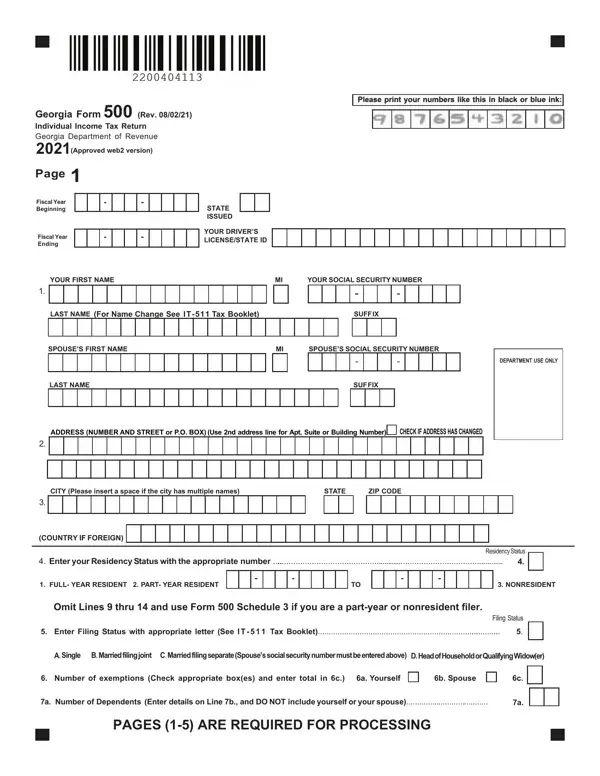
Georgia Form 500 PDF Details

Managing personal taxes can be a complex endeavor, especially when dealing with the intricacies of state-specific requirements. This is particularly true in the state of Georgia, where individuals are required to complete the Georgia Form 500 for their annual income tax return. This form, a critical document published by the Georgia Department of Revenue, serves multiple purposes. It is designed for residents, part-year residents, and nonresidents to calculate and report their state income tax. Georgia Form 500, updated as of June 20, 2020, for the tax year 2020, includes detailed sections for personal information, income computations, standard and itemized deductions, exemptions, Georgia taxable income calculations, various tax credits, and specific instructions for direct deposits or refunds. Taxpayers are also given the option to contribute to charitable causes directly through their tax return. The comprehensive nature of the form ensures a thorough process, guiding taxpayers through each step with sections to report adjusted gross income from federal returns, apply adjustments specific to Georgia, and calculate the final tax owed to the state or the refund due. Fulfilling this requirement is not just about compliance; it's an opportunity for Georgia residents to efficiently manage their financial obligations, potentially uncovering avenues for savings through credits and deductions unique to the state's tax code. Completing and submitting all five required pages of the form is essential for processing, highlighting the state's emphasis on detailed financial reporting and accountability.

QuestionAnswer
Form NameGeorgia Form 500
Form Length19 pages
Fillable?No
Fillable fields0
Avg. time to fill out4 min 45 sec
Other names2015 georgia 500 fillable, fillable 2015 georgia tax form 500, printable georgia form 500, georgia form 500 2015

Form Preview Example

Georgia Form 500 (Rev. 06/20/20) Individual Income Tax Return

Georgia Department of Revenue

2020(Approved web version)

Please print your numbers like this in black or blue ink:

Page 1

Fiscal Year

Beginning

sion) Fiscal Year

Ending

YOUR FIRST NAME

1.

STATE

ISSUED

YOUR DRIVER’S

LICENSE/STATE ID

MI

YOUR SOCIAL SECURITY NUMBER


LAST NAME (For Name Change See IT-511 Tax Booklet)


SUFFIX


SPOUSE’S FIRST NAME

MI


SPOUSE’S SOCIAL SECURITY NUMBER


DEPARTMENT USE ONLY


LAST NAME


SUFFIX


ADDRESS (NUMBER AND STREET or P.O. BOX) (Use 2nd address line for Apt, Suite or Building Number) CHECK IF ADDRESS HAS CHANGED

2.

CITY (Please insert a space if the city has multiple names)

STATE

ZIP CODE

3.

(COUNTRY IF FOREIGN)

4. Enter your Residency Status with the appropriate number

ResidencyStatus


4.


1. FULL- YEAR RESIDENT 2. PART- YEAR RESIDENT

TO

3. NONRESIDENT

Omit Lines 9 thru 14 and use Form 500 Schedule 3 if you are a part-year or nonresident filer.


Filing Status

5.

Enter Filing Status with appropriate letter (See IT - 511 Tax Booklet)

.... 5.


A.Single B.Marriedfilingjoint C.Marriedfilingseparate(Spouse’ssocialsecuritynumbermustbeenteredabove)


D.HeadofHouseholdorQualifyingWidow(er)


6.

Number of exemptions (Check appropriate box(es) and enter total in 6c.) 6a. Yourself

6b. Spouse

6c.


7a. Number of Dependents (Enter details on Line 7b., and DO NOT include yourself or your spouse)


7a.


ALL PAGES (1-5) ARE REQUIRED FOR PROCESSING