
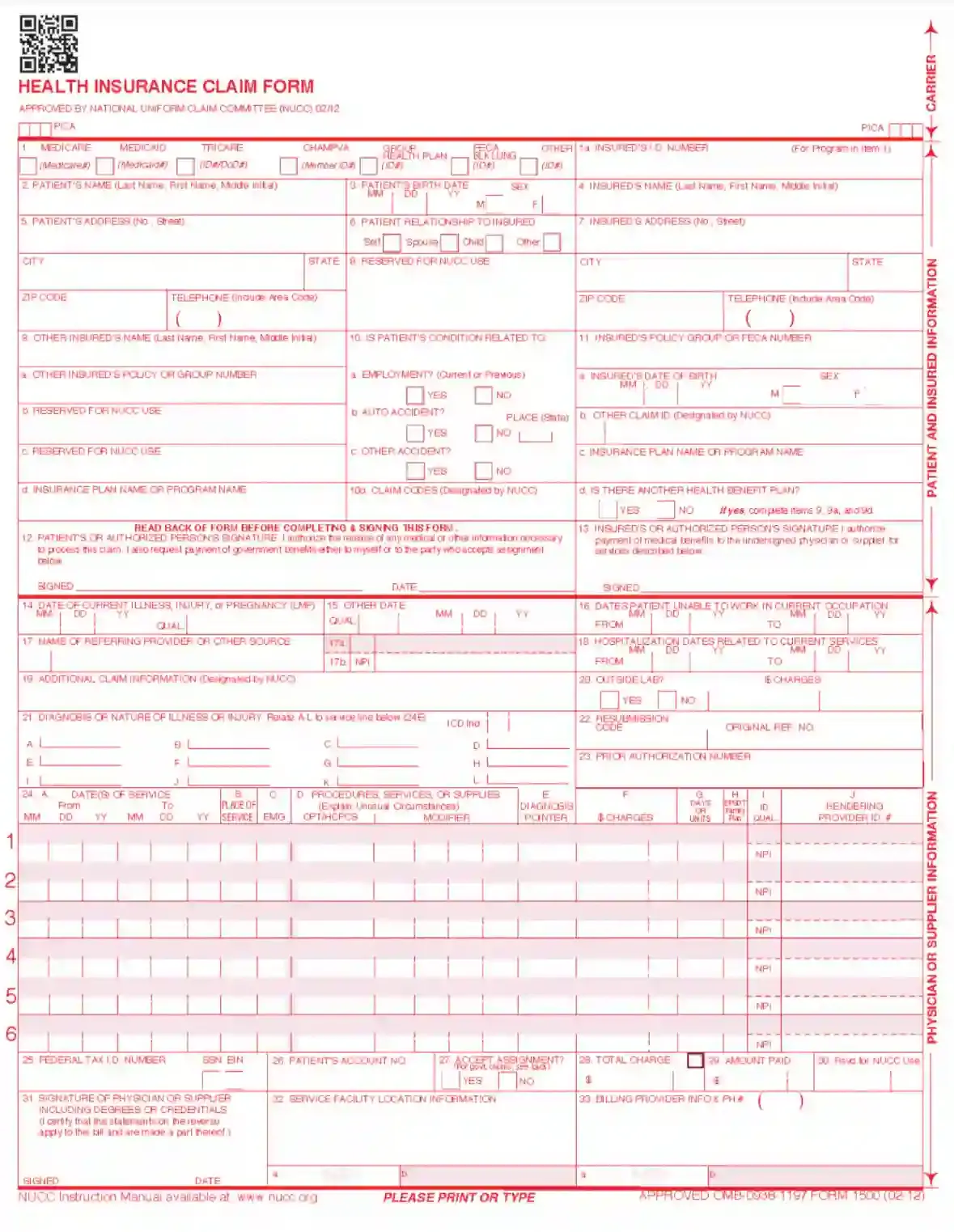
CMS Form 1500 is a standardized form used in the healthcare industry, primarily by non-institutional providers and suppliers to submit insurance claims to Medicare and other health insurance companies in the United States. This form is crucial for healthcare providers to receive reimbursement for services provided to insured patients. It includes fields to detail the patient’s diagnosis, the treatment provided, and the associated costs. The CMS Form 1500 is recognized universally by health insurance providers, making it an essential tool for medical billing and ensuring that healthcare providers are compensated for their services.
The form is carefully designed to include all necessary information that insurance companies require to process a claim efficiently. This includes patient identification, insurance policy numbers, service codes, dates of service, and other relevant clinical information. The accuracy of the data entered into CMS Form 1500 is paramount, as any errors can lead to delays in payment or denial of the claim altogether. Thus, it plays a vital role in the healthcare financial cycle, affecting the cash flow of medical practices and the broader healthcare economy.
Other CMS Forms
You’ll find more fillable CMS forms accessible with our tool. Just below, we listed several of the more popular forms included in this category. Moreover, do not forget that you are able to upload, fill out, and edit any PDF form at FormsPal.
Unfortunately, claimants cannot simply download the form on the internet and then submit the template. This Form CMS-1500 needs to be purchased, and there are several places to do that: from public authorities’ websites and online retailers to various physical shops that sell stationery. Another way to get it is by applying to the US Government Printing Office.
If you want to take a closer look at the template and understand the basics, you can use our form-building software to download the file and check it out.
It is so complicated because the form’s fields are all written in a specific red color, so operators that accept the document can process it. Your printer may correct the used color even a little bit, and in this case, the form will be impossible to process.
The rules of the form completion are quite strict: you have to follow the guidance issued by the NUCC thoroughly. The particular fonts must be used (Arial or Courier New, the allowed color is black only), or the content should be written by hand and specifically in black ink. However, if you pick the second option, the form processing will take more time.
So, before purchasing the template, open the file downloaded on our site and follow the instructions we offer below.
Choose the Program
The first step is to specify who pays: which program covers the patient’s curation (Medicare, Tricare, or others). There are six options, and a claimer must choose the relevant one.

Write the Insured Person’s ID Number and Other Info
Look at the right-hand side of the form. Here, you will enter the insured person’s details. Take their insurance card and insert the number written there. Below, write their name, full address, and phone number. Then, indicate the policy group of FECA (Federal Employees Compensation Program) number.

Add the insured person’s sex and birth date. If there is another claim ID given by the NUCC, write it down below, along with the insurance plan description or program’s name. Specify if the subject person uses any other health benefit plan. If yes, fill out certain lines of the paper’s left-hand side stating other insured’s name, policy or group number, and name of the insurance plan or program.

Add the Patient’s Data
Sometimes a patient and an insurance company client are not the same people; they can be spouses, for example. In any case, the patient’s details must be entered in corresponding lines. They are located on the template’s left and in the middle.
Enter their name, birth date, sex, full address, and telephone number. Check the suitable box that describes a relationship between the patient and the insurance plan client with a cross (whether the patient and insured are the same person or the patient is a spouse, child, or someone else).

State if the patient’s condition is linked to their employment, car accident, or other accident. If you choose the car accident option, you must write the two letters specifying the American state where the accident occurred. Below, insert the claim codes according to the NUCC guide. Pay attention to the template’s lines left for the NUCC use. You do not have to write anything there.

Give the Form to the Described Parties
Both the patient and the insured person must sign the form. The patient has to date it as well. Pass the template to the parties to complete the form’s first part.

Complete the Second Part
In the second part, physicians or other medical services specialists shall provide certain info about the patient.
Begin with writing the date of the patient’s last injury, illness, or pregnancy (in this case, add the last menstrual period or LMP date). Nearby, you will see a “QUAL” field that requires adding a qualifier describing what you have inserted. Use 431 for injuries and illnesses and 484 for LMP.
Then, insert other dates that describe the treatment or visits made by the patient. There are many qualifiers you can use here:
Add the service provider’s name and the relevant qualifier: referring (DN), supervising (DQ), or ordering (DK) provider. Nearby, add the provider’s ID and NPI numbers.
You have to get the NUCC’s guidance to understand whether to fill out the Additional Claim Information field or not. Below, you should add the patient’s diagnosis: there are 12 lines for various illnesses in case the patient suffers from multiple diseases. You must use the official NUCC codes here.

Then, add the dates when the patient is unable to work and their hospitalization dates. If an independent entity (for instance, a laboratory) was asked to provide services, cross the “yes” option below and write the contractor’s fees for those services. Check the applicable insurance plan instructions to fill out the “resubmission code,” “original reference number,” and “prior authorization number” fields.

Provide supplemental information about curation procedures in the chart. You must fill the chart out in accordance with the NUCC rules. You will add dates of services, conducted procedures, and charges here.

Below the chart, write the physician’s tax ID number (either SSN or EIN) and sign the form. On the right, insert the patient’s account number, service facility location (the place where the patient was provided with services), the provider’s billing information, total charge, and the amount that is already paid.
