

Form HUD-50059 at a glance
What it is: HUD-50059 is the Owner's Certification of Compliance with HUD's Tenant Eligibility and Rent Procedures.
Who signs: Under Tenant Signatures, the Head of Household, the Spouse / Co-Head and each Other Adult sign and enter a Date. Under Owner/Agent Signature, the Owner/Agent signs and enters the Date.
The form is the Landlord's Official Record of Certification.
HUD collects the information to determine an applicant's eligibility, the recommended unit size, and the amount the tenant(s) must pay toward rent and utilities.
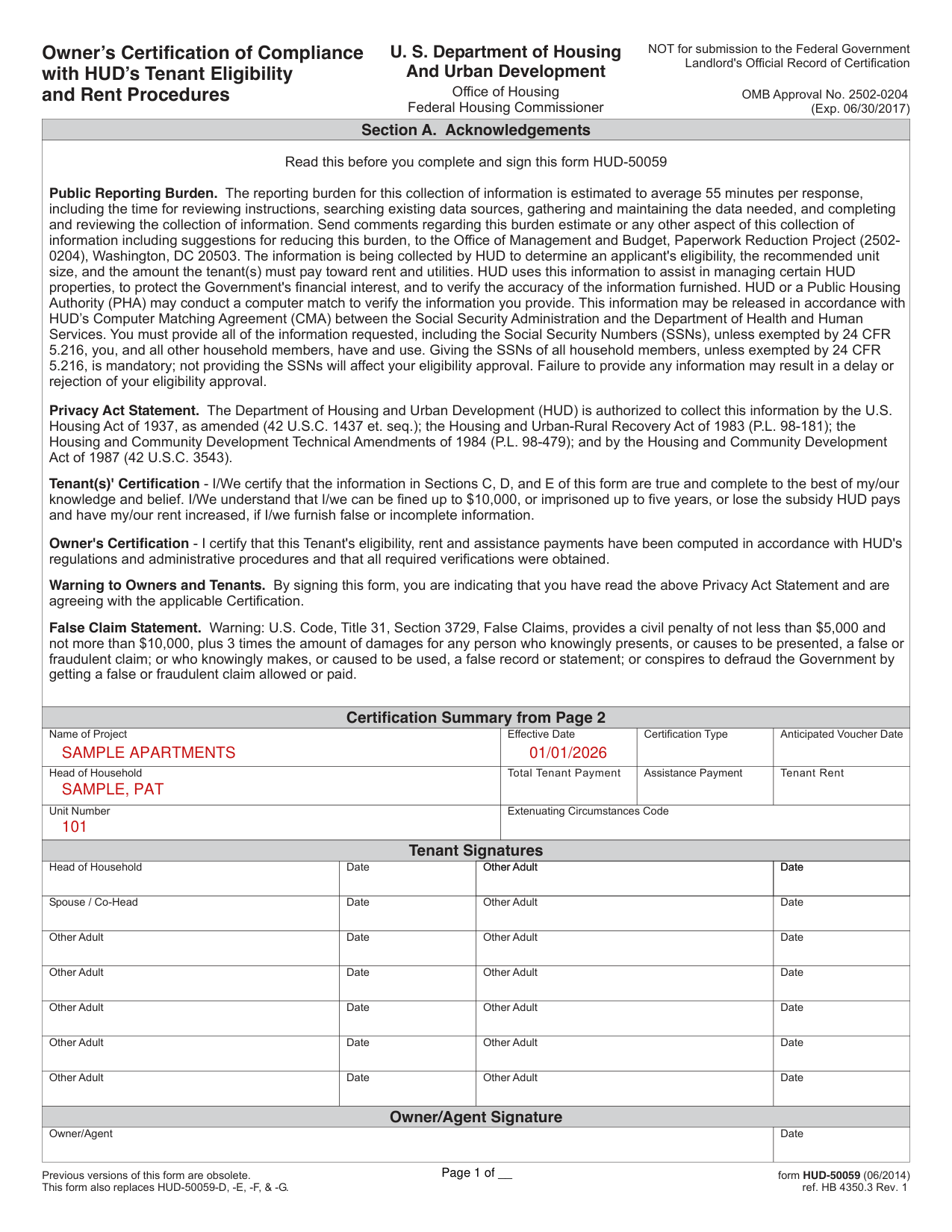
A filled-in Form HUD-50059 example: a head of household on the summary page
How to fill out Form HUD-50059, box by box
Certification Summary from Page 2
In the Certification Summary from Page 2, enter the Name of Project, Certification Type, Effective Date, Anticipated Voucher Date, Head of Household, Total Tenant Payment, Tenant Rent, Assistance Payment, Unit Number and Extenuating Circumstances Code.
Tenant Signatures and Owner/Agent Signature
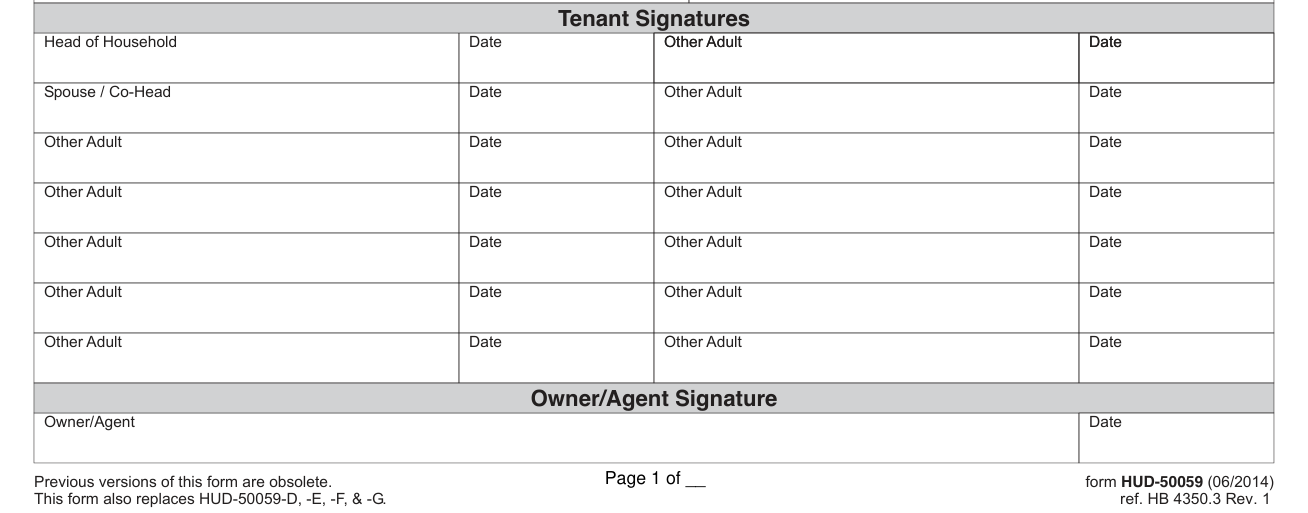
Under Owner/Agent Signature, the Owner/Agent signs and enters the Date.
By signing this form, you are indicating that you have read the Privacy Act Statement and are agreeing with the applicable Certification.
Tenants certify that the information in Sections C, D, and E of this form is true and complete to the best of their knowledge and belief.
Tenants understand that they can be fined up to $10,000, or imprisoned up to five years, or lose the subsidy HUD pays and have their rent increased, if they furnish false or incomplete information (checked November 1, 2026).
The owner certifies that this Tenant's eligibility, rent and assistance payments have been computed in accordance with HUD's regulations and administrative procedures and that all required verifications were obtained.
Section B. Summary Information
In Section B. Summary Information, enter the Project Name in box 1.
Enter the Effective Date in box 12, the Anticipated Voucher Date in box 13 and the Next Recertification Date in box 14.
Section B also has Subsidy Type, Secondary Subsidy Type, Property ID, Project Number, Contract Number, Project iMAX ID, Plan of Action Code, HUD-Owned Project?, Previous Housing Code and Displacement Status Code.
Section B also has 15. Project Move-In Date, 16. Certification Type, 17. Action Processed, 18. Correction Type, 19. EIV Indicator and 20. Prev. Subsidy Type.
Enter 21. Unit Number, 22. No. of Bedrooms, 23. Building ID, 24. Unit Transfer Code, 25. Previous Unit No., 26. Security Deposit, 27. 236 Basic/BMIR Rent, 28. Market Rent, 29. Contract Rent, 30. Utility Allowance, 31. Gross Rent and 32. TTP at RAD Conversion.
Section C. Household Information
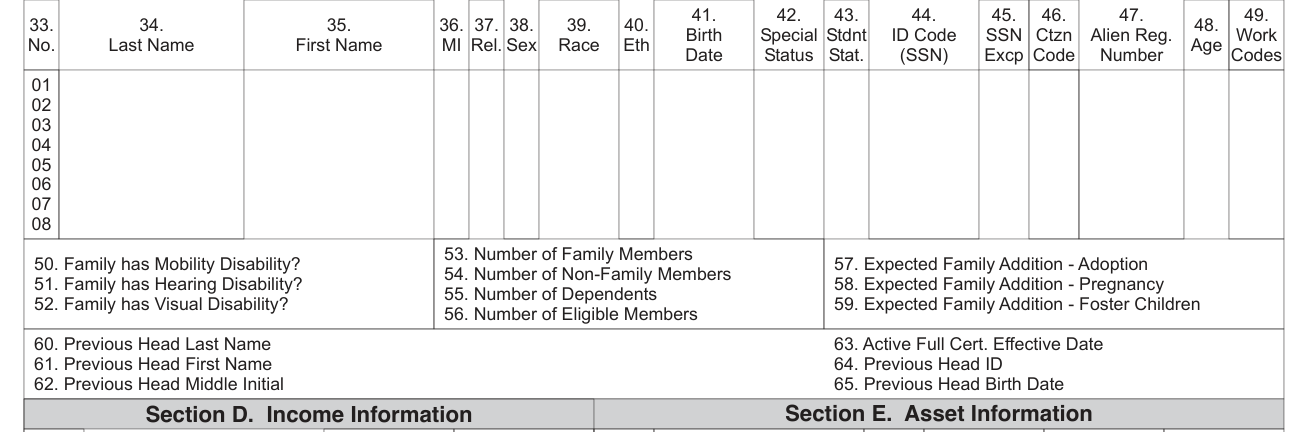
Section C. Household Information has 33. No., 34. Last Name, 35. First Name, 37. Rel., 38. Sex, 39. Race, 40. Eth, 41. Birth Date, 42. Special, 43. Stdnt, 44. ID Code, 45. SSN Excp, 46. Ctzn Code, 47. Alien Reg., 48. Age and 49. Work Codes.
Enter 53. Number of Family Members, 54. Number of Non-Family Members, 55. Number of Dependents and 56. Number of Eligible Members.
Enter 50. Family has Mobility Disability?, 51. Family has Hearing Disability?, 52. Family has Visual Disability?, 57. Expected Family Addition, Adoption, 58. Expected Family Addition, Pregnancy and 59. Expected Family Addition, Foster Children.
For the previous head, enter 60. Previous Head Last Name, 61. Previous Head First Name and 62. Previous Head Middle Initial.
Section D. Income Information and Section E. Asset Information
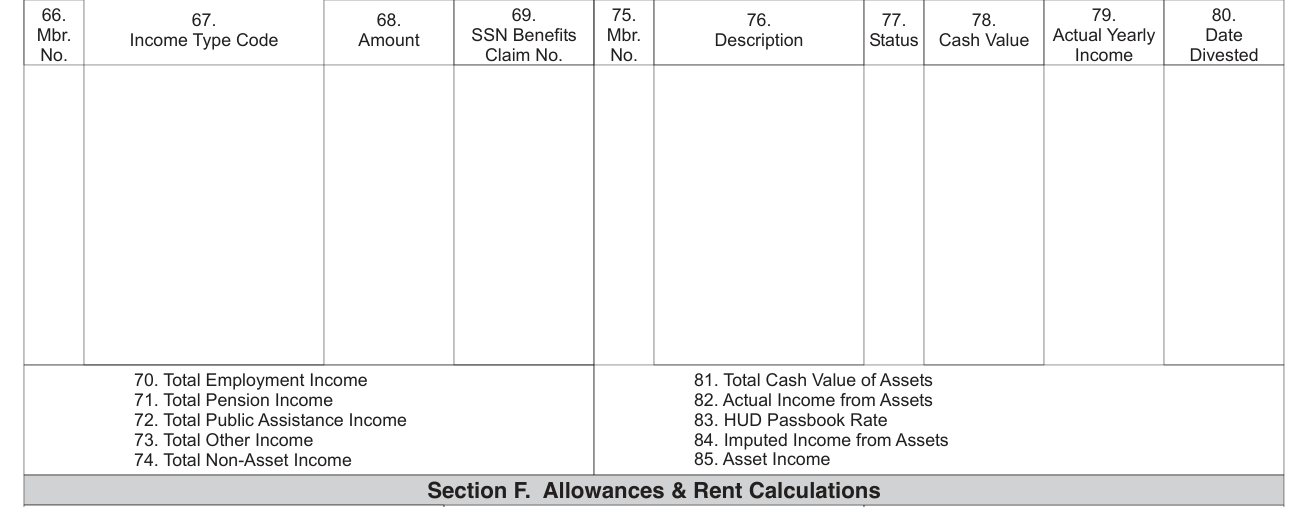
Section D. Income Information has 66. Mbr., 67. Income Type Code, 68. Amount and 69. SSN Benefits; Section E. Asset Information has 75. Mbr., 76. Description, 77. Status, 78. Cash Value, 79. Actual Yearly Income and 80. Date Divested.
Enter 70. Total Employment Income, 71. Total Pension Income, 72. Total Public Assistance Income, 73. Total Other Income and 74. Total Non-Asset Income.
Enter 81. Total Cash Value of Assets, 82. Actual Income from Assets, 83. HUD Passbook Rate, 84. Imputed Income from Assets and 85. Asset Income.
Section F. Allowances & Rent Calculations
Section F. Allowances & Rent Calculations has Total Annual Income, Low Income Limit, Very Low Income Limit, Extremely Low Income Limit, Current Income Status, Eligibility Universe Code, Sec. 8 Assist. 1984 Indicator, Income Exception Code, Police / Security Tenant?, Survivor of Qualifier? and Household Citizenship Eligibility.
Enter Deduction for Dependents, Child Care Expense (work), Child Care Expense (school), 3% of Income, Disability Expense, Disability Deduction, Medical Expense, Medical Deduction, Elderly Family Deduction, Total Deductions and Adjusted Annual Income.
Enter Total Tenant Payment, TTP Before Override, Tenant Rent, Utility Reimbursement, Assistance Payment, Welfare Rent, Rent Override, Hardship Exemption, Waiver Type Code, Eligibility Check Not Required and Extenuating Circumstances Code.
More rules for Form HUD-50059
Giving the SSNs of all household members, unless exempted by 24 CFR 5.216, is mandatory; not providing the SSNs will affect your eligibility approval.
Failure to provide any information may result in a delay or rejection of your eligibility approval.
Use the Continuation Page only when household members, income or asset items exceed the space allowed on page 2.
Common questions about Form HUD-50059
What is HUD 50059 used for?
HUD uses this information to assist in managing certain HUD properties, to protect the Government's financial interest, and to verify the accuracy of the information furnished.
When is this form not the right one?
This form is NOT for submission to the Federal Government.
Sources
[1] Form HUD-50059 (06/2014), Owner's Certification of Compliance with HUD's Tenant Eligibility and Rent Procedures, U.S. Department of Housing and Urban Development (the Official source link on this page).