
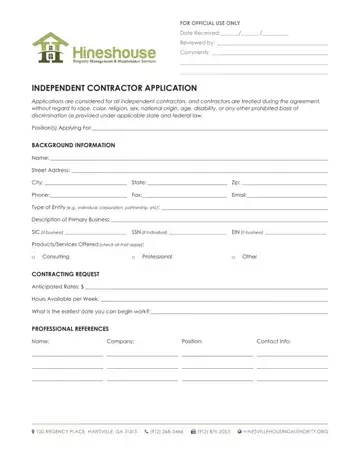
At the heart of every independent contractor's professional journey lies the pivotal moment of completing an Independent Contractor Application form. This comprehensive document not only serves as a vital introduction of the contractor to potential hiring entities but also meticulously outlines the foundational details crucial for establishing a clear and legally sound working relationship. From capturing basic background information, such as the applicant's name, contact details, and type of entity, to more intricate aspects like the detailed description of the primary business, services offered, and anticipated rates, the form encompasses a broad spectrum of data. Furthermore, it delves into the contractor's professional history, existing contractual obligations, and importantly, their legal eligibility to work within the U.S., providing a robust framework for assessing the contractor's qualifications and readiness. This form also touches upon critical compliance and verification sections, requiring signatures for accuracy certification, thereby underscoring the importance of honesty and integrity in the process. The inclusion of sections addressing the contractor's understanding of their tax obligations and the nature of their independent relationship with the hiring entity reaffirms the non-employment nature of the engagement, highlighting the unique responsibilities and conditions that govern the independent contractor's role.
| Question | Answer |
|---|---|
| Form Name | Independent Contractor Application |
| Form Length | 15 pages |
| Fillable? | No |
| Fillable fields | 0 |
| Avg. time to fill out | 3 min 45 sec |
| Other names | contractor application form, 31st, Wyoming, Cosmetology |
