
Jd Cv 21 Form PDF Details

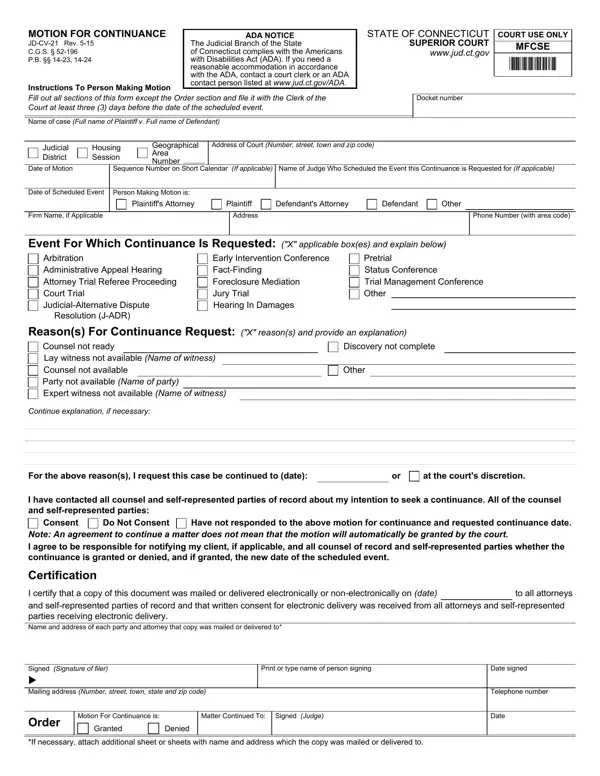
Navigating the legal proceedings in courts can often be complex, requiring parties involved to adapt to changing circumstances. The JD-CV-21 form, known as the Motion for Continuance, plays a critical role in such situations, enabling individuals or their attorneys to request a postponement of a scheduled court event in Connecticut's Superior Court system. This form is designed to be comprehensive, asking for detailed information including the docket number, case name, and specific details of the event for which a continuance is sought, whether that be a trial, hearing, or any other court procedure. It mandates that the requester provides reasons for the delay, such as unavailability of counsel or parties, incomplete discovery, or absence of essential witnesses, ensuring that the court has ample context to make an informed decision. Moreover, the form underscores the importance of communication, requiring that all parties involved are notified of the intention to seek a continuance, emphasizing the collaborative nature of legal processes. Compliance with the Americans with Disabilities Act (ADA) is also noted, reflecting the judiciary's commitment to accessibility for all participants. Through this procedure, the JD-CV-21 form serves as a vital tool in the administration of justice, allowing for flexibility while maintaining the integrity and efficiency of court operations.

QuestionAnswer
Form NameJd Cv 21 Form
Form Length1 pages
Fillable?No
Fillable fields0
Avg. time to fill out15 sec
Other names21 jd cv, jd 21 cv, motion for continuance jd cv 21, court continuance form

How to Edit Jd Cv 21 Form Online for Free

ct motion for continuance can be completed online easily. Just make use of FormsPal PDF editor to get it done quickly. In order to make our editor better and less complicated to use, we continuously implement new features, taking into consideration feedback coming from our users. Getting underway is effortless! Everything you should do is stick to these easy steps down below:

Step 1: Click on the orange "Get Form" button above. It's going to open up our editor so you can begin filling in your form.

Step 2: The tool lets you work with your PDF document in various ways. Change it by including customized text, adjust what is already in the PDF, and put in a signature - all at your fingertips!

It will be straightforward to complete the pdf with our detailed tutorial! This is what you have to do:

1. It's very important to fill out the ct motion for continuance properly, therefore be careful while filling out the segments including all of these fields:

jd cv 021 conclusion process clarified (stage 1)

2. Once the last array of fields is complete, you have to insert the essential details in For the above reasons I request, at the courts discretion, I have contacted all counsel and, Consent, Do Not Consent, Have not responded, to the above motion for, Note An agreement to continue a, Certification, I certify that a copy of this, to all attorneys, Signed Signature of filer u, Print or type name of person, Date signed, and Mailing address Number street town allowing you to progress further.

Step number 2 of filling in jd cv 021

Always be very attentive when completing Note An agreement to continue a and Print or type name of person, since this is the part where most people make a few mistakes.

Step 3: Right after taking another look at the filled out blanks, click "Done" and you're good to go! Try a 7-day free trial subscription with us and obtain direct access to ct motion for continuance - download or modify in your personal cabinet. FormsPal provides safe form tools without personal information record-keeping or distributing. Be assured that your details are safe here!