

Form 1000A at a glance
What it is: Form 1000A is the Business Tax Renewal Form 2026 of the City of Los Angeles Office of Finance.
Where and when to file: Mail renewal form and payment to: City of Los Angeles Office of Finance, P.O. Box 102654, Pasadena, CA 91189-2654. The form is delinquent after March 2, 2026.
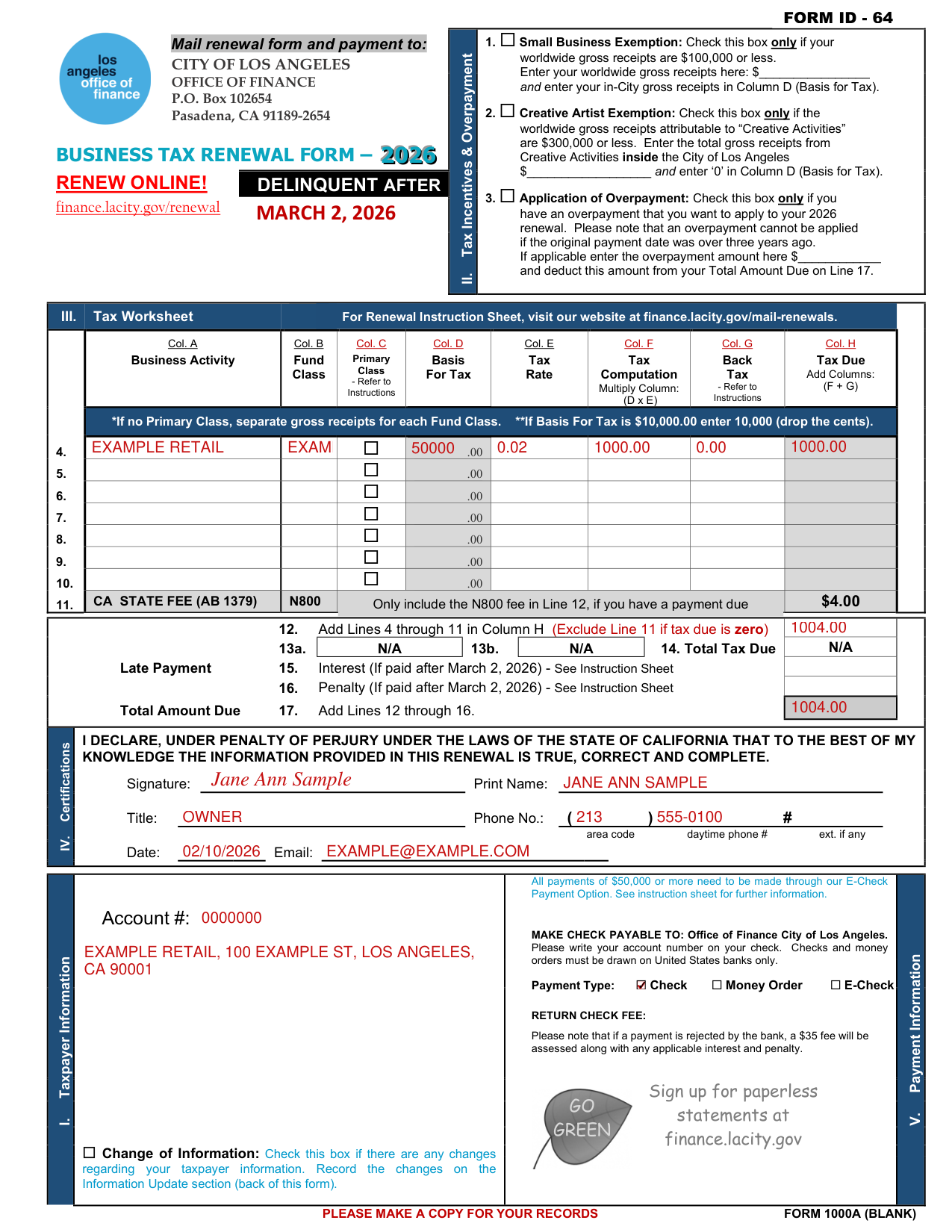
A filled-in Form 1000A example: one business activity paid by check
How to fill out Form 1000A, box by box
Tax Incentives & Overpayment
Check Box 1, Small Business Exemption, only if your worldwide gross receipts are $100,000 or less (checked October 22, 2026).
Enter your worldwide gross receipts and enter your in-City gross receipts in Column D (Basis for Tax).
Check Box 2, Creative Artist Exemption, only if the worldwide gross receipts attributable to “Creative Activities” are $300,000 or less (checked October 22, 2026).
Enter the total gross receipts from Creative Activities inside the City of Los Angeles and enter ‘0' in Column D (Basis for Tax).
Check Box 3, Application of Overpayment, only if you have an overpayment that you want to apply to your 2026 renewal. An overpayment cannot be applied if the original payment date was over three years ago. If applicable enter the overpayment amount and deduct this amount from your Total Amount Due on Line 17.
Tax Worksheet
Enter the Business Activity in Col. A and the Fund Class in Col. B.
If no Primary Class, separate gross receipts for each Fund Class. If Basis For Tax is $10,000.00 enter 10,000 (drop the cents) (checked October 22, 2026).
For Primary Class, refer to Instructions; for Col. G Back Tax, refer to Instructions.
Col. F Tax Computation: multiply Column (D x E).
Col. H Tax Due: add Columns (F + G).
Late Payment and Total Amount Due
Line 11 is the CA State Fee (AB 1379) N800, $4.00 (checked October 22, 2026).
Only include the N800 fee in Line 12, if you have a payment due.
Line 12: add Lines 4 through 11 in Column H (Exclude Line 11 if tax due is zero). Line 13a is N/A, Line 13b is N/A and Line 14, Total Tax Due, is N/A.
Late Payment: for Line 15, Interest, and Line 16, Penalty (if paid after March 2, 2026), see the Instruction Sheet.
Total Amount Due, Line 17: add Lines 12 through 16.
Certifications
By signing you declare, under penalty of perjury under the laws of the State of California, that to the best of your knowledge the information provided in this renewal is true, correct and complete.
Fill in Signature and Print Name.
Fill in Title, Phone No. (area code, daytime phone # and ext. if any), Date and Email.
Account # and Payment Information
Enter your Account #.
All payments of $50,000 or more need to be made through the E-Check Payment Option (checked October 22, 2026).
Make check payable to: Office of Finance City of Los Angeles. Please write your account number on your check. Checks and money orders must be drawn on United States banks only.
Mark the Payment Type: Check, Money Order or E-Check.
If a payment is rejected by the bank, a $35 fee will be assessed along with any applicable interest and penalty (checked October 22, 2026).
Change of Information
Check Change of Information if there are any changes regarding your taxpayer information. Record the changes on the Information Update section (back of this form).
Information Update
If you have changes to your account, checkmark the appropriate box and fill in that section.
Enter your Account # and Name.
The boxes are A. Doing Business As (DBA), B. Mailing Address, C. Legal Name Change, D. Business Address, E. Rental Property Sold, F. Moved outside of L.A. City, no physical presence, G. Entire Business(es) Sold or Discontinued, H. Individual Business Activity Sold or Discontinued and I. Fiscal year reporting.
For H. Individual Business Activity Sold or Discontinued, enter the Fund/Class(es).
Vendor / Subcontractor / Commercial Tenant Listing
The Los Angeles Municipal Code requires you to provide a list of all out-of-city vendors and subcontractors that meet the following criteria: generated total invoices/billings to your business of $500,000 or more during your last complete business year AND physically enter the city of Los Angeles seven (7) or more times a year (checked October 22, 2026).
If you are an owner, lessor or sublessor, of office and/or commercial space in the City of Los Angeles, The Los Angeles Municipal Code requires that you provide the Office of Finance the following information regarding your commercial tenants.
Enter NAME, COMPLETE ADDRESS including SUITE NUMBER, PHONE NO. and INVOICED AMOUNT / RENTAL.
Please use additional sheets if necessary.
More rules for Form 1000A
For the Renewal Instruction Sheet, visit finance.lacity.gov/mail-renewals.
Make a copy for your records.
Renew online at finance.lacity.gov/renewal.
Sold, transferred or moved out of Los Angeles
Your business is sold or transferred to another entity or you purchase a business
Tax Registration Certificates are not transferable. If your business is sold or transferred to another entity or you purchase a business, a new Tax Registration Certificate is required.
You have moved out of the City of Los Angeles
If you have moved out of the City of Los Angeles, but continue to solicit or promote business activities within the City of Los Angeles for seven or more days a year, you are still required to file a business tax renewal.
Common questions about Form 1000A
What is a de 1000A form?
Form 1000A is the Business Tax Renewal Form 2026 of the City of Los Angeles Office of Finance. Use it to renew your City of Los Angeles business tax for 2026.
Where do I file it?
Mail renewal form and payment to: City of Los Angeles Office of Finance, P.O. Box 102654, Pasadena, CA 91189-2654.
Sources
[1] Form 1000A, Business Tax Renewal Form 2026, City of Los Angeles Office of Finance (the Official source link on this page).
