
Maap Aplication Form PDF Details

Embarking on a journey towards a maritime career is a significant decision, punctuated by the completion of the Midshipmen Application Form F-006 ISSUE 0 REV. 4 for the Maritime Academy of Asia and the Pacific–Kamaya Point (MAAP). Dated March 18, 2006, and rooted in the collaborative effort of the Associated Marine Officers’ and Seamen’s Union of the Philippines – PTGWO - ITF, this document serves as the first step for aspiring cadets. Applicants are required to provide comprehensive personal and academic information, including preferred courses among BSMT (Bachelor of Science in Marine Transportation), BSMarE (Bachelor of Science in Marine Engineering), and BSMTE (Bachelor of Science in Marine Transportation Engineering). This form not only seeks basic identifiers like name and address but extends to detailed familial, educational background, and affiliation with AMOSUP if applicable, signifying the breadth of data gathered to evaluate a candidate’s suitability for the rigorous training ahead. This thorough application process, capped by an admission examination, underscores the academy's dedication to entrusting maritime leadership to only the most qualified individuals. Complete with spaces for the applicant’s testimony of the accuracy of provided information and sections reserved for MAAP's internal use, including examination grades and application status, this document exemplifies the meticulous screening involved in shaping future maritime professionals. Additionally, the inclusion of an examination permit details the procedural steps and requirements for potential cadets, signaling MAAP's commitment to a systematic and equitable selection process.

QuestionAnswer
Form NameMaap Aplication Form
Form Length9 pages
Fillable?No
Fillable fields0
Avg. time to fill out2 min 15 sec
Other namesmaap entrance exam 2021, maap application, maap application form 2021, maap edu ph

How to Edit Maap Aplication Form Online for Free

Making use of the online editor for PDFs by FormsPal, you may fill out or change maap here and now. We are aimed at providing you with the absolute best experience with our editor by consistently introducing new capabilities and upgrades. With these improvements, working with our tool gets easier than ever! It just takes several easy steps:

Step 1: First of all, open the pdf editor by clicking the "Get Form Button" in the top section of this page.

Step 2: Using this state-of-the-art PDF editor, you can actually do more than merely complete blanks. Express yourself and make your forms appear perfect with custom textual content added in, or adjust the original input to excellence - all that backed up by the capability to add stunning graphics and sign the document off.

With regards to the fields of this precise document, here's what you should know:

1. The maap will require certain details to be inserted. Make certain the subsequent blank fields are complete:

Part # 1 for completing maap online application 2021

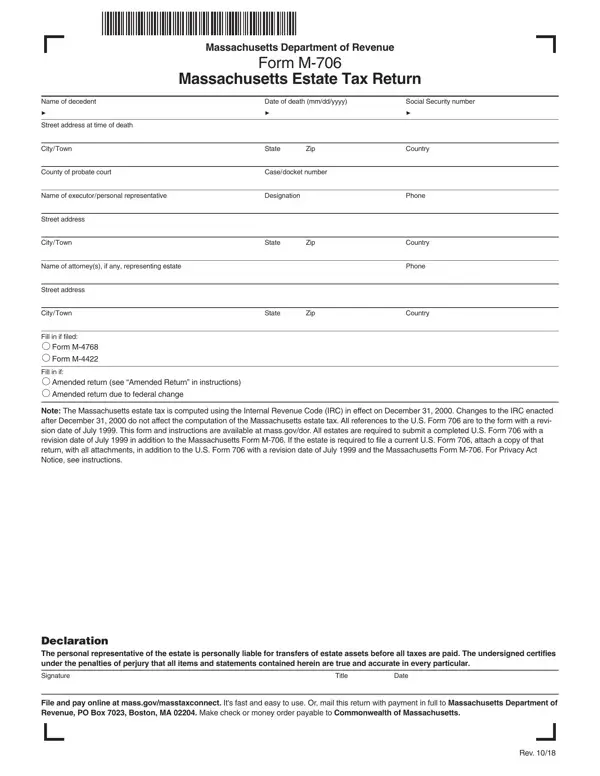
2. Now that this array of fields is finished, you should include the required particulars in Declaration The personal, Signature, Title, Date, File and pay online at, and Rev in order to move on further.

Signature, File and pay online at, and Declaration The personal in maap online application 2021

3. This next step is focused on Name of decedent, Date of death mmddyyyy, Social Security number, Marital status at time of death, Single Married Widow or widower, a Name of deceased spouse, b Social Security number of spouse, c Date of death of spouse mmddyyyy, Fill in if there was any, Fill in if at time of death the, Fill in if at time of death the, held corporation, Fill in if the decedent made any, from the gross estate, and Fill in if during the decedents - fill in all of these empty form fields.

Part number 3 in filling out maap online application 2021

4. To go ahead, this next part will require completing several blank fields. Examples include Part Tentative Massachusetts, Total gross estate from page, this return, Total allowable deductions from, line of this return, Subtract line from line, Adjusted taxable gifts from page, Add lines and, Total gift tax payable from page, Credit for state death taxes from, Part Computation of tax for, Total gross estate wherever, Credit for state death taxes, Estate or inheritance taxes, and Gross value of real estate and, which are integral to continuing with this particular document.

Adjusted taxable gifts from page, Part  Computation of tax for, and Part  Tentative Massachusetts inside maap online application 2021

5. This document has to be wrapped up by going through this part. Here there is a comprehensive set of blanks that need accurate details to allow your document submission to be complete: Deduction allowable for taxes, and Massachusetts estate tax Subtract.

maap online application 2021 conclusion process detailed (portion 5)

When it comes to Deduction allowable for taxes and Deduction allowable for taxes, ensure that you review things in this current part. Both these are thought to be the most important ones in the PDF.

Step 3: Spell-check the details you have entered into the form fields and then press the "Done" button. Sign up with FormsPal now and immediately obtain maap, ready for downloading. Every change made is handily saved , meaning you can change the form further if required. Here at FormsPal.com, we strive to be certain that all your details are kept secure.