
Nexus Application Form PDF Details

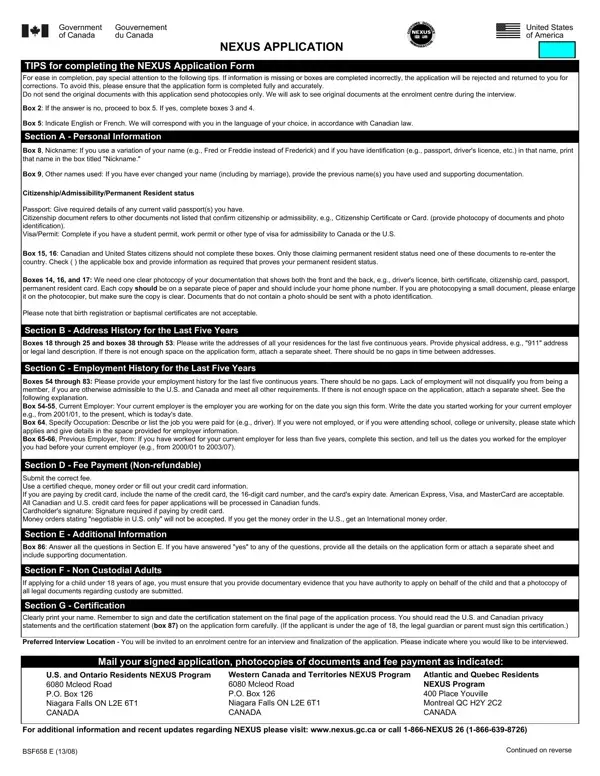
The process of applying for the NEXUS program, a joint initiative by the United States and Canada aimed at expedited border crossings for pre-approved, low-risk travelers, involves careful attention to the completion of the Nexus Application Form. The form is a comprehensive document that solicits personal information, address and employment history, citizenship or permanent resident status, and additional details that are crucial for the assessment of the applicant's eligibility. Applicants must ensure that all information provided on the form is accurate and complete, as any missing or incorrectly completed sections can lead to the rejection of the application. The importance of submitting photocopies of all relevant documents, including identification and status documents, cannot be overstressed, as original documents are requested at a later stage of the enrolment process. Furthermore, the form outlines the requirement for an uninterrupted five-year history of addresses and employment, underscoring the program's thorough approach to security. It also details the fee payment process, underscoring that fees are non-refundable, and highlights the need for additional information and documentation in certain circumstances, such as criminal history or previous denials of entry. For minors applying for the program, the application must be accompanied by evidence of custody or parental authorization. Ultimately, the Nexus Application Form demands careful review and accurate responses from applicants, as it serves as a critical step toward enjoying the expedited travel benefits offered by the NEXUS program.

QuestionAnswer
Form NameNexus Application Form
Form Length4 pages
Fillable?No
Fillable fields0
Avg. time to fill out1 min
Other namesform bsf658 e, nexus application form pdf, nexus application form printable, nexus form bsf 658

How to Edit Nexus Application Form Online for Free

Using the online editor for PDFs by FormsPal, you may complete or alter form bsf658 e here. Our tool is constantly evolving to grant the very best user experience achievable, and that is due to our commitment to continuous development and listening closely to comments from users. Here is what you would want to do to get going:

Step 1: Press the "Get Form" button above. It'll open up our pdf editor so you can begin completing your form.

Step 2: After you open the online editor, there'll be the form prepared to be filled out. Apart from filling out different blanks, you can also perform some other actions with the Document, namely adding any words, editing the original textual content, adding illustrations or photos, putting your signature on the document, and a lot more.

Pay close attention when filling in this form. Ensure that every single field is filled in correctly.

1. The form bsf658 e needs specific details to be inserted. Ensure that the next blank fields are completed:

The way to fill out nexus application form portion 1

2. Immediately after the prior section is done, go on to enter the applicable information in all these - Citizenship document, Type of document, Naturalization certificate, Birth Certificate, Country of issuance, Date of birth, Name on document, Year, Month, Day, Year, Month, Day, Country of issuance, and Date of birth.

Simple tips to complete nexus application form stage 2

In terms of Date of birth and Citizenship document, be sure that you don't make any errors in this section. Both these are the most significant ones in this file.

3. Through this part, review Do you have a valid drivers, Year, Month, Day, Drivers licence, ProvinceState of issue, Country of issuance, Expiry date, BSF E, and Ce formulaire existe aussi en. All these must be completed with greatest precision.

The way to fill in nexus application form portion 3

4. This next section requires some additional information. Ensure you complete all the necessary fields - SECTION B ADDRESS HISTORY FOR THE, From, City, Year, Month, Street number, Street name, To present, Apt, ProvinceState, PostalZip code, Country, Home phone number Mailing, Cell phone number, and Street name - to proceed further in your process!

City, Street name, and Home phone number  Mailing in nexus application form

5. Lastly, the following last portion is precisely what you will need to wrap up prior to submitting the PDF. The fields here are the following: Please specify occupation, A Previous employer name and, Year, Month, Year, Month, Employers name, From, Employers telephone number, Street number, Street name, Apt, City, ProvinceState, and PostalZip code.

nexus application form completion process shown (part 5)

Step 3: Check that the details are right and then simply click "Done" to complete the task. Sign up with us today and immediately obtain form bsf658 e, all set for downloading. All changes made by you are preserved , making it possible to modify the file at a later stage as required. Whenever you work with FormsPal, it is simple to complete documents without worrying about data breaches or records getting distributed. Our protected system makes sure that your personal data is kept safe.