Please rate Nj Driver License Application Request R2-26

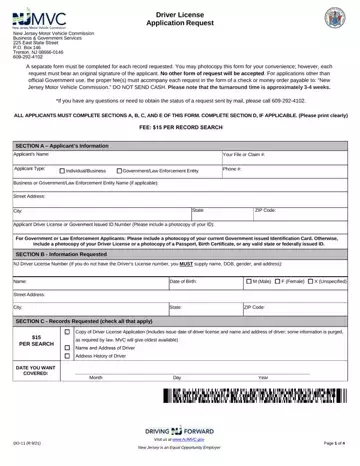
Page 1 is the request and page 2 lists the permitted uses.
Section D: purpose for the request, required only when requesting another's record.
Address: your documents will be mailed to the address that you provide in Section A; mail from the NJMVC is not forwarded.
Copy of Driver License Application: if no date is supplied, you will only receive the name and address.
Government applicants: include a photocopy of your current Government issued Identification Card.
Other applicants: include a photocopy of your Driver License or a photocopy of a Passport, Birth Certificate, or any valid state or federally issued ID.
| Question | Answer |
|---|---|
| Form Name | Form DO-11 |
| Form Length | 3 pages |
| Fillable? | Yes |
| Fillable fields | 40 |
| Avg. time to fill out | 7 min |
| Edition | R2/26 |
| Where to send | New Jersey Motor Vehicle Commission Business & Government Services 225 East State Street PO Box 146 Trenton, NJ 08666-0146 |
| Matches the agency's file | Yes, checked October 2, 2026 |
| Other names | DO-11, DO11, Form DO-11, NJ DO-11, Driver License Application Request |
| Official source | Form DO-11 (Rev R2/26), New Jersey Motor Vehicle Commission |
Nj Driver License Application Request isn’t the one you’re looking for?
Please rate Nj Driver License Application Request R2-26
