Please rate Nwacc Enrollment Verification Form

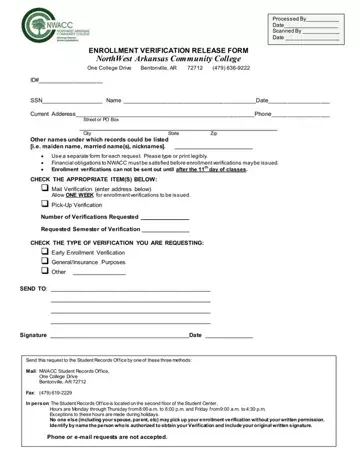
NorthWest Arkansas Community College (NWACC) provides a straightforward process for students needing enrollment verifications through its Enrollment Verification Release Form. This essential document caters to various needs, including early enrollment verification, general or insurance purposes, indicating NWACC's understanding of the wide-ranging reasons why students or alumni might need such verifications. Located in Bentonville, Arkansas, the college stipulates that all financial obligations to NWACC must be cleared before any verification can be processed. Furthermore, verifications will not be dispatched until after the 11th day of classes, ensuring that enrolment status is accurately reflected. The form requires basic but vital information, including the student's ID, Social Security Number, current address, and any other names that might be associated with their records - accommodating those who have undergone name changes due to marriage or other reasons. Significantly, the college emphasizes the importance of privacy and security by allowing only the student or an authorized individual, explicitly named and approved by the student's signature, to pick up the verification. Requests must be submitted through mail, fax, or in person, with specific instructions provided for each method, showcasing NWACC's commitment to accessibility while maintaining a high standard of record-keeping integrity.
| Question | Answer |
|---|---|
| Form Name | Nwacc Enrollment Verification Form |
| Form Length | 1 pages |
| Fillable? | No |
| Fillable fields | 0 |
| Avg. time to fill out | 15 sec |
| Other names | legibly, nicknames, verifications, 11th |
Nwacc Enrollment Verification Form isn’t the one you’re looking for?
Please rate Nwacc Enrollment Verification Form
