
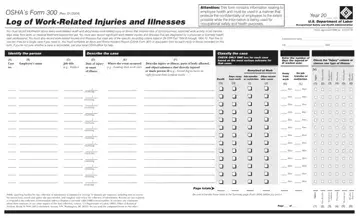
- OSHA Form 300 at a glance
- What to bring and attach to OSHA Form 300
- A filled-in OSHA Form 300 example: a sprain and a needlestick privacy case
- How to fill out OSHA Form 300, box by box
- More rules for OSHA Form 300
- Privacy cases, a more serious outcome and more than one establishment
- Common questions about OSHA Form 300
- Where to get help with OSHA Form 300
- Sources
OSHA Form 300 at a glance
What it is: The Log of Work-Related Injuries and Illnesses (Form 300) is used to classify work-related injuries and illnesses and to note the extent and severity of each case.[1]
What to bring and attach to OSHA Form 300
Complete an Injury and Illness Incident Report (OSHA Form 301) or equivalent form for each injury or illness recorded on this form.[1]
A filled-in OSHA Form 300 example: a sprain and a needlestick privacy case
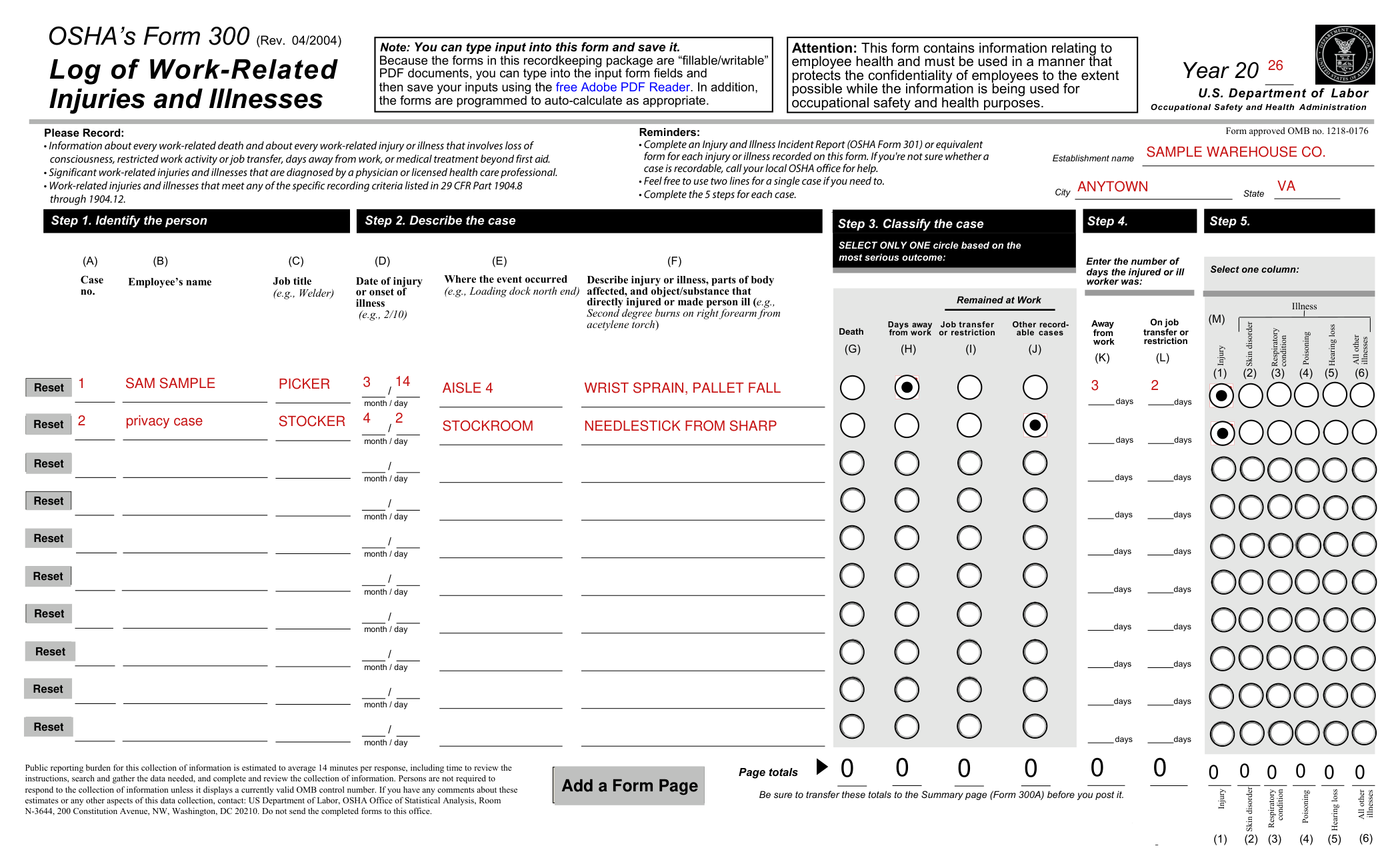
How to fill out OSHA Form 300, box by box
Tap a group of boxes to open it, and a picture to see it full size.
Decide whether to record the case
Within 7 calendar days after you receive information about a case, decide if the case is recordable under the OSHA recordkeeping requirements.
Determine whether the incident is a new case or a recurrence of an existing one.
Establish whether the case was work-related.
If the case is recordable, decide which form you will fill out as the injury and illness incident report.
You may use OSHA's 301: Injury and Illness Incident Report or an equivalent form.
Some state workers compensation, insurance, or other reports may be acceptable substitutes, as long as they provide the same information as the OSHA 301.
If you're not sure whether a case is recordable, call your local OSHA office for help.[1]
What to record on the Log
Record information about every work-related death and about every work-related injury or illness that involves loss of consciousness, restricted work activity or job transfer, days away from work, or medical treatment beyond first aid.
You must record any significant work-related injury or illness that is diagnosed by a physician or other licensed health care professional.
You must record any work-related case involving cancer, chronic irreversible disease, a fractured or cracked bone, or a punctured eardrum.
You must record the following conditions when they are work-related: any needlestick injury or cut from a sharp object that is contaminated with another person's blood or other potentially infectious material; any case requiring an employee to be medically removed under the requirements of an OSHA health standard; tuberculosis infection as evidenced by a positive skin test or diagnosis by a physician or other licensed health care professional after exposure to a known case of active tuberculosis; an employee's hearing test (audiogram) reveals 1) that the employee has experienced a Standard Threshold Shift (STS) in hearing in one or both ears (averaged at 2000, 3000, and 4000 Hz) and 2) the employee's total hearing level is 25 decibels (dB) or more above audiometric zero (also averaged at 2000, 3000, and 4000 Hz) in the same ear(s) as the STS.
Record work-related injuries and illnesses that meet any of the specific recording criteria listed in 29 CFR Part 1904.8 through 1904.12.[1]
Complete the 5 steps for each case
Complete the 5 steps for each case.
Feel free to use two lines for a single case if you need to.[1]
Year, establishment name, city and state
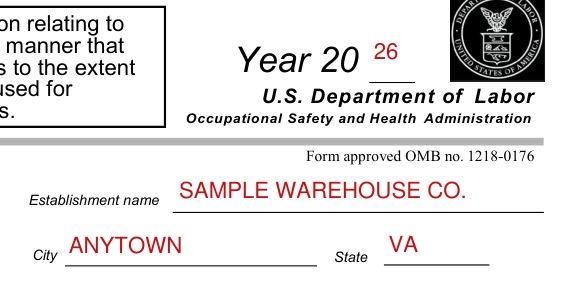
At the top of the Log, in the blank next to Year 20, write the last two of the year's number, and enter the Establishment name, the City and the State.[1]
Step 1. Identify the person
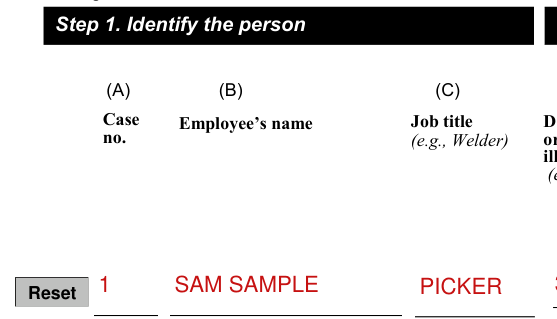
Under Step 1, Identify the person, enter the Case no., the Employee's name and the Job title.
Identify the employee involved unless it is a privacy concern case as described below.[1]
Step 2. Describe the case
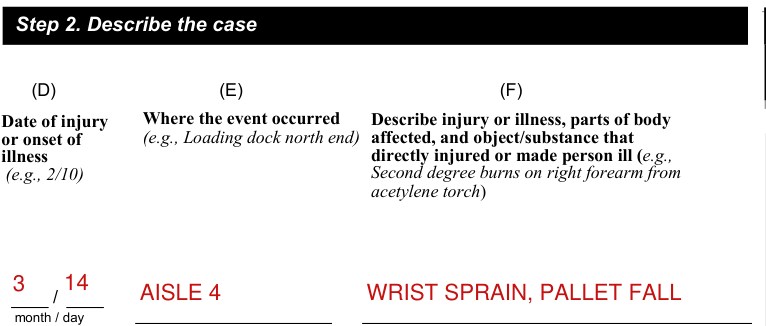
Next, under Step 2, Describe the case (the Case no. is Step 1), enter the Date of injury or onset of illness, Where the event occurred, and a description: Describe injury or illness, parts of body affected, and object/substance that directly injured or made person ill.
Identify when and where the case occurred.
Also describe the case, as specifically as you can.[1]
Step 3. Classify the case
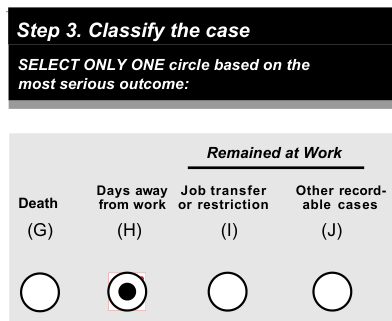
Common mistake: Under Step 3, Classify the case, select only one circle based on the most serious outcome: Death (G), Days away from work (H), Job transfer or restriction (I) or Other recordable cases (J).
Classify the seriousness of the case by recording the most serious outcome associated with the case, with column G (Death) being the most serious and column J (Other recordable cases) being the least serious.[1]
Step 4. Enter the number of days
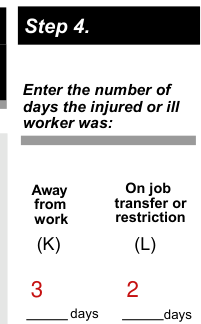
Under Step 4, enter the number of days the injured or ill worker was Away from work and On job transfer or restriction.
Restricted work activity occurs when, as the result of a work-related injury or illness, an employer or health care professional keeps, or recommends keeping, an employee from doing the routine functions of his or her job or from working the full workday that the employee would have been scheduled to work before the injury or illness occurred.
Count the number of calendar days the employee was on restricted work activity or was away from work as a result of the recordable injury or illness.
Common mistake: Do not count the day on which the injury or illness occurred in this number.
Begin counting days from the day after the incident occurs.
If a single injury or illness involved both days away from work and days of restricted work activity, enter the total number of days for each.
You may stop counting days of restricted work activity or days away from work once the total of either or the combination of both reaches 180 days.[1]
Step 5. Select one column
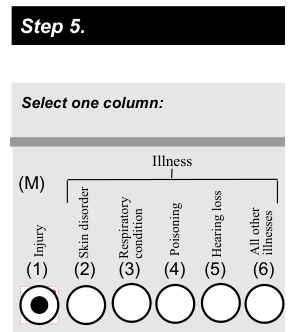
Under Step 5, select one column: Injury, Skin disorder, Respiratory condition, Poisoning, Hearing loss or All other illnesses.
Identify whether the case is an injury or illness.
If the case is an injury, check the injury category.
If the case is an illness, check the appropriate illness category.
An injury is any wound or damage to the body resulting from an event in the work environment.
Sprain and strain injuries to muscles, joints, and connective tissues are classified as injuries when they result from a slip, trip, fall or other similar accidents.
Skin diseases or disorders are illnesses involving the worker's skin that are caused by work exposure to chemicals, plants, or other substances.
Respiratory conditions are illnesses associated with breathing hazardous biological agents, chemicals, dust, gases, vapors, or fumes at work.
Poisoning includes disorders evidenced by abnormal concentrations of toxic substances in blood, other tissues, other bodily fluids, or the breath that are caused by the ingestion or absorption of toxic substances into the body.
Noise-induced hearing loss is defined for recordkeeping purposes as a change in hearing threshold relative to the baseline audiogram of an average of 10 dB or more in either ear at 2000, 3000, and 4000 hertz, and the employee's total hearing level is 25 decibels (dB) or more above audiometric zero (also averaged at 2000, 3000, and 4000 hertz) in the same ear(s).
All other illnesses are all other occupational illnesses.[1]
Page totals and the Summary

Be sure to transfer these totals to the Summary page (Form 300A) before you post it.
Common mistake: You don't post the Log; you post only the Summary at the end of the year.
If you need additional copies of the Log, you may photocopy the printout or insert additional form pages in the PDF, and then use as many as you need.[1]
More rules for OSHA Form 300
The Occupational Safety and Health (OSH) Act of 1970 requires certain employers to prepare and maintain records of work-related injuries and illnesses.[1]
This form contains information relating to employee health and must be used in a manner that protects the confidentiality of employees to the extent possible while the information is being used for occupational safety and health purposes.[1]
You can type input into this form and save it.[1]
Because the forms in this recordkeeping package are fillable/writable PDF documents, you can type into the input form fields and then save your inputs using the free Adobe PDF Reader, and the forms are programmed to auto-calculate as appropriate.[1]
Privacy cases, a more serious outcome and more than one establishment
The case is a privacy concern case
You must consider the following types of injuries or illnesses to be privacy concern cases: an injury or illness to an intimate body part or to the reproductive system, an injury or illness resulting from a sexual assault, a mental illness, a case of HIV infection, hepatitis, or tuberculosis, a needlestick injury or cut from a sharp object that is contaminated with blood or other potentially infectious material (see 29 CFR Part 1904.8 for definition), and other illnesses, if the employee independently and voluntarily requests that his or her name not be entered on the log.
Common mistake: You must not enter the employee's name on the OSHA 300 Log for these cases.
Instead, enter “privacy case” in the space normally used for the employee's name.
You must keep a separate, confidential list of the case numbers and employee names for the establishment's privacy concern cases so that you can update the cases and provide information to the government if asked to do so.
If you have a reasonable basis to believe that information describing the privacy concern case may be personally identifiable even though the employee's name has been omitted, you may use discretion in describing the injury or illness on both the OSHA 300 and 301 forms.
You must enter enough information to identify the cause of the incident and the general severity of the injury or illness, but you do not need to include details of an intimate or private nature.[1]
The injury or illness progresses and the outcome is more serious
Revise the log if the injury or illness progresses and the outcome is more serious than you originally recorded for the case.
Cross out, erase, or white-out the original entry if hard copy.
If using the PDF's fillable form feature, simply change your selections.
If using the PDF's fillable form feature, you can also clear the entire case entry from the log using the Reset button.[1]
Your company has more than one establishment or site
If your company has more than one establishment or site, you must keep separate records for each physical location that is expected to remain in operation for one year or longer.[1]
Common questions about OSHA Form 300
What is form 300 in OSHA?
The Log of Work-Related Injuries and Illnesses (Form 300) is used to classify work-related injuries and illnesses and to note the extent and severity of each case. When an incident occurs, use the Log to record specific details about what happened and how it happened.[1]
What is the difference between OSHA Form 300 and 300A?
The Summary, a separate form (Form 300A), shows the totals for the year in each category. Common mistake: You don't post the Log; you post only the Summary at the end of the year.[1]
What is the most serious outcome which could be entered on an OSHA 300 log?
Classify the seriousness of the case by recording the most serious outcome associated with the case, with column G (Death) being the most serious and column J (Other recordable cases) being the least serious.[1]
How long must OSHA Form 300 be kept?
You must keep the Log and Summary for 5 years following the year to which they pertain.[1]
Who is exempt from OSHA 300 reporting?
Many but not all employers must complete the OSHA injury and illness recordkeeping forms on an ongoing basis. Employers with 10 or fewer employees throughout the previous calendar year do not need to complete these forms. In addition to the small employer exemption, there is an exemption for establishments classified in certain industries. A complete list of exempt industries can be found on the OSHA web page at www.osha.gov/recordkeeping. Establishments normally exempt from keeping the OSHA forms must complete the forms if they are informed in writing to do so by the Bureau of Labor Statistics or OSHA. Employers in State Plan States should check with their State Plan to see if the exemptions apply. All employers, including those partially exempted by reason of company size or industry classification, must report to OSHA any workplace incident that results in a fatality, in-patient hospitalization, amputation, or loss of an eye.[1]
Does it need a notary?
No notary is named anywhere on OSHA Form 300.
Who signs it?
On the Summary (Form 300A), under Sign here, the Company executive signs.[1]
Is there a deadline?
Within 7 calendar days after you receive information about a case, decide if the case is recordable under the OSHA recordkeeping requirements. You must post the Summary (Form 300A) only, not the Log, by February 1 of the year following the year covered by the form and keep it posted until April 30 of that year.[1]
Where do I file it?
Many employers are required to electronically submit information from their OSHA Forms to OSHA. To see if your establishment is required to submit the information, visit www.osha.gov/injuryreporting/index.html.[1]
Are there fees?
The form does not say.
Is there a penalty for filing late?
The form does not say.
What am I certifying when I sign?
On the Summary (Form 300A), the certification is: I certify that I have examined this document and that to the best of my knowledge the entries are true, accurate, and complete.[1]
Where to get help with OSHA Form 300
If you have a question about how to fill out the Log, visit us online at www.osha.gov or call your local OSHA office.[1]
Sources
[1] OSHA's Form 300 (Rev. 04/2004), Log of Work-Related Injuries and Illnesses, in OSHA's forms package for recording work-related injuries and illnesses (Forms 300, 300A and 301), U.S. Department of Labor (the Official source link on this page).
