
P 315 Form PDF Details

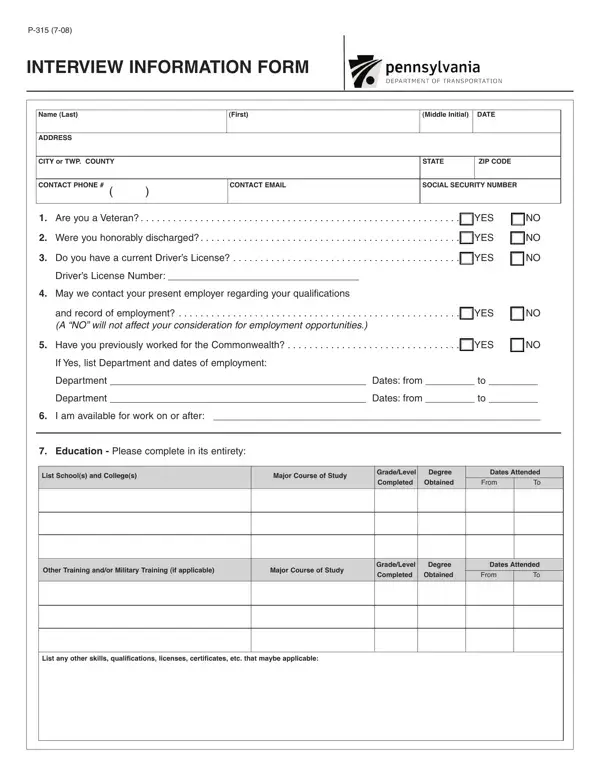
Navigating through the process of applying for positions within the Commonwealth can be meticulous, particularly when it comes to filling out necessary documentation such as the P-315 Interview Information Form. This form serves as a comprehensive document aiming to collect a variety of information from potential employees. It starts off by requesting personal details including name, contact information, and social security number. Important questions follow, seeking to ascertain the applicant's veteran status and if so, the nature of their discharge, which could influence the application process favorably under certain conditions. Applicants are also asked about their ability to legally drive, a critical requirement for roles necessitating travel. A noteworthy feature of this form is its consideration for an applicant's current employment situation, providing an option to respect their privacy by not contacting their present employer. It delves into the individual’s work history within the Commonwealth, if applicable, and availability to commence work. Educational background is thoroughly explored, asking for details of schools or colleges attended, majors, degrees obtained, and any other pertinent training, including military, that could enhance the candidate’s qualifications. The form also ventures into the applicant's employment record, requiring specifics about past positions, tasks performed, reasons for leaving, and salary details, to paint a clear picture of the individual’s professional journey. Additionally, it broaches the sensitive topic of criminal convictions, clarifying which types of offenses need to be disclosed and reassuring applicants that a conviction does not automatically disqualify them, demonstrating an inclusive approach to employment. The P-315 Interview Information Form encapsulates a multi-dimensional view of the candidate, ensuring that hiring teams within the Commonwealth have a holistic understanding of each applicant’s background, skills, and potential fit within their organization.

QuestionAnswer
Form NameP 315 Form
Form Length2 pages
Fillable?No
Fillable fields0
Avg. time to fill out30 sec
Other namesofffense, 18th, honorably, expunged

How to Edit P 315 Form Online for Free

When you desire to fill out adjudicated, you don't need to download and install any sort of programs - just try using our PDF editor. To retain our editor on the leading edge of efficiency, we aim to implement user-driven features and enhancements regularly. We're routinely pleased to get suggestions - help us with revampimg the way you work with PDF forms. With a few basic steps, you may begin your PDF editing:

Step 1: Click on the "Get Form" button in the top part of this page to open our tool.

Step 2: Using our advanced PDF editor, it is possible to do more than merely fill out blank form fields. Edit away and make your docs appear professional with customized text added in, or optimize the original input to excellence - all comes along with the capability to incorporate stunning photos and sign the document off.

This form will require particular information to be filled out, thus you should definitely take whatever time to enter what is expected:

1. It is recommended to complete the adjudicated accurately, thus be mindful when working with the segments that contain these fields:

Step no. 1 in completing expunged

2. Right after filling out the previous part, head on to the subsequent part and complete the essential particulars in these blanks - Department Dates from to, I am available for work on or, Education Please complete in its, List Schools and Colleges, Major Course of Study, GradeLevel, Degree, Dates Attended, Completed, Obtained, From, Other Training andor Military, Major Course of Study, GradeLevel, and Degree.

expunged completion process shown (step 2)

It is possible to make errors when filling in your Education Please complete in its, consequently make sure that you reread it prior to when you finalize the form.

3. Completing DATES EMPLOYED, From, EMPLOYER, CITY AND STATE, POSITION HELD, SUPERVISOR TITLE, LIST DUTIES, REASON FOR LEAVING, DATES EMPLOYED, From, LIST DUTIES, REASON FOR LEAVING, DATES EMPLOYED, EMPLOYER, and CITY AND STATE is essential for the next step, make sure to fill them out in their entirety. Don't miss any details!

Writing section 3 in expunged

4. This fourth subsection arrives with all of the following fields to fill out: DATES EMPLOYED, From, LIST DUTIES, EMPLOYER, CITY AND STATE, POSITION HELD, SUPERVISOR TITLE, REASON FOR LEAVING, SALARY, Were you ever convicted of a, forfeited bond or collateral in, The term criminal offfense is, and Are there any criminal charges.

Guidelines on how to complete expunged stage 4

Step 3: Make sure the details are correct and press "Done" to progress further. Make a 7-day free trial option with us and gain immediate access to adjudicated - accessible from your personal account. When you work with FormsPal, you'll be able to fill out documents without needing to worry about personal information incidents or records getting shared. Our protected software helps to ensure that your private information is maintained safe.