
Pa 1000 Instructions PDF Details

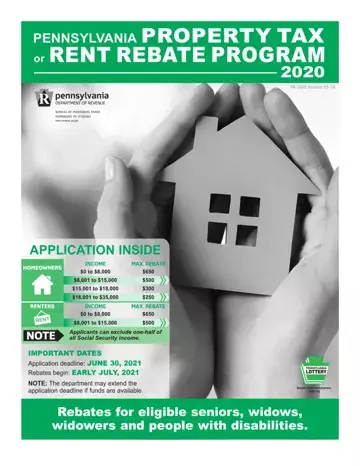
Within the realm of financial assistance programs offered by the state of Pennsylvania, the PA-1000 form, associated with the Property Tax or Rent Rebate Program, represents a critical tool for seniors, widows, widowers, and individuals with disabilities seeking relief on property taxes or rent paid in the preceding year. The PA-1000 booklet, as a comprehensive guide, outlines the detailed instructions necessary for eligible claimants to accurately complete and submit their applications by the stipulated deadline of June 30, 2021, to benefit from rebates starting early July. The program is specifically designed to support Pennsylvanians who meet certain age and disability criteria, with income thresholds that determine the rebate amount, which can reach up to $650 for both renters and homeowners. The eligibility extends to seniors aged 65 and above, widows and widowers aged 50 and older, and people with disabilities aged 18 and over. The 2020 update introduces electronic filing through myPATH, making the process more streamlined and user-friendly, with added features like automatic calculators to aid applicants. Besides addressing the rebate calculations for different income brackets, the instructions also cover nuanced situations like changes in eligibility income that exclude federal stimulus or economic impact payments and the inclusion of a new field for claimants residing outside the United States. Moreover, the booklet provides guidance on how to check application status, opt for direct deposit for faster rebate receipt, and specifics on navigating the program for Philadelphia residents, thereby encapsulating the essential elements claimants must be aware of to successfully navigate the application process and secure their rebates.

QuestionAnswer
Form NamePa 1000 Instructions
Form Length27 pages
Fillable?No
Fillable fields0
Avg. time to fill out6 min 45 sec
Other namesdetail instructions on how to fill out a pa 1000 form, pa 1000 property tax rent rebate form 2019, pa1000 schedule a, schedule of pa 1000

Form Preview Example

PENNSYLVANIA PROPERTY TAX

or RENT REBATE PROGRAM

2020

PA-1000 Booklet 05-20

HARRISBURG PA 17128-0503

www.revenue.pa.gov

APPLICATION INSIDE

IMPORTANT DATES

Application deadline: JUNE 30, 2021

Rebates begin: EARLY JULY, 2021

NOTE: The department may extend the application deadline if funds are available.

Rebates for eligible seniors, widows, widowers and people with disabilities.

WHAT IS THE PROPERTY TAX/RENT REBATE PROGRAM?

A Pennsylvania program providing rebates on property tax or rent paid the previous year by income-eligible seniors and people with disabilities.

AM I ELIGIBLE?

The program benefits income-eligible Pennsylvanians age 65 and older; widows and widowers age 50 and older; and people with disabilities age 18 and older.

HOMEOWNERS

2020

FORM AND INSTRUCTIONS

CHANGES

Two additional items have been added to the list of income that is not reported for Line 11g. Federal stimulus or economic impact payments received by claimants are not eligibility income by Property Tax or Rent Rebate claimants. STRIVE (Senior Tax Reduction Incentive Volunteer Exchange) Program credits are also not eligibility income by Property Tax Rebate claimants.

A country code field has been added to Section I on

Income

$0 to $8,000 $8,001 to $15,000 $15,001 to $18,000 $18,001 to $35,000

Maximum Rebate

$650 $500 $300 $250

Page 1 of the PA-1000 form. Claimants who moved out of the United States of America and lived at least part of the year in Pennsylvania must include the three-digit abbreviation for the country where the claimant now resides. See the instructions for Country Code on Page 6 for additional information.

RENTERS

Income

Maximum Rebate

$0 to $8,000

$650

$8,001 to $15,000

$500

NEW FOR 2020

ELECTRONIC PTRR FILING

Starting with the 2020 claim year, Pennsylvanians will be able to electronically submit their Property Tax/Rent Rebate program applications. Visit mypath.pa.gov to access the Department of Revenue’s electronic filing portal. Claimants who submit their applications electronically will have the benefit of automatic calculators and other user- friendly features that are not available when filing a paper application.

myPATH is safe, secure and more efficient. See Page 18 or go to the department's website at www.revenue.pa.gov/mypathinformation to learn more about our electronic services.

CHECK APPLICATION STATUS

Applicants will be able to check the status of their rebates using the myPATH portal (mypath.pa.gov).

Be sure to include a valid phone number on your application to receive updates automatically. The department will make automated phone calls to advise when your claim is received and again when your claim is approved for payment. These calls begin around April.

If you prefer to call to check the status of your appli- cation, you may dial 1-888-PA-TAXES.

DIRECT DEPOSIT

Get your rebate faster with direct deposit. See Pages 12 and 13 for details.

2 PA-1000 Pennsylvania Property Tax or Rent Rebate Program

www.revenue.pa.gov

BEFORE YOU BEGIN

STATE SUPPLEMENTARY PAYMENT RECIPIENTS

The State Supplementary Payment (SSP) is not included on your SSA-1099 form. The Department of Human Services will issue annual statements to verify your SSP benefit. SSP is still considered reportable income. As with other Social Security income, only half of the SSP income needs to be included on Line 4 of the Property Tax/Rent Rebate claim form.

SOCIAL SECURITY RECIPIENTS WITH

PA ADDRESSES

If you were a Pennsylvania resident for all of 2020, you do not have to submit proof of your Social Security income including Social Security retirement and Supplemental Security benefits. The Social Security Administration provides Social Security income information to the PA Department of Revenue. The PA Department of Human Services will provide State Supplementary Payment information to the department.

However, you or the person who prepares your claim will need these statements to correctly calculate the amount of your rebate. If none of these documents are available, you or your preparer will need to estimate the amount you received during the year. If the dollar amount you provide is not correct, the department will adjust the amount of your rebate based upon income amounts reported directly to the department by the Social Security Administration or the Department of Human Services.

SOCIAL SECURITY RECIPIENTS WITHOUT PA ADDRESSES

If your address in Social Security Administration records was not a Pennsylvania address for 2020, you must submit a copy of one of the following documents as proof of your 2020 Social Security income: Form SSA-1099 reporting your 2020 Social Security benefits, a statement from Social Security that reports the monthly or yearly Social Security/Supplemental Security Income benefits you received during 2020, or a bank statement showing the amount of Social Security/Supplemental Security Income benefits deposited into your account during 2020.

PHILADELPHIA RESIDENTS

Please read the special filing instructions on Page 11.

ELIGIBILITY REQUIREMENTS

You are eligible for a Property Tax/Rent Rebate for claim year 2020, if you meet the requirements in each of the three categories below:

CATEGORY 1 – TYPE OF FILER

a.You were 65 or older as of Dec. 31, 2020;

b.You were not 65, but your spouse who lived with you was 65 or older as of Dec. 31, 2020;

c.You were a widow or widower during all or part of 2020 and were 50 or older as of Dec. 31, 2020; or

d. You were permanently disabled and 18 or older during all or part of 2020, you were unable to work because of your medically determined physical or mental disability, and your disability is expected to continue indefinitely. If you received Supplemental Security Income (SSI) payments, you are eligible for a rebate if you meet all other requirements.

NOTE: If you applied for Social Security disability benefits and the Social Security Administration did not rule in your favor, you are not eligible for a Property Tax/Rent Rebate as a disabled claimant.

CATEGORY 2 – ELIGIBILITY INCOME

When calculating your total eligible annual household income, exclude one-half of your Social Security benefits as shown in Box 5 of your SSA-1099 statement, one-half of your Supplemental Security Income benefits, one-half of your State Supplementary Payment benefits and one-half of any Railroad Retirement Tier 1 benefits as shown on Form RRB-1099.

a.Property Owners - Your total eligible annual house- hold income, including the income that your spouse earned and received while residing with you, was $35,000 or less in 2020.

b.Renters - Your total eligible annual household income, including the income that your spouse earned and received while residing with you, was $15,000 or less in 2020.

You must report all items of income, except the nonre- portable types of income listed on Pages 8 and 9, whether or not the income is taxable for federal or PA income tax purposes.

NOTE: There may be differences between eligibility income and PA-taxable income. Please see specific line instructions for each category of income.

CATEGORY 3 – OWNER, RENTER OR

OWNER/RENTER

To file as a property owner, renter, or owner/renter, you must meet all requirements for one of the following categories:

OWNER

a.You owned and occupied your home, as evidenced by a contract of sale, deed, trust, or life estate held by a grantee;

b.You occupied your home (rebates are for your primary residence only); and

c.You or someone on your behalf paid the 2020 property taxes on your home.

PA-1000 Pennsylvania Property Tax or Rent Rebate Program 3

RENTER

a.You rented and occupied a home, apartment, nursing home, boarding home, or similar residence in Pennsylvania;

b.Your landlord paid property taxes or agreed to make a payment in lieu of property taxes on your rental property for 2020 (see Page 12); and

c.You or someone on your behalf paid the rent on your residence for 2020.

OWNER/RENTER

a.You owned, occupied, and paid property taxes for part of the year and were a renter for part of the year;

b.You owned and occupied your home and paid property taxes and paid rent for the land upon which your home is situated; or

c.You paid rent for the home you occupied, and paid property taxes on the land upon which your home is situated.

CAUTION: As a renter, if you received cash public assis- tance during 2020, you are not eligible for any rebate for those months you received cash public assistance. Please complete a PA-1000 Schedule D (enclosed in this booklet).

PROOF DOCUMENTS THAT FIRST

TIME FILERS MUST SUBMIT

IMPORTANT: Please send photocopies, since the depart- ment cannot return original documents. Print your Social Security Number (SSN) on each proof document that you submit with your claim form.

If you are age 65 or older, provide proof of your age.

If you are under age 65 and your spouse is age 65 or older, provide proof of your spouse’s age.

If you are a widow or widower age 50 to 64, provide proof of your age and a photocopy of your spouse’s death certificate.

If you are permanently disabled, age 18 to 64, you must provide proof of your age and proof of your permanent disability.

PROOF OF AGE

NOTE: If you receive Social Security or SSI benefits and have proven your age with the Social Security Administration, you do not need to submit proof of age.

IMPORTANT: The department accepts photocopies of the following documents as proof of your age. Do not send your original documents since the department cannot return original documents.

Birth certificate

Blue Cross or Blue Shield 65 Special Card

Church baptismal record

Driver’s license or PA identification card

Hospital birth record

Naturalization/immigration paper, if age is shown

Military discharge paper, if age is shown

Medicare card

PACE/PACENET card

Passport

The department will not accept a Social Security card or hunting or fishing license as proof of age.

If you have questions on other types of acceptable documents, please call the department at 1-888-222-9190.

PROOF OF DISABILITY

For Social Security disability, SSI permanent and total disability, Railroad Retirement permanent and total disability, or Black Lung disability, provide a copy of your award letter.

For Veterans Administration disability, provide a letter from the Veterans Administration stating that you are 100 percent disabled.

For Federal Civil Service disability, provide a letter from Civil Service stating that you are 100 percent disabled.

If you do not qualify under any of the disability programs mentioned above, did not apply for Social Security benefits, or do not have a letter from the Veterans Administration or Civil Service Administration, you must submit a Physician’s Statement of Permanent Disability (PA-1000 PS), enclosed in this booklet. The form must describe your disability as permanent and your physician must sign the statement to certify that the information is true and accurate to the best of his/her knowledge and belief.

IMPORTANT: The Physician’s Statement of Permanent Disability cannot be used if you were denied Social Security disability. The Department of Revenue has the legal authority to require additional evidence that you are permanently disabled and eligible for a rebate.

HOUSEHOLDS WITH MORE THAN

ONE QUALIFIED CLAIMANT

Only one member of your household may file a claim even if more than one person qualifies for a rebate. If someone other than your spouse appears on the deed or the lease, please complete a PA-1000 Schedule F (enclosed in this booklet). You may apply for only one rebate each year.

DECEASED CLAIMANT

To be eligible for a rebate, the claimant must have lived at least one day of a claim year, owned and occupied and paid taxes or rented and occupied and paid rent for the claim year during the time period the claimant was alive. The property tax paid for a deceased claimant will be prorated based upon the number of days the claimant lived during the claim year. See Schedule A for the calculation of the prorated property tax rebate.

To determine if a deceased claimant is eligible for a rebate, a deceased claimant’s claim form must also include an annualized income amount in the calculation of total household income. See Schedule G, specifically the instructions for Line 11g, for information on the calculation of

4PA-1000 Pennsylvania Property Tax or Rent Rebate Program

annualized income to be included in household income. A copy of the death certificate must also be included with the claim form.

A surviving spouse, estate or personal representative may file a claim on behalf of a deceased claimant. A personal representative can also have a previously filed rebate issued in his or her name, instead of the name of the decedent, in certain circumstances. Please see sections entitled SURVIVING SPOUSE, AN ESTATE, and PERSONAL REPRESENTATIVE for details.

SURVIVING SPOUSE

The surviving spouse can file the completed claim and include a copy of the death certificate and a letter stating that he/she was the spouse of the claimant at the time of death. The surviving spouse may sign on the claimant’s signature line.

OR

If the surviving spouse is eligible to file a claim, he/she can file under his/her own name instead of submitting a claim using the deceased individual’s claim form.

The surviving spouse should print his/her name, address, and Social Security Number (SSN) in Section I, and follow the filing instructions. The surviving spouse should furnish proof required for a first time filer. Do not use the label the department sent to the decedent in the booklet. The surviving spouse should enter the deceased spouse’s SSN and name in the spouse information area, and fill in the oval “if Spouse is Deceased”, located in the area next to the Spouse’s SSN on the claim form.

AN ESTATE

The executor or the administrator of the claimant’s estate may file the claim and submit a Short Certificate showing the will was registered or probated. When there is no will and there are assets (an estate), submit a copy of the Letters of Administration. A Short Certificate or Letters of Administration can be obtained from the county courthouse where the death is recorded. The person filing the claim form on behalf of the deceased person may sign on the claimant’s signature line.

PERSONAL REPRESENTATIVE

If a person dies and there is no will, the will has not been reg- istered or probated or there is no estate, then a personal rep- resentative may file a claim on behalf of an eligible decedent. A decedent’s personal representative must submit a copy of the decedent’s death certificate, a DEX-41, Application for Refund/Rebate Due the Decedent, and a receipted copy of the decedent’s funeral bill showing that the personal repre- sentative personally paid the decedent’s funeral expenses in an amount that is greater than or equal to the amount of the property tax/rent rebate to which the decedent is entitled.

If a person dies after filing a claim and there is no will, or if the will has not been registered or probated, or there is no estate, then a personal representative can also request that the department change the rebate to be issued into his/her name. In cases where the rebate check has been received but cannot be cashed, the check must be

returned with a request to have the rebate issued in the name of the personal representative. The decedent’s per- sonal representative must submit a copy of the decedent’s death certificate, a DEX-41, Application for Refund/Rebate Due the Decedent, and a receipted copy of the claimant’s funeral bill showing that the personal representative personally paid the funeral expenses in an amount that is greater than or equal to the amount of the property tax/rent rebate to the claimant is entitled.

The DEX-41, Application for Refund/Rebate Due the Decedent, can be obtained by visiting the department’s website at www.revenue.pa.gov or by using one of the department’s Forms Ordering Services found on Page 18.

If you have any questions regarding the filing of a claim on behalf of a deceased claimant, please call the department at 1-888-222-9190.

PRIVACY NOTIFICATION

By law, (42 U.S.C. § 405(c)(2)(C)(i); 61 Pa. Code §117.16) the Pennsylvania Department of Revenue has the authority to use the Social Security Number (SSN) to administer the Property Tax or Rent Rebate Program, the Pennsylvania personal income tax and other Commonwealth of Pennsyl- vania tax laws. The department uses the SSN to identify individuals and verify their incomes. The department also uses the SSN to administer a number of tax-offset and child-support programs federal and Pennsylvania laws require. The commonwealth may also use the SSN in exchange-of-tax-information agreements with governmental authorities.

Pennsylvania law prohibits the commonwealth from disclosing information that individuals provide on income tax returns and rebate claims, including the SSN(s), except for official purposes.

PA - 1000 FILING INSTRUCTIONS

SECTION I - SOCIAL SECURITY NUMBER, NAME,

ADDRESS AND RESIDENCE INFORMATION

You must fill in your Social Security Number and enter your county and school district codes even if using the preprinted label. If you are not using software or myPATH to prepare your claim and your label is correct, place your label in Section I. If you or your preparer are using software or myPATH to prepare your claim, or if any information on the preprinted label is incorrect, discard the label. If not using a label, follow the instructions for printing letters and numbers and completing your name and address.

If your spouse lived in a nursing home the entire year do not include his/her Social Security Number on the claim form. He or she may qualify for a separate rebate on the rent paid to the nursing home.

IMPORTANT TIPS: There are two lines to enter your address. For the First Line of Address, enter the street address. If the address has an apartment number (APT), suite (STE), floor (FL) or rural route number (RR), enter

PA-1000 Pennsylvania Property Tax or Rent Rebate Program 5

How to Edit Pa 1000 Instructions Online for Free

It is really simple to fill in the pa1000 schedule a empty blanks. Our software can make it virtually effortless to complete any specific PDF. Down below are the primary four steps you should take:

Step 1: Select the button "Get Form Here" on the website and select it.

Step 2: Now you can modify your pa1000 schedule a. Our multifunctional toolbar allows you to include, delete, modify, and highlight content as well as undertake several other commands.

The next areas will make up the PDF form:

mc pa1000 w fields to fill out

Type in the required particulars in Railroad Retirement Tier, Total Benefits from Pension, Interest and Dividend Income, Gain or Loss on the Sale or, Net Rental Income or Loss, Net Business Income or Loss, Other Income, LOSS, LOSS, LOSS, a Salaries wages bonuses, b Gambling and Lottery winnings, c Value of inheritances alimony, d Cash public assistancerelief, and f Gifts of cash or property box.

step 2 to entering details in mc pa1000 w

Write down any details you are required inside the field g Miscellaneous income and, Claimants with Federal Civil, TOTAL INCOME Add only the, and IMPORTANT You must submit proof of.

Filling out mc pa1000 w stage 3

Explain the rights and responsibilities of the parties in the part PA FI, Your Social Security Number, Your Name, PROPERTY OWNERS ONLY Total, Property Tax Rebate Enter the, Compare this amount to line and, Multiply Line by percent, Compare this amount to the sum of, DIRECT DEPOSIT Banking rules do, Place an X in one box to, Checking, and Savings.

stage 4 to filling out mc pa1000 w

Terminate by reading these fields and filling them out correspondingly: Routing number Enter in boxes to, Account number Enter in boxes to, Enter the amount from Line of the, TABLE A OWNERS ONLY INCOME LEVEL, TABLE B RENTERS ONLY, INCOME LEVEL Maximum Rebate to, An excessive claim with intent to, CLAIMANT OATH I declare that this, Witnesses Signatures If the, Spouses Signature Date, PREPARER I declare that I prepared, Preparers Signature if other than, Name of claimants power of, Telephone number of claimants, and Home address of claimants power.

Entering details in mc pa1000 w stage 5

Step 3: When you are done, click the "Done" button to transfer the PDF document.

Step 4: Ensure that you stay clear of forthcoming complications by creating as much as a couple of duplicates of your form.

Watch Pa 1000 Instructions Video Instruction

Please rate Pa 1000 Instructions

1 Votes
If you believe this page is infringing on your copyright, please familiarize yourself with and follow our DMCA notice and takedown process - click here to proceed .
