Please rate Pa Notice

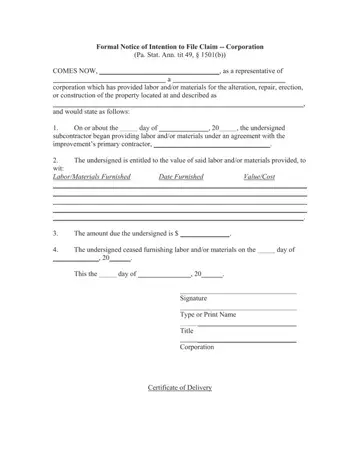
Understanding the formalities of legal documentation within the construction industry is essential for corporations engaged in these types of projects. One pivotal document in this realm is the "Formal Notice of Intention to File Claim -- Corporation" as per the Pennsylvania Statutes Annotated, title 49, section 1501(b). At the heart of this notice is the aim to clearly articulate the intention of a corporate entity, through its representative, to seek claims for the labor and/or materials provided in the improvement of a property. This document serves multiple roles: it notifies the primary contractor of the claimant's intent, it itemizes the labor and/or materials provided along with their respective values, and it officially records the amounts owed but unpaid. Furthermore, it denotes the cessation of work, effectively setting a clear timeline of the subcontractor's involvement. The procedure for delivering this notice is also specified, requiring personal service or mailing with a certified method, ensuring the document's receipt is formally acknowledged. This level of detail underscores the significance of transparency and proper procedure in construction-related legal matters, providing a structured approach to asserting financial claims in a sector where such claims are all too common.
| Question | Answer |
|---|---|
| Form Name | Pa Notice |
| Form Length | 2 pages |
| Fillable? | No |
| Fillable fields | 0 |
| Avg. time to fill out | 30 sec |
| Other names | pa notice pdf, pa notice of intent to file lien form, pa notice, formal notice |
Pa Notice isn’t the one you’re looking for?
Please rate Pa Notice
