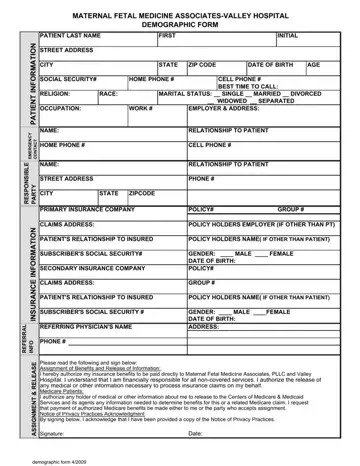
Patient Demographic Form PDF Details

Embarking on a medical journey, it's pivotal for both the patient and healthcare providers to have a comprehensive understanding of the patient's background, and the Patient Demographic Form serves as a cornerstone in building this foundational knowledge. Encompassing a wide array of information ranging from basic identity particulars such as name, date of birth, and social security number to more detailed aspects including marital status, race, employment, and language proficiency, this form is designed to ensure personalized and sensitive care tailored to each individual’s needs. Additionally, it extends beyond just the patient’s information by collecting data on the responsible party or guarantor, thereby streamlining the financial and emergency communications process. This document also bridges the gap between the patient and the healthcare system by identifying how they were referred, which can provide insights into the effectiveness of the healthcare provider's outreach efforts. With spaces dedicated to emergency contacts and other non-residential contacts, it ensures that a comprehensive support network is identified right from the outset. Therefore, the Patient Demographic Form is not merely a bureaucratic necessity but a critical tool in enhancing patient care, facilitating communication, and ensuring that every individual receives care that respects their unique circumstances and preferences.

QuestionAnswer
Form NamePatient Demographic Form
Form Length1 pages
Fillable?No
Fillable fields0
Avg. time to fill out15 sec
Other namespatient demographic medical template, patient demographic sheet, demographic sheet, patient demographic form

How to Edit Patient Demographic Form Online for Free

When working in the online tool for PDF editing by FormsPal, you are able to complete or alter patient demographic form pdf here and now. The tool is consistently improved by us, acquiring new awesome functions and turning out to be better. Should you be looking to get going, here's what it takes:

Step 1: Access the PDF form in our editor by hitting the "Get Form Button" at the top of this page.

Step 2: As you access the online editor, there'll be the form prepared to be filled in. Other than filling in different blank fields, you may as well perform other sorts of actions with the PDF, namely putting on any words, editing the original textual content, adding images, affixing your signature to the document, and a lot more.

This document will need particular information to be filled out, therefore be sure to take whatever time to enter exactly what is required:

1. It is crucial to fill out the patient demographic form pdf accurately, thus take care when working with the areas including these fields:

demographic sheet for patient writing process explained (step 1)

2. The subsequent stage is usually to complete all of the following fields: Home Address, Apt, City, State, Zip Code, Home Phone, Employer, Work Phone, Other Phone cid Cell cid Pager cid, Employment Status, cid Active Duty Military cid Child, cid Employed FullTime cid Employed, cid Not Employed cid Retired cid, cid Student FullTime cid Student, and Employer Phone.

Tips on how to complete demographic sheet for patient step 2

3. This 3rd section should be quite simple, Home Phone, Work Phone, Other Phone cid Cell cid Pager cid, If copies of insurance cards are, Pt Demo English V, and Rev September - all these form fields is required to be filled in here.

demographic sheet for patient writing process shown (stage 3)

It's easy to make an error when completing your Rev September, for that reason you'll want to go through it again prior to when you submit it.

Step 3: Check everything you've entered into the blank fields and then click the "Done" button. Sign up with us right now and instantly gain access to patient demographic form pdf, prepared for download. Each and every modification you make is handily saved , so that you can modify the form at a later stage if required. FormsPal is focused on the confidentiality of all our users; we make sure that all personal information used in our tool is protected.