
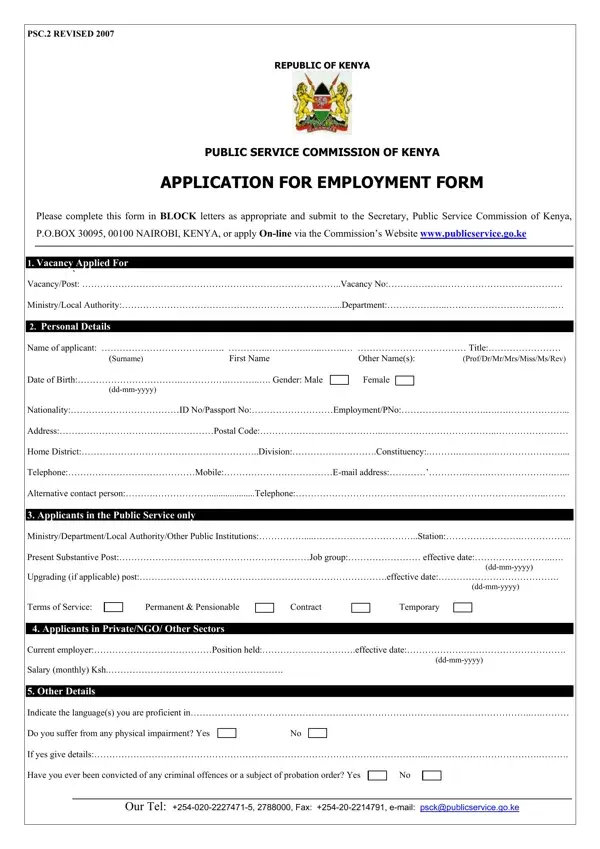
PSC.2A Form PDF Details

Navigating the pathway to securing a position within the government sector in Kenya necessitates a thorough understanding and completion of the PSC 2A form, a crucial document revised in 2007 under the auspices of the Republic of Kenya's Public Service Commission (PSC). This form serves as the foundational step in the application process for employment, offering a structured format for potential employees to present their personal details, educational background, professional experiences, and any other relevant information that could support their candidacy for a variety of public service positions. Applicants are required to fill out their information in block letters, adhering to the specific sections that capture details ranging from basic personal information, current and previous employment history, academic achievements, to languages spoken, and even includes inquiries about any criminal record. It is emphasized that honesty in disclosing such information will not automatically disqualify an applicant but will be considered on its individual merits. Furthermore, the PSC 2A form extends to capturing the applicant’s capabilities, achievements, and the rationale behind their application to the public service, aimed at providing a holistic view of the applicant to the evaluating committee. This form, available for submission both in a tangible format to the Secretary, Public Service Commission of Kenya, and digitally via the Commission’s official website, underscores the inclusive and thorough approach the Kenyan government employs in its recruitment process to ensure a competent and transparent public service sector.

QuestionAnswer
Form NamePSC.2A Form
Form Length1 pages
Fillable?Yes
Fillable fields15
Avg. time to fill out3 min 15 sec
Other namespsc2 form revised 2016, psc 2 form revised 2016 pdf download, psc form, public service commission application form 2020 pdf

How to Edit PSC.2A Form Online for Free

If you wish to fill out public service commission, it's not necessary to install any software - simply try our PDF tool. FormsPal is committed to making sure you have the absolute best experience with our tool by constantly releasing new functions and upgrades. Our editor is now even more helpful thanks to the latest updates! Now, working with PDF documents is simpler and faster than before. With some basic steps, you can begin your PDF editing:

Step 1: Just click on the "Get Form Button" at the top of this site to start up our pdf form editor. There you'll find everything that is needed to work with your document.

Step 2: Once you launch the editor, there'll be the document all set to be filled out. In addition to filling in various blank fields, you may also do some other actions with the file, namely putting on your own textual content, changing the original textual content, inserting images, signing the document, and more.

It's an easy task to fill out the document using this detailed guide! Here's what you should do:

1. It is crucial to fill out the public service commission accurately, so be mindful while filling out the areas including all these blanks:

Completing section 1 in public service commission application form 2020 pdf

2. Once your current task is complete, take the next step – fill out all of these fields - MinistryDepartmentLocal, Present Substantive PostJob group, ddmmyyyy, Upgrading if applicable, Terms of Service Applicants in, Permanent Pensionable, Contract, ddmmyyyy, Temporary, Current employerPosition, ddmmyyyy, Salary monthly Ksh, Other Details, Indicate the languages you are, and Do you suffer from any physical with their corresponding information. Make sure to double check that everything has been entered correctly before continuing!

Part # 2 in filling in public service commission application form 2020 pdf

3. Within this part, look at Have you ever been dismissed or, Yes, Have you ever been interviewed by, Year, UniversityCollege InstitutionSchool, AwardAttainment eg Degree Diploma, Courses eg PhD Msc BA, Subject EconMaths etc, ClassGrade, and From Other Relevant Courses and. These must be filled in with utmost precision.

public service commission application form 2020 pdf conclusion process explained (step 3)

4. The subsequent section will require your details in the following areas: From Other Relevant Courses and, Year, InstitutionCollege, Courses, and Details. Remember to fill out all of the requested info to go further.

InstitutionCollege, Details, and From  Other Relevant Courses and in public service commission application form 2020 pdf

When it comes to InstitutionCollege and Details, be certain that you get them right in this current part. Those two are the most significant ones in the form.

5. And finally, this last part is what you should wrap up prior to submitting the document. The blank fields in this instance include the following: Year, and Our Tel Fax email.

Completing part 5 in public service commission application form 2020 pdf

Step 3: Before moving on, make sure that all blanks were filled out as intended. When you’re satisfied with it, press “Done." Get the public service commission once you sign up at FormsPal for a 7-day free trial. Conveniently gain access to the pdf document in your personal cabinet, along with any edits and changes automatically synced! When you work with FormsPal, you can easily complete forms without worrying about personal data incidents or entries being distributed. Our protected system helps to ensure that your personal data is maintained safe.