
RCMP Hearing Test Form PDF Details

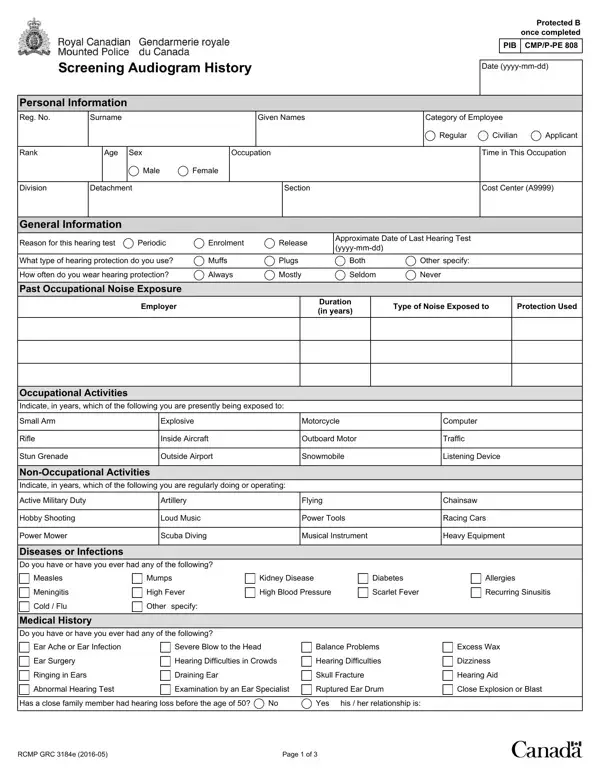
The RCMP Hearing Test Form, officially known as RCMP GRC 3184e, is a comprehensive document used by the Royal Canadian Mounted Police to evaluate the auditory health of its employees and applicants. Filled with Protected B information once completed, this form serves multiple purposes, including the screening of new enrollees, periodic assessments of current personnel, and evaluations at the time of release. Individuals are required to provide personal details, employment history, and specifics regarding both occupational and non-occupational noise exposure, as well as a detailed medical history focusing on auditory health. The form also outlines the use and frequency of hearing protection devices, capturing data on exposure to various noise sources. Moreover, it includes a section for diseases or infections that might affect hearing capabilities, such as measles, cold/flu, and diabetes, among others. Applicants must sign a declaration and consent for the use of their information for pre-selection purposes, with a clear understanding that the cost of the examination and subsequent reports are their responsibility. The test results section mandates the completion by a certified examiner, who assesses whether the individual meets the RCMP's detailed hearing standards, which specify the acceptable levels of hearing loss across different frequencies. Ultimately, the RCMP Hearing Test Form is a pivotal tool in ensuring that members of one of Canada's premier national law enforcement services maintain the level of auditory health required for their demanding roles, embodying a blend of meticulous personal data collection and stringent auditory health standards.

QuestionAnswer
Form Name RCMP Hearing Test Form
Form Length 3 pages
Fillable? No
Fillable fields 0
Avg. time to fill out 45 sec
Other names how to uptain a rcmp 6509 hearing test form, rcmp hearing, rcmp hearing and vision forms, rcmp grc 3184e

How to Edit RCMP Hearing Test Form Online for Free

With the online PDF editor by FormsPal, you're able to complete or edit RCMP Hearing Test Form right here and now. The editor is constantly improved by our team, acquiring powerful features and turning out to be better. Should you be looking to begin, this is what it requires:

Step 1: Press the "Get Form" button in the top part of this webpage to get into our editor.

Step 2: Using our state-of-the-art PDF editing tool, you could do more than simply fill out blanks. Edit away and make your forms appear professional with custom text put in, or optimize the file's original content to perfection - all that comes with the capability to incorporate stunning graphics and sign the PDF off.

Filling out this document will require attentiveness. Make sure that every blank is filled out properly.

1. To start off, while filling out the RCMP Hearing Test Form, start out with the part with the following fields:

Step # 1 in filling out how to uptain a rcmp 6509 hearing test form

2. Now that the previous segment is complete, you're ready include the required details in Occupational Activities, Indicate in years which of the, Small Arm, Rifle, Stun Grenade, Explosive, Inside Aircraft, Outside Airport, NonOccupational Activities, Indicate in years which of the, Active Military Duty, Hobby Shooting, Power Mower, Artillery, and Loud Music allowing you to move on further.

how to uptain a rcmp 6509 hearing test form conclusion process explained (portion 2)

It is possible to make a mistake when filling out your Artillery, thus ensure that you reread it before you decide to finalize the form.

3. Completing Do you have or have you ever had, Ear Ache or Ear Infection, Severe Blow to the Head, Balance Problems, Ear Surgery, Ringing in Ears, Hearing Difficulties in Crowds, Hearing Difficulties, Draining Ear, Skull Fracture, Excess Wax, Dizziness, Hearing Aid, Abnormal Hearing Test, and Examination by an Ear Specialist is essential for the next step, make sure to fill them out in their entirety. Don't miss any details!

how to uptain a rcmp 6509 hearing test form completion process outlined (step 3)

4. This next section requires some additional information. Ensure you complete all the necessary fields - For applicants only I declare that, Employee Comments and Signature, Comments, Signature of Applicant, Date yyyymmdd, Signature of Employee, Date yyyymmdd, Recommendations, To be Completed on the Day of the, Time lapse since last noise, hours or less, and More than hours - to proceed further in your process!

how to uptain a rcmp 6509 hearing test form writing process clarified (stage 4)

5. To finish your document, this final part requires several additional blanks. Filling out Hearing loss no greater than dbs, Meets or Exceeds, Does not meet, Not applicable, New Recommendations, Type of Audiometer, Examined by, Facility, Date of Test yyyymmdd, RCMP GRC e, and Page of will certainly conclude the process and you're going to be done in a tick!

Learn how to fill in how to uptain a rcmp 6509 hearing test form stage 5

Step 3: Once you have glanced through the information entered, click "Done" to finalize your form at FormsPal. Make a free trial account at FormsPal and get instant access to RCMP Hearing Test Form - which you can then work with as you want from your personal account page. Here at FormsPal.com, we endeavor to be certain that all of your details are maintained protected.