
Re 204A Form PDF Details

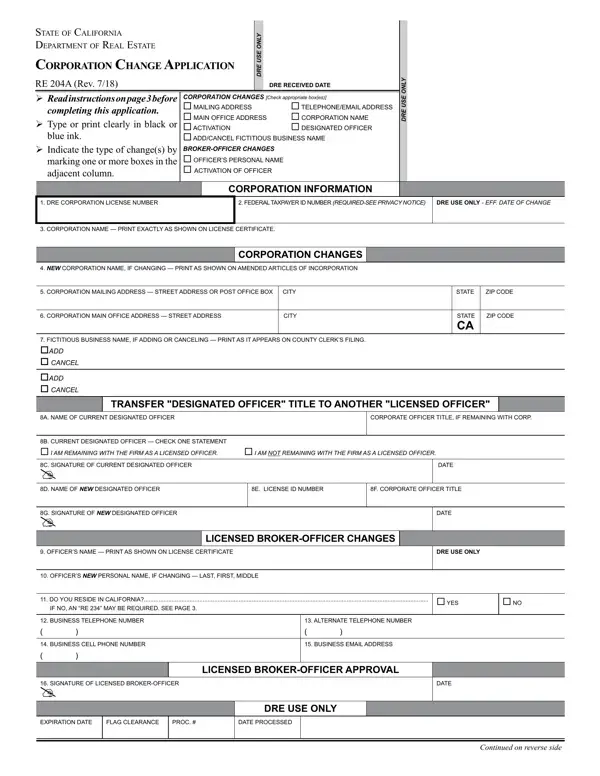
In the dynamic landscape of California's real estate sector, the Department of Real Estate requires that corporations navigating changes in structure, designation, or operational specifics adhere to specific procedural guidelines, encapsulated in the RE 204A form. This form, a crucial component for any corporation looking to update its information or change particulars related to its real estate license, serves as a structured pathway to ensure compliance with state regulations. The form addresses several pivotal areas, including changes to mailing and main office addresses, corporation name alterations, and the addition or cancellation of a fictitious business name, alongside shifts in the designated officer or modifications pertaining to broker-officers' personal details. With instructions detailed for clear comprehension, it mandates the use of black or blue ink for legibility and underscores the necessity of checking appropriate boxes to indicate the type of changes being implemented. Furthermore, it serves a dual function of facilitating smooth transitions within corporate structures and maintaining the integrity of public records, ensuring that the Department of Real Estate holds accurate, up-to-date information on licensed real estate corporations. This dual functionality emphasizes the form's importance as both a regulatory requirement and a tool for corporate transparency. Additionally, it lays the groundwork for regulatory compliance, delineating specific instructions for submitting background statements for corporate officers, thus underscoring the department’s commitment to maintaining high standards within the industry.

QuestionAnswer
Form NameRe 204A Form
Form Length3 pages
Fillable?No
Fillable fields0
Avg. time to fill out45 sec
Other namesre 204a, california 204a form pdf, re form 204, re204a

How to Edit Re 204A Form Online for Free

With the online PDF editor by FormsPal, you are able to fill in or alter california 204a form right here. Our team is devoted to providing you the best possible experience with our tool by continuously releasing new features and improvements. With all of these updates, using our editor gets better than ever before! To get started on your journey, go through these simple steps:

Step 1: First, access the tool by pressing the "Get Form Button" in the top section of this webpage.

Step 2: With our state-of-the-art PDF editing tool, it is possible to do more than merely complete blanks. Try each of the functions and make your documents appear sublime with custom text added, or adjust the original input to excellence - all that supported by the capability to incorporate any type of photos and sign the file off.

This PDF doc will require specific information; in order to ensure accuracy and reliability, take the time to take note of the following steps:

1. Firstly, while completing the california 204a form, beging with the page that has the subsequent blank fields:

Part # 1 for filling out when re 204a get

2. After completing this part, head on to the subsequent step and fill in all required details in all these blank fields - fictitious businEss namE if, tranSfEr DESignatED officEr titLE, a namE of cuRREnt DEsignatED, coRpoRatE officER titlE if, b cuRREnt DEsignatED officER, c signatuRE of cuRREnt DEsignatED, DatE, D namE of New DEsignatED officER E, f coRpoRatE officER titlE, g signatuRE of New DEsignatED, DatE, officERs namE pRint as shown on, DrE USE onLY, LicEnSED brokErofficEr changES, and officERs New pERsonal namE if.

The way to fill in when re 204a get stage 2

3. Within this part, examine businEss cEll phonE numbER, businEss Email aDDREss, signatuRE of licEnsED, LicEnSED brokErofficEr approvaL, DatE, ExpiRation DatE, flag clEaRancE, pRoc, DatE pRocEssED, DrE USE onLY, and Continued on reverse side. All of these should be completed with utmost attention to detail.

Filling out section 3 in when re 204a get

4. Completing I certify that I have read and, I also certify that a Corporation, than ten percent of the, A completed Corporation, Regulation, coRpoRatE namE, signatuRE of officER applicant, and DatE is paramount in this next section - make sure to don't rush and be mindful with each blank area!

Part number 4 in filling out when re 204a get

It's easy to get it wrong while filling in the coRpoRatE namE, therefore make sure that you look again prior to deciding to finalize the form.

Step 3: After you've looked once again at the details in the fields, click on "Done" to conclude your FormsPal process. Join FormsPal today and easily access california 204a form, set for downloading. Each change made is handily preserved , enabling you to customize the pdf at a later stage as required. At FormsPal.com, we do everything we can to ensure that all your information is kept protected.