
Report Of Marriage Form PDF Details

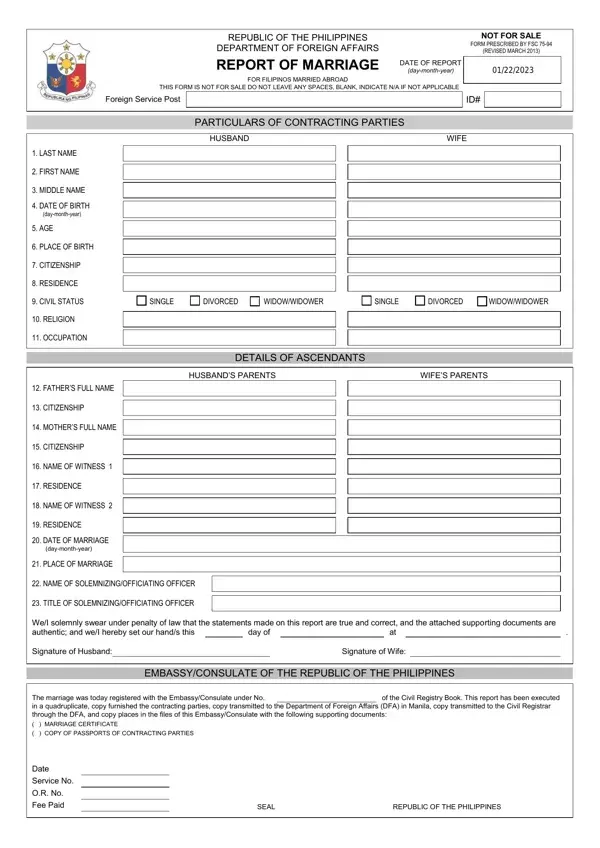
Documenting a marriage is a fundamental step in acknowledging and preserving the legal status of unions, especially for nationals living abroad. The Republic of the Philippines, through its Department of Foreign Affairs, provides a systematic approach for Filipinos who have married outside their homeland to ensure their marital bonds are recognized within the country's legal framework. The Report of Marriage form, mandated by FSC 75-94 and revised in March 2013, serves as the crux of this process. This exhaustive form captures detailed information about the contracting parties, from personal identifications such as last names, first names, middle names, dates of birth, ages, places of birth, citizenship, residences, civil statuses, religions, and occupations to details about the couple’s parents, witnesses to the marriage, and the solemnizing officer. Additionally, the forms contain procedural affirmations by the couple, swearing the truthfulness of their statements under penalty of law, thereby underscoring the seriousness and legality of the document. The form further outlines the administrative path it follows post-submission, which includes registrations with the Philippine Embassy or Consulate, and detailed instructions for document dissemination, ensuring a comprehensive recording system. The requirement for this report highlights the Philippines’ commitment to maintaining accurate demographic records and providing its citizens, no matter where they choose to marry, the assurance that their marital status is legally recognized back home.

QuestionAnswer
Form NameReport Of Marriage Form
Form Length1 pages
Fillable?No
Fillable fields0
Avg. time to fill out15 sec
Other namesreport of marriage philippines, sample of report of marriage form, philippine consulate san francisco report of marriage, report of marriage form download

How to Edit Report Of Marriage Form Online for Free

When working in the online editor for PDFs by FormsPal, you are able to fill out or alter report of marriage form washington dc here. To retain our tool on the forefront of convenience, we aim to integrate user-oriented features and enhancements regularly. We are routinely thankful for any feedback - join us in remolding how we work with PDF forms. If you're seeking to get going, this is what it requires:

Step 1: Access the PDF in our editor by clicking on the "Get Form Button" in the top section of this webpage.

Step 2: The editor gives you the capability to work with your PDF file in a range of ways. Enhance it by adding any text, correct what is originally in the file, and include a signature - all at your convenience!

This PDF will require specific details to be entered, therefore ensure that you take your time to enter exactly what is requested:

1. You have to complete the report of marriage form washington dc properly, so be mindful while working with the segments that contain these blanks:

The right way to fill in report of marriage form pdf portion 1

2. Once your current task is complete, take the next step – fill out all of these fields - FATHERS FULL NAME CITIZENSHIP, MOTHERS FULL NAME CITIZENSHIP, NAME OF WITNESS RESIDENCE, NAME OF WITNESS RESIDENCE, DATE OF MARRIAGE daymonthyear, NAME OF SOLEMNIZINGOFFICIATING, TITLE OF SOLEMNIZINGOFFICIATING, WeI solemnly swear under penalty, day of, Signature of Husband, Signature of Wife, EMBASSYCONSULATE OF THE REPUBLIC, The marriage was today registered, and of the Civil Registry Book This with their corresponding information. Make sure to double check that everything has been entered correctly before continuing!

Filling in segment 2 in report of marriage form pdf

3. Completing The marriage was today registered, MARRIAGE CERTIFICATE, COPY OF PASSPORTS OF CONTRACTING, Date, Service No, OR No, Fee Paid, SEAL, and REPUBLIC OF THE PHILIPPINES is essential for the next step, make sure to fill them out in their entirety. Don't miss any details!

report of marriage form pdf completion process outlined (step 3)

When it comes to COPY OF PASSPORTS OF CONTRACTING and MARRIAGE CERTIFICATE, make sure that you get them right in this section. These are certainly the most important ones in this page.

Step 3: Prior to moving on, it's a good idea to ensure that blanks were filled in the proper way. When you believe it is all fine, press “Done." Join us right now and immediately gain access to report of marriage form washington dc, all set for downloading. All adjustments made by you are preserved , letting you edit the form at a later stage when necessary. FormsPal ensures your information privacy by having a secure method that in no way saves or shares any type of private data used in the form. Rest assured knowing your files are kept safe when you work with our tools!