
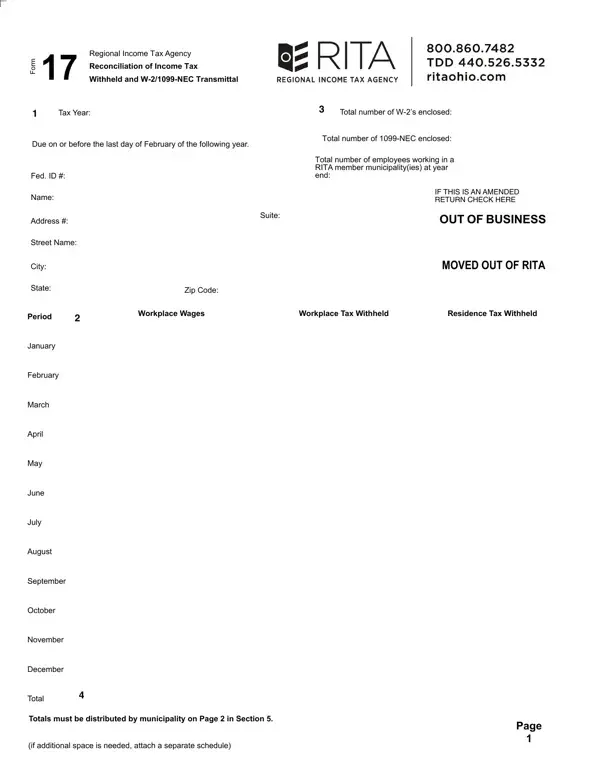
Rita Form 17 PDF Details

Every year, businesses and employers navigate the complexities of tax reporting, a task which includes the preparation and submission of various forms imperative for compliance with local and federal tax laws. Among these, the Rita 17 form, also known as the Regional Income Tax Agency Reconciliation of Income Tax Withheld and W-2/1099-NEC Transmittal, plays a crucial role for entities operating within RITA member municipalities. This document is designed to reconcile income tax amounts withheld from employees' wages with the actual tax documents provided to the employees, such as W-2 and 1099-NEC forms. Due annually by the last day of February, the form requires detailed reporting including the total number of W-2 and 1099-NEC forms issued, the total number of employees, as well as a breakdown of wages and taxes withheld and paid to each municipality. Additionally, specifics such as federal ID numbers, addresses, and the allocation of taxes by municipality underscore the form’s comprehensive nature. For businesses amending previous submissions or reporting changes such as out-of-business status, relocation outside of RITA jurisdictions, or adjustments in payroll distribution, the form accommodates such updates. Moreover, complexities increase for entities like professional employer organizations (PEOs) or those providing payroll services to unrelated third parties, necessitating further detailed reporting per client through an attached Schedule R-17. Ensuring accuracy and timeliness in submitting the Rita 17 form is pivotal not only for abiding by legal obligations but also for preventing potential fines and facilitating smooth operations.

QuestionAnswer
Form NameRita Form 17
Form Length2 pages
Fillable?No
Fillable fields0
Avg. time to fill out30 sec
Other names Reconciliation of Income Tax

How to Edit Rita Form 17 Online for Free

By using the online PDF editor by FormsPal, you may fill in or edit Rita Form 17 right here and now. To make our editor better and easier to use, we continuously implement new features, taking into consideration suggestions coming from our users. Getting underway is effortless! Everything you should do is follow these easy steps directly below:

Step 1: Click on the "Get Form" button above. It will open our pdf tool so you can start filling in your form.

Step 2: With our advanced PDF editor, you're able to do more than just complete blank form fields. Try all of the functions and make your docs appear sublime with custom text put in, or adjust the file's original input to excellence - all that comes along with the capability to incorporate your personal graphics and sign it off.

Pay attention while filling out this document. Ensure every blank field is done accurately.

1. You'll want to fill out the Rita Form 17 accurately, therefore be attentive while filling in the segments comprising these fields:

Writing section 1 of Rita Form 17

2. Once your current task is complete, take the next step – fill out all of these fields - April, May, June, July, August, September, October, November, December, Total, and Totals must be distributed by with their corresponding information. Make sure to double check that everything has been entered correctly before continuing!

Writing section 2 of Rita Form 17

3. The following step will be about Municipality, Fed ID, Number of employees, at year end, Workplace Wages, Workplace Tax Rate, Workplace Tax, Residence Tax, Municipality, Number of employees, at year end, Workplace Wages, Workplace Tax Rate, Workplace Tax, and Residence Tax - fill in every one of these blanks.

The best way to prepare Rita Form 17 portion 3

4. To go ahead, your next form section involves typing in several blanks. These include Workplace Wages, Workplace Tax Rate, Workplace Tax, Residence Tax, Municipality, Number of employees, at year end, Workplace Wages, Workplace Tax Rate, Workplace Tax, Residence Tax, Municipality, Number of employees, at year end, and Workplace Wages, which you'll find vital to moving forward with this process.

Workplace Tax Rate, Municipality, and Workplace Wages in Rita Form 17

5. To finish your document, the final section requires some extra blank fields. Filling out I have examined this return and to, Signature, Title, Date, Print Name, Phone, Mail to Attn RITA, PO BOX, CINCINNATI OH Fax, For OVERNIGHT mail Attn RITA, POBOX CENTRAL AVENUE SUITE, and Page will finalize the process and you'll definitely be done in a short time!

Rita Form 17 writing process explained (stage 5)

Always be extremely mindful while filling out For OVERNIGHT mail Attn RITA and Title, since this is where many people make mistakes.

Step 3: Just after double-checking your fields, press "Done" and you're good to go! Try a free trial plan with us and get instant access to Rita Form 17 - downloadable, emailable, and editable inside your personal account. When you use FormsPal, you can easily complete documents without the need to get worried about personal information breaches or records getting distributed. Our protected system makes sure that your private details are maintained safe.