
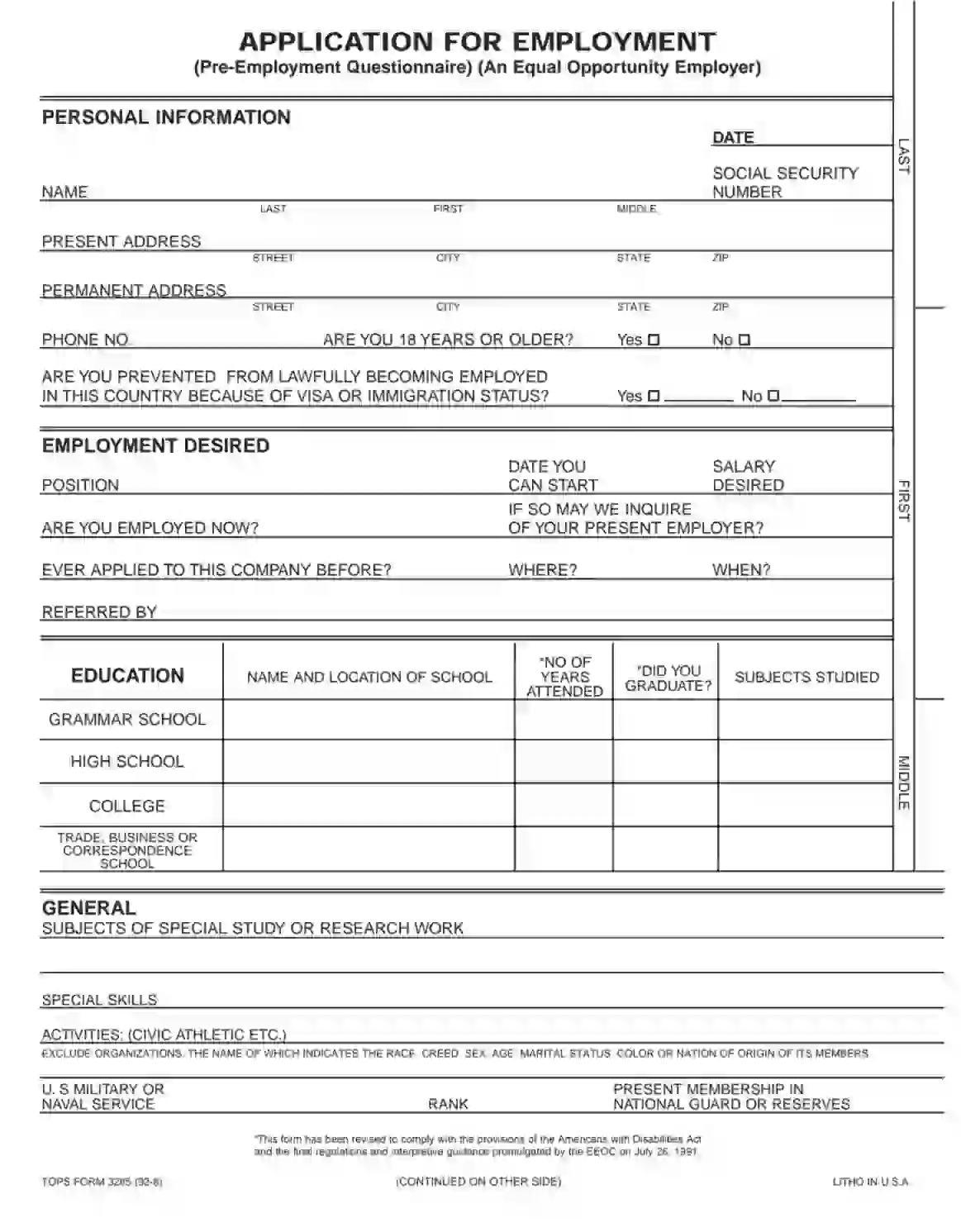
The Employment Application Form is a standardized document businesses use to collect information from job applicants. This form includes sections for personal information, educational background, employment history, and references. It also has fields for skills, certifications, and specific questions related to the position being applied for. The Employment Application Form helps employers systematically gather relevant details from all candidates, facilitating a more organized and equitable hiring process.
The Employment Application Form is a uniform platform for job seekers to present their qualifications, experiences, and suitability for the job. This form enables hiring managers to compare candidates efficiently and select those who best meet the job requirements for further assessment or interviews.
Other Application Forms
You can get more fillable application forms accessible here. Below, we listed several of the more popular forms included in this category. Additionally, remember that you are able to upload, fill out, and edit any PDF at FormsPal.
Filling out this form is quite easy for you as a candidate: you do not have to provide answers to difficult questions, just information about you, your education, and your career. Some people prefer to lie in such questionnaires about their skills and studies, but we insist on being honest, and your potential employer will appreciate the truthful info, too. We have taken one example of the Employment Application Form and reviewed it step by step below.
Introduce Yourself
The template’s first part consists of typical questions about an applicant. Here, you must provide your full name, SSN (social security number), the date when you are filling this form out, your present and permanent address.

Then, add your phone number and answer if you have already turned 18 or not. Another “yes or no” question here asks if you have problems with your visa or immigration status that prevent you from getting a job in the United States.

Tell about the Desired Employment
The next section is dedicated to the position for which you are applying. Indicate the position itself, the date when you are ready to start working, and the salary you wish to get. Reply if you are employed anywhere now and if your potential employer can consult with your current employer.
If this is not the first time when you apply to this entity, write “yes” in the designated line, then specify where and when it happened and who has processed your application.

Add Your Education Information
The block below is about your education. You should add the name, location, subjects studied, years spent in each place, and the result (if you graduated or not). You can write all of these for grammar school, high school, college, and trade, business, or correspondence school.

Write General Details
In the following part, you can add your achievements and special skills. If you have done any research and have publications, enter the info here. If you are a member of the US military or naval service, describe your position and current service in the designated lines.

Describe Your Ex-Employers
Besides the education information, employers usually want to know about your work experience. So, there is a section where you must list at least three last employers of yours. For each, specify the terms when you worked, the employer’s name and address, your salary and position there, and reasons for quitting the job.
Below the chart, there are two questions about which job you liked the most and what was the best about the chosen job.

Include References
Your future employer asks for references so they can check everything you have written in the application. Typically, in such forms, you should suggest at least three people. They must not be your relatives or partners (boyfriends, girlfriends, or spouses). It is preferable that your references are people that you have worked with who can verify your experience and skills.
When you have thought about your perfect references, write their names, addresses, where they work, and for how many years you know each other. If you wish, you can also enter their phone numbers; in this case, we recommend notifying the people you include about possible calls from strangers who may ask about you.

Sign the Form
Before signing, write the American state(s) where this form is valid. Then, sign the record below. This template also provides lines for your emergency contact: indicate it below the signature by writing the name, address, and phone number.
Then, sign the form again, verifying that all inserted data was checked and is correct and truthful. Write the current date near the signature.

The form’s first page ends with the section that the company’s HR manager will fill out after you have an interview in the company. Skip this part and scroll to the following page.
Give Your Basic Details Again
By signing the second page, you allow the company to check your data. Write your name and SSN, list the cities (and states) where you resided before, sign, and date the paper.

Read a Disclosure and Fill It Out
You must read the company’s disclosure about your data processing and authorize it. After you have read everything carefully, there are sections to fill out. Check one of the applicable options if you are a resident of New York state, Minnesota, Oklahoma, or California. Add your email address where needed (depends on the state).
Then, sign the form, add the current date, and give your background information again: full name, other names (or alias), SSN, birth date, driving license number and state where it was issued, full address, and primary phone number.

Read More about Your Data Processing
After you have provided the information in the disclosure, you may read some more details about how your info will be processed. You do not have to fill anything out anymore. If needed, read all statements and then submit your form to the employer.