
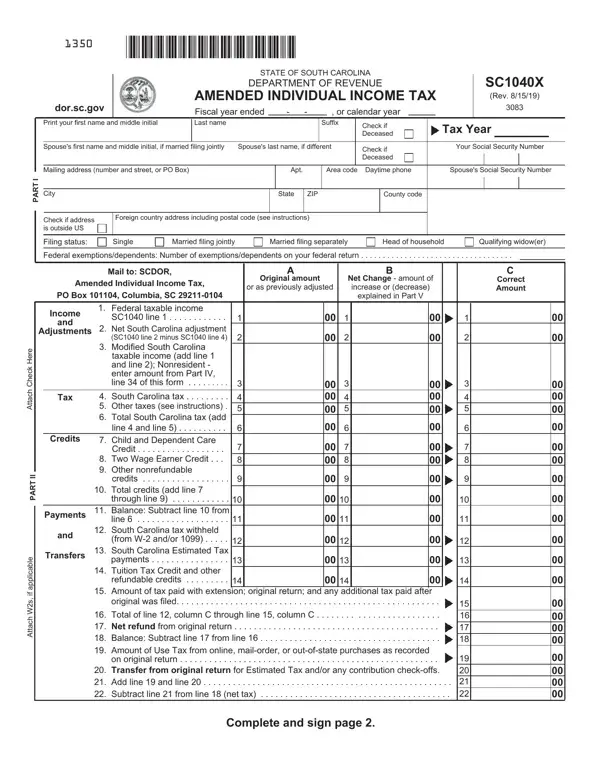
Sc1040X Form PDF Details

When individuals in South Carolina discover inaccuracies or changes that need to be made to their previously filed SC1040 Individual Income Tax return, the SC1040X amendment form serves as the key to rectifying those issues. This comprehensive document is designed to correct or update information, significantly impacting one's tax obligations or refund amounts. Whether it's an oversight in the original filing, a necessary adjustment following a discrepancy, or changes in filing status, deductions, credits, or income, the SC1040X form ensures taxpayers can align their records with the South Carolina Department of Revenue accurately. The process involves a detailed comparison between the original filing and the amended figures, requiring taxpayers to justify any adjustments through an explanation section in Part V. From basic taxpayer information to intricate details of income, tax liability, credits, and payments, every element can be updated. Importantly, this form also facilitates corrections for nonresident taxpayers under specific sections designed to cater to their unique circumstances. Timely filing of the SC1040X can lead to either additional tax dues or a refund, depending on the nature of the amendments. Additionally, adherence to the instructions provided ensures efficient processing, minimizing delays or the need for further clarification from the Department of Revenue. It's a critical tool for maintaining accurate tax records and ensuring compliance with state tax laws, reflecting the evolving financial situations of South Carolina's residents.

QuestionAnswer
Form NameSc1040X Form
Form Length6 pages
Fillable?No
Fillable fields0
Avg. time to fill out1 min 30 sec
Other namessc1040x sc fillable form sc1040x

How to Edit Sc1040X Form Online for Free

Any time you need to fill out Sc1040X Form, it's not necessary to download any kind of programs - just try using our online PDF editor. Our team is devoted to making sure you have the best possible experience with our editor by consistently adding new functions and upgrades. With these improvements, working with our tool becomes better than ever! Getting underway is effortless! Everything you need to do is take the next basic steps directly below:

Step 1: Click on the "Get Form" button above. It is going to open up our editor so that you could start completing your form.

Step 2: The tool grants the ability to customize PDF files in many different ways. Enhance it with personalized text, adjust what's already in the file, and add a signature - all when you need it!

Filling out this document demands care for details. Make sure all necessary areas are filled in properly.

1. While submitting the Sc1040X Form, make sure to include all essential blanks in its relevant part. It will help to facilitate the process, allowing for your information to be processed quickly and accurately.

Filling out segment 1 of Sc1040X Form

2. Soon after performing the previous section, go on to the subsequent stage and complete the necessary details in all these fields - Tax, Credits, Payments, and, Transfers, e r e H k c e h C h c a t t, I I, T R A P, e b a c, i l, p p a, f i s W h c a, t t, Modified South Carolina taxable, and credits.

Filling in segment 2 in Sc1040X Form

3. In this stage, have a look at Refund, Refund Options subject to program, Balance, Due, Please Sign Here, If line is larger than line, line a check box entry is required, REFUND, Debit Card, Paper Check, Direct Deposit b required, a Mark one refund choice b Direct, Must be digits The first two, digits, and I declare that this return and all. Each one of these have to be taken care of with highest precision.

Stage number 3 of completing Sc1040X Form

4. Completing PART IV NONRESIDENT It is best to, Federal adjusted gross income, PART V EXPLANATION OF CHANGES, and Have you been notified that your is vital in this stage - make certain that you take your time and take a close look at each empty field!

Filling out segment 4 in Sc1040X Form

5. To wrap up your form, the particular area involves several additional fields. Filling in Have you been notified that your is going to finalize the process and you'll be done in an instant!

Have you been notified that your, Have you been notified that your, and Have you been notified that your of Sc1040X Form

In terms of Have you been notified that your and Have you been notified that your, be sure that you review things in this section. The two of these could be the most significant ones in the PDF.

Step 3: Make sure the details are right and click "Done" to complete the task. Go for a free trial account with us and acquire direct access to Sc1040X Form - download, email, or change in your FormsPal cabinet. FormsPal offers secure form editor without personal information recording or distributing. Rest assured that your information is secure here!