

Optional Form 1012 at a glance
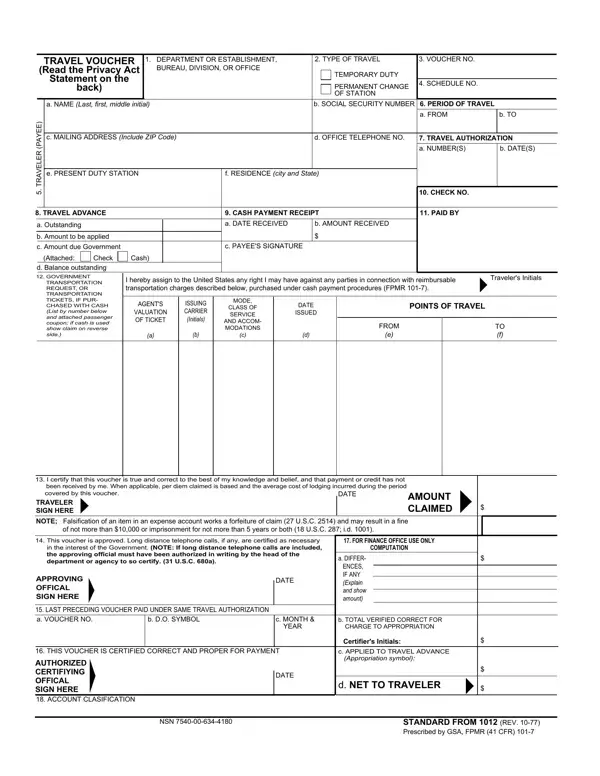
What it is: Optional Form 1012 is a Travel Voucher.
Who signs: The Traveler signs at Traveler Sign Here and the Approving Official signs at Approving Official Sign Here.
The primary purpose of the requested information is to determine payment or reimbursement to eligible individuals for allowable travel and/or relocation expenses incurred under appropriate administrative authorization and to record and maintain costs of such reimbursements to the Government.
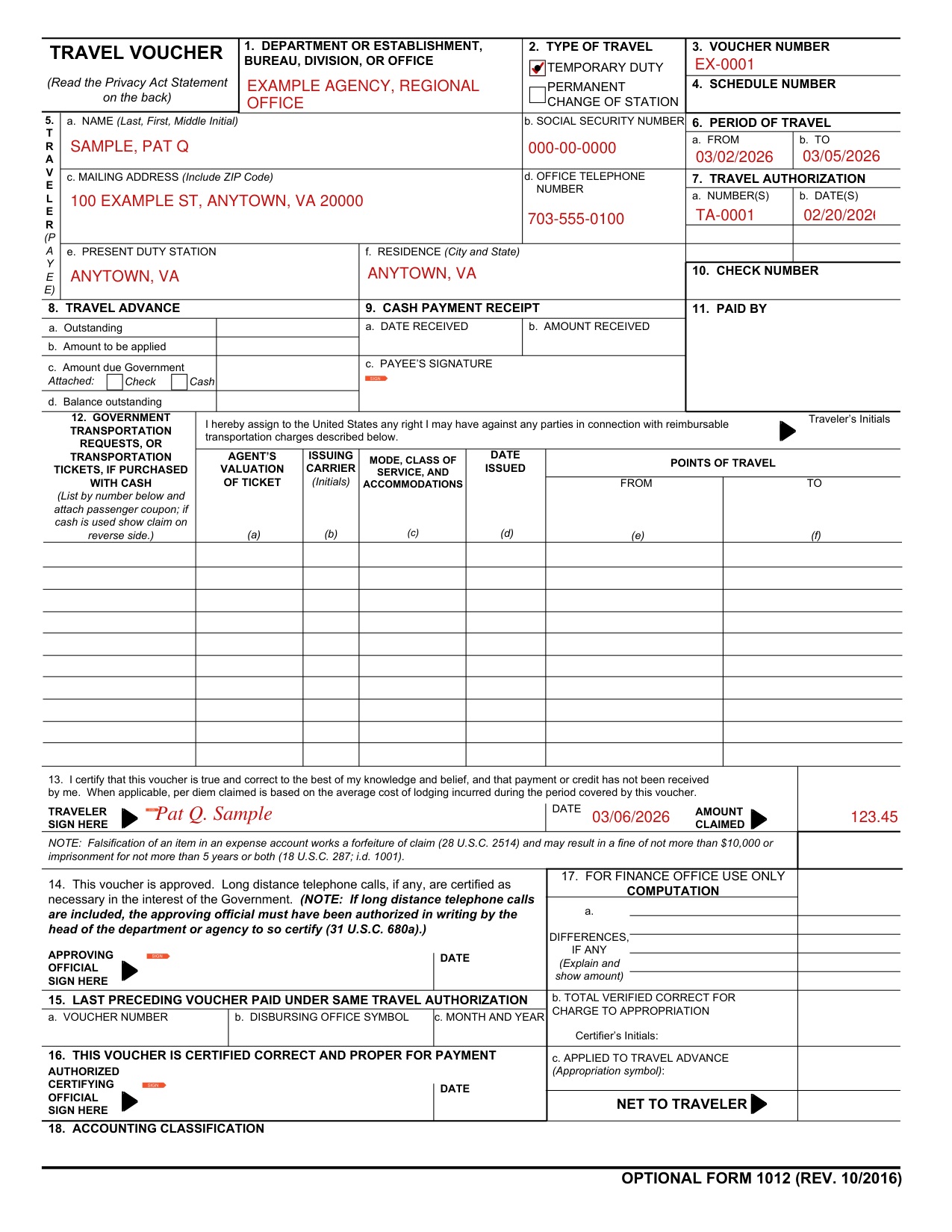
A filled-in Optional Form 1012 example: a federal employee claims a temporary duty trip
How to fill out Optional Form 1012, box by box
1. Department or Establishment, Bureau, Division, or Office

Enter the department or establishment, bureau, division, or office in Box 1.
2. Type of Travel and 3. Voucher Number

In Box 2, Type of Travel, mark Temporary Duty or Permanent Change of Station.
Enter the Voucher Number in Box 3 and the Schedule Number in Box 4.
5. Traveler
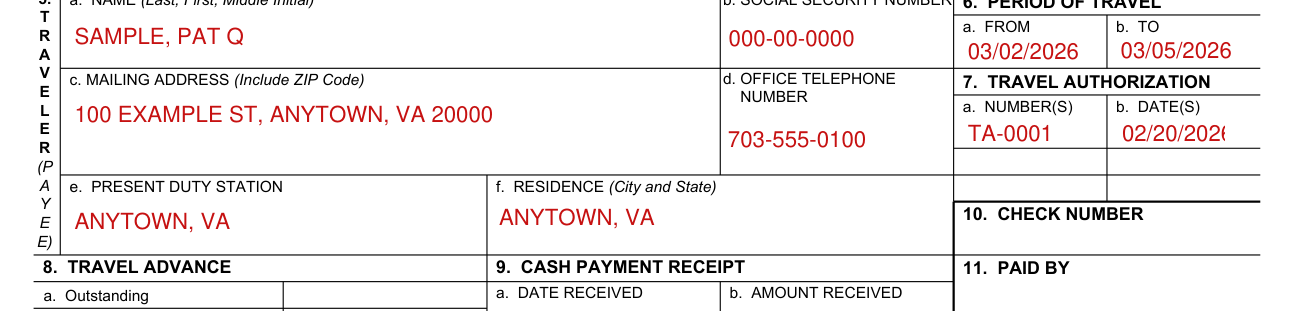
In Box 5, Traveler (Payee), enter a. Name (Last, First, Middle Initial), b. Social Security Number, c. Mailing Address (Include ZIP Code) and d. Office Telephone Number.
Enter e. Present Duty Station and f. Residence (City and State).
The Social Security Number (SSN) is solicited under the authority of the Internal Revenue Code (26 U.S.C. 6011(b) and 6109) and E.O. 9397, November 22, 1943; disclosure is MANDATORY on vouchers claiming travel and/or relocation allowance expense reimbursement which is, or may be, taxable income.
6. Period of Travel and 7. Travel Authorization

In Box 6, Period of Travel, fill in a. From and b. To.
In Box 7, Travel Authorization, enter a. Number(s) and b. Date(s).
13. Certification and Amount Claimed

In Box 13, the Traveler certifies that this voucher is true and correct to the best of the Traveler's knowledge and belief, and that payment or credit has not been received. When applicable, per diem claimed is based on the average cost of lodging incurred during the period covered by this voucher.
At Traveler Sign Here, sign, then enter the Date and the Amount Claimed.
Enter the total of columns (l), (m), and (n) in Total Amount Claimed and in item 13 on the front of this form.
More rules for Optional Form 1012
In Box 8, Travel Advance, enter a. Outstanding, b. Amount to be applied, c. Amount due Government and d. Balance outstanding.
In Box 9, Cash Payment Receipt, enter a. Date Received and b. Amount Received, and sign at c. Payee's Signature.
Enter the Check Number in Box 10 and Paid By in Box 11.
In Box 12, list Government Transportation Requests, or Transportation Tickets, if purchased with cash, by number and attach passenger coupon; if cash is used show claim on reverse side.
For each, enter (a) Agent's Valuation of Ticket, (b) Issuing Carrier (Initials), (c) Mode, Class of Service, and Accommodations, (d) Date Issued, and under Points of Travel (e) From and (f) To.
Traveler's Initials: I hereby assign to the United States any right I may have against any parties in connection with reimbursable transportation charges described in the list.
In Box 14, the Approving Official signs under Approving Official Sign Here: This voucher is approved. Long distance telephone calls, if any, are certified as necessary in the interest of the Government.
If long distance telephone calls are included, the approving official must have been authorized in writing by the head of the department or agency to so certify (31 U.S.C. 680a).
In Box 15, Last Preceding Voucher Paid Under Same Travel Authorization, enter a. Voucher Number, b. Disbursing Office Symbol and c. Month and Year.
If additional space is required, continue on another Optional Form 1012 BACK, leaving the front blank.
Complete this information if this is a continuation sheet: Page, Of Pages, Travel Authorization Number and Traveler's Last Name.
In Schedule of Expenses and Amounts Claimed, enter (a) Date, (b) Time (Hour and am/pm) and (c) Description (Departure/arrival city, per diem computation, or other explanations of expense).
Column (c): If the voucher includes per diem allowances for members of employee's immediate family, show member's names, ages, and relationship to employee and marital status of children (unless information is shown on the travel authorization).
Column (d) thru (g): Show amount incurred for each meal, including tax and tips, and daily total meal cost.
(h) Show expenses, such as laundry, cleaning and pressing of clothes, tips to bellboys, porters, etc. (other than for meals).
(i) Complete for per diem and actual expense travel.
(j) Show total subsistence expense incurred for actual expense travel.
Enter the Mileage Rate, Number Of Miles (k) and Mileage (l).
(m) Show per diem amount, limited to maximum rate, or if travel on actual expense, show the lesser of the amount from column (j) or maximum rate.
(n) Show expenses, such as taxi/limousine fares, air fare (if purchased with cash), local or long distance telephone calls for Government business, car rental, relocation other than subsistence, etc.
Common questions about Optional Form 1012
Who signs it?
The Traveler signs at Traveler Sign Here and the Approving Official signs at Approving Official Sign Here.
Is there a penalty?
Falsification of an item in an expense account works a forfeiture of claim (28 U.S.C. 2514) and may result in a fine of not more than $10,000 or imprisonment for not more than 5 years or both (18 U.S.C. 287; i.d. 1001) (checked November 1, 2026).
Sources
[1] Optional Form 1012 (REV. 10/2016), Travel Voucher (the Official source link on this page).