
Ssa 16 Bk Form PDF Details

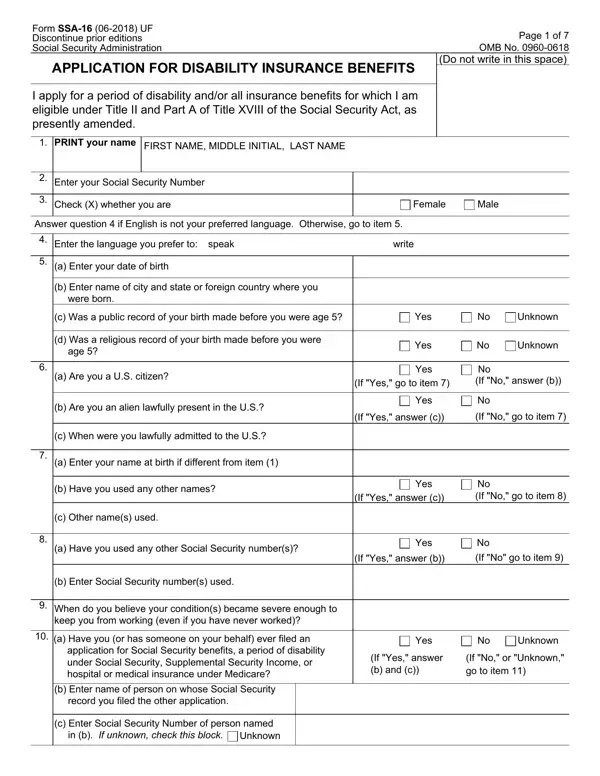
Navigating the process of applying for disability insurance benefits can often feel overwhelming, especially when faced with the detailed and specific questions found on the SSA-16 (06-2018) UF form. This form, crucial for individuals looking to obtain financial support due to disability, serves as an application for disability insurance benefits under the Social Security Act's Title II and Part A of Title XVIII. It comprehensively collects personal information, work history, and the intricate details of one’s medical condition that has led to their inability to work. Apart from personal identification details like name, Social Security Number, and date of birth, it delves into the applicant's work history, including whether they've worked under a different Social Security number or in industries not covered by Social Security. The form also touches on military service, eligibility for pensions not covered by Social Security, and any public disability benefits the applicant might be simultaneously applying for. It accounts for the applicant's marriage history, potentially eligible children, and the specific nature and impact of their disability. With additional sections dedicated to queries about recent earnings, the possibility of work despite the disability, and the impact of the disability on the applicant's capacity to work, the SSA-16 form stands as a comprehensive document aimed at evaluating eligibility for disability benefits. Its completion and accuracy are fundamental not only for the smooth processing of an application but also for ensuring that applicants receive the support they are eligible for, underlining the critical role this document plays in the lives of those applying for disability insurance benefits.

QuestionAnswer
Form NameSsa 16 Bk Form
Form Length7 pages
Fillable?No
Fillable fields0
Avg. time to fill out1 min 45 sec
Other namesssa disability application, what does form disability, form application disability benefits, ssa 16 download

How to Edit Ssa 16 Bk Form Online for Free

By using the online PDF editor by FormsPal, you are able to fill out or change social security disability forms right here. Our tool is continually developing to present the very best user experience attainable, and that is due to our resolve for continual enhancement and listening closely to testimonials. It just takes several easy steps:

Step 1: First, open the pdf editor by pressing the "Get Form Button" in the top section of this page.

Step 2: As you start the file editor, you'll notice the form ready to be filled in. Besides filling out different blanks, you might also perform various other actions with the form, including putting on any words, changing the initial textual content, inserting graphics, affixing your signature to the PDF, and much more.

As for the blanks of this particular form, this is what you want to do:

1. It's vital to complete the social security disability forms properly, hence be careful while filling in the parts that contain all of these blank fields:

Stage number 1 in filling out what does form disability

2. Once your current task is complete, take the next step – fill out all of these fields - a Have you used any other Social, Yes, If Yes answer b, If No go to item, b Enter Social Security numbers, When do you believe your, keep you from working even if you, a Have you or has someone on your, application for Social Security, b Enter name of person on whose, Yes, Unknown, If Yes answer b and c, If No or Unknown go to item, and c When were you lawfully admitted with their corresponding information. Make sure to double check that everything has been entered correctly before continuing!

what does form disability conclusion process shown (part 2)

3. This third part will be simple - complete all the fields in c Enter Social Security Number of to conclude this part.

Part # 3 of submitting what does form disability

It is possible to make errors when filling in the c Enter Social Security Number of, so ensure that you go through it again before you decide to send it in.

4. The next part requires your involvement in the subsequent parts: Form SSA UF a Were you in the, Yes, Reserve or National Guard active, If Yes answer b and c, Page of, No If No go to item, b Enter dates of service, c Have you ever been or will you, Veterans Administration benefits, FROM Month Year, TO Month Year, Yes, Did you or your spouse or prior, industry for years or more, and a Do you have Social Security. Be sure that you provide all of the requested info to go forward.

Filling out segment 4 of what does form disability

5. To wrap up your document, this particular section involves a couple of additional blank fields. Entering a Have you ever been married, Yes, If Yes answer b, No If No go to item, b Give the following information, When Month day year Where Name of, Marriage performed by, Spouses date of birth or age, Clergyman or public official Other, c Enter information about any, Had a marriage that lasted at, Spouses Social Security Number If, Had a marriage that ended due to, the combined period of marriage, and Spouses name including maiden name should wrap up the process and you'll surely be done in the blink of an eye!

Clergyman or public official Other, Spouses date of birth or age, and Spouses Social Security Number If inside what does form disability

Step 3: Before submitting this document, make certain that all form fields were filled in properly. When you determine that it's fine, press “Done." Join us now and easily get access to social security disability forms, available for download. Every modification you make is conveniently kept , enabling you to change the file later on as required. At FormsPal, we do our utmost to make sure that all of your details are kept private.