

Stock Power Form at a glance
What it is: Stock Power Form: use it for transferring shares, changing names, or adding a beneficiary.
Who signs: All current owners or authorized individual(s) must sign their name and have the signature guaranteed by a member of a Medallion Stamp Program. The Medallion Guarantor may require additional documentation.
A filled-in Stock Power Form example: transferring all shares of one account
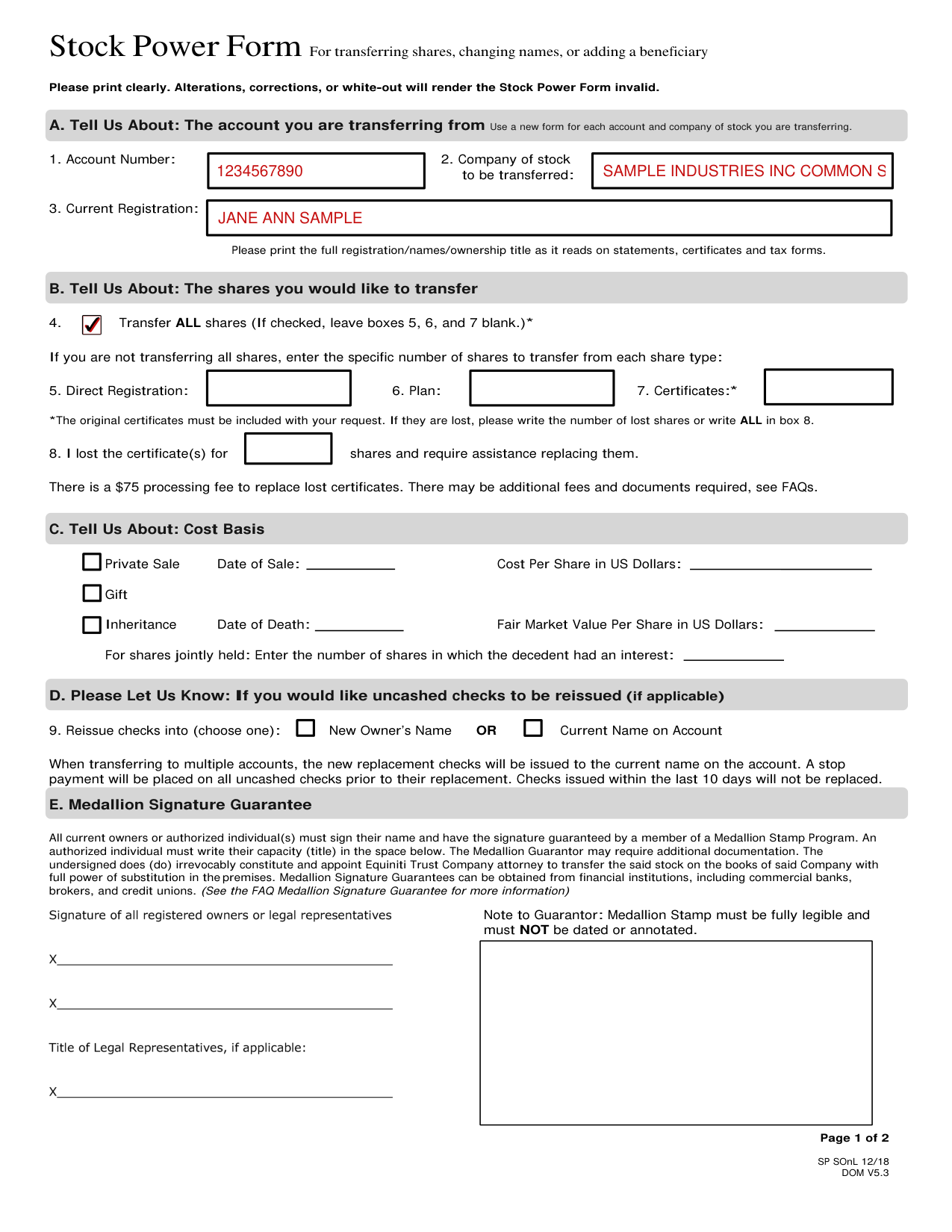
How to fill out Stock Power Form, box by box
Tell Us About: The account you are transferring from

Please print clearly. Alterations, corrections, or white-out will render the Stock Power Form invalid.
Enter the 10 digit account number for the current account.
Enter the name of the company of stock to be transferred.
A separate Stock Power Form is needed for each account and company of stock you are transferring.
List the current registration names/ownership title as it reads on statements, certificates and tax forms.
Tell Us About: The shares you would like to transfer

Check the first box only if you are transferring all shares. If checked, leave boxes 5, 6, and 7 blank.
If you are not transferring all shares, enter the specific number of shares to transfer from each share type into boxes 5, 6, or 7 as needed.
Enter the number of Direct Registration shares being transferred or leave blank.
Enter the number of Plan shares being transferred or leave blank.
Enter the number of certificate shares being transferred or leave blank.
Original stock certificate(s) must be mailed with your Stock Power Form.
Common mistake: Do not sign the back of the stock certificates.
Enter the number of lost certificate shares or write ALL in box 8.
There is a $75 processing fee to replace lost certificates (checked November 9, 2026).
Tell Us About: Cost Basis

Private Sale: Include the Date of Sale and the Cost Per Share.
Gift: Select this box if gifting shares, the gift date will default to the date that the transfer is processed.
Inheritance: Include the Date of Death and Fair Market Value Cost per Share.
For shares jointly held: Enter the number of shares or percentage of shares in which the decedent had an interest.
Tell Us About: The account you want the shares transferred to
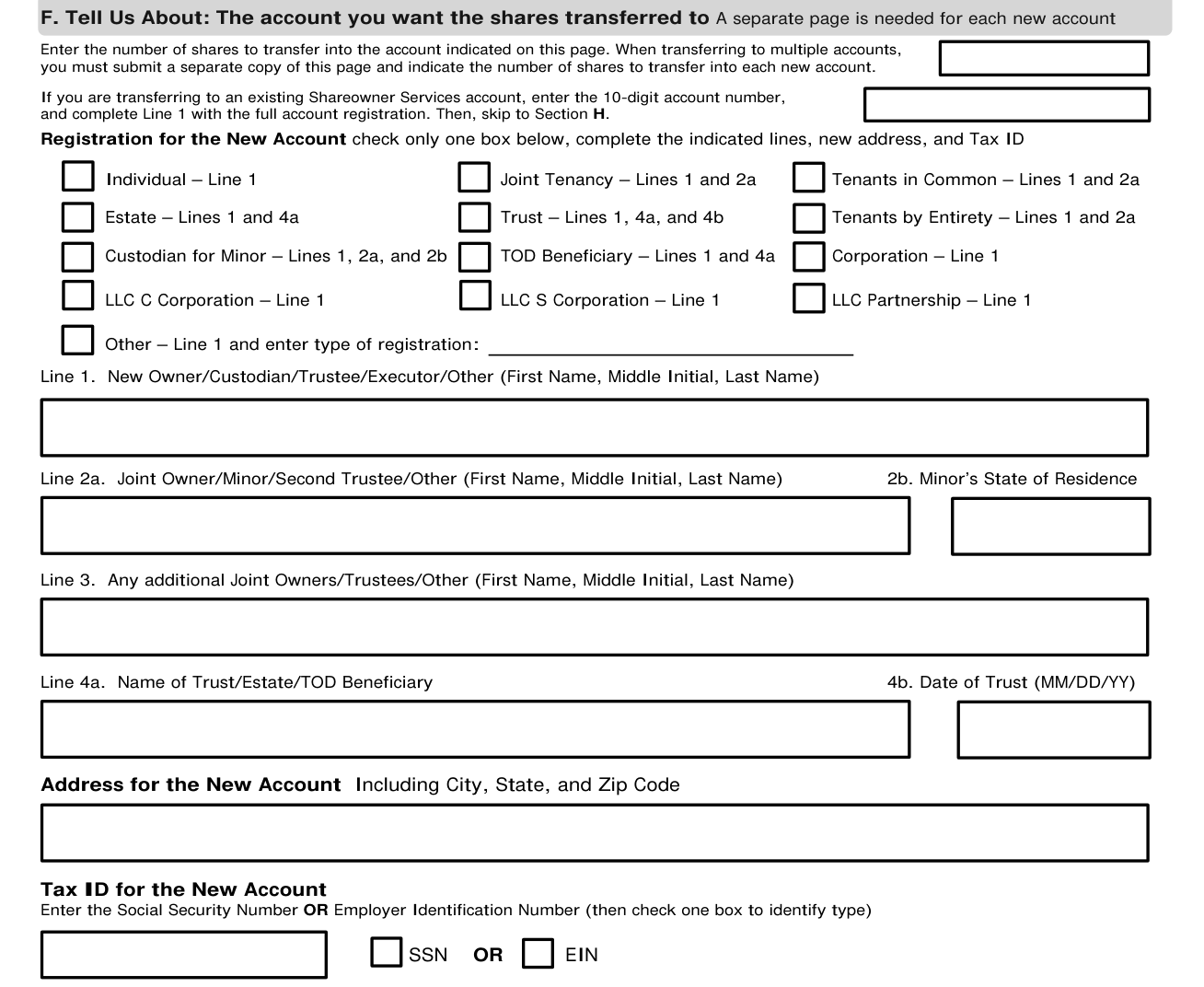
Complete page one of the Stock Power Form, and then complete a separate page two for each new account.
If you are transferring to an existing Shareowner Services account, enter the 10-digit account number, and complete Line 1 with the full account registration. Then, skip to Section H.
Registration for the New Account: check only one box, complete the indicated lines, new address, and Tax ID. Individual - Line 1. Joint Tenancy - Lines 1 and 2a. Tenants in Common - Lines 1 and 2a. Estate - Lines 1 and 4a. Trust - Lines 1, 4a, and 4b. Tenants by Entirety - Lines 1 and 2a. Custodian for Minor - Lines 1, 2a, and 2b. TOD Beneficiary - Lines 1 and 4a. Corporation - Line 1. LLC C Corporation - Line 1. LLC S Corporation - Line 1. LLC Partnership - Line 1. Other - Line 1 and enter type of registration.
Line 1. Enter the name of the New Owner, Custodian, Trustee, Executor, or Other name (First Name, Middle Initial, Last Name). This should match the name shown on the income tax return filed with the IRS.
Line 2a. If applicable, enter the Joint Owner, Minor, Second Trustee, or Other name (First Name, Middle Initial, Last Name).
Line 2b. If applicable, enter Minor's state of residence.
Line 3. If applicable, enter any additional Joint Owner, Trustee, or Other name (First Name, Middle Initial, Last Name).
Line 4a. If applicable, enter Name of Trust, Estate name, or the TOD Beneficiary's name. Only one TOD Beneficiary is allowed per account.
Line 4b. If applicable, enter the date of the Trust.
Address for the New Account: Enter full mailing address including City, State, and Zip Code.
Tax ID for the New Account: Enter the 9 digit Social Security Number (SSN) or Employer Identification Number (EIN) for the new account and then check the applicable box. If there are multiple owners, enter the number you would like the income reported under. If Custodian for Minor is selected, enter the Minor's Social Security Number (SSN).
Substitute Form W-9

The new owner, whose SSN or EIN is listed in the Tax ID for the New Account box, must sign and date the Substitute Form W-9.
Certification: Under penalties of perjury, I certify that: 1. The number shown on this form is my correct taxpayer identification number (or I am waiting for a number to be issued to me), and 2. I am not subject to backup withholding because: (a) I am exempt from backup withholding, (b) I have not been notified by the Internal Revenue Service (IRS) that I am subject to backup withholding as a result of a failure to report all interest or dividends, or (c) the IRS has notified me that I am no longer subject to backup withholding, and 3. I am a U.S. citizen or other U.S. person (defined in the instructions). 4. The FATCA code entered on this form (if any) indicating that the payee is exempt from FATCA reporting is correct.
You must cross out item 2 in the certification if you have been notified by the IRS that you are currently subject to backup withholding because you failed to report all interest and dividends on your tax return.
Notice to non-U.S. persons: do not complete the substitute Form W-9. Non-U.S. persons must properly and timely complete and return the applicable Form W-8 (available at www.irs.gov).
Sign up for Online Access

Check the box to the left to send instructions for online access.
An Authentication ID and sign up instructions will be mailed to the address in Section F.
If your situation is different
Reissue checks into
Reissue checks into (choose one): New Owner's Name OR Current Name on Account.
When transferring to multiple accounts, the new replacement checks will be issued to the current name on the account. Checks issued within the last 10 days will not be replaced.
Medallion Signature Guarantee
If an owner is unable to sign, a legal representative such as a Power of Attorney, Custodian, or Successor Trustee may sign on behalf of the shareowner. List the title of the legal representative.
Contact your Guarantor institution for their document requirements to obtain the stamp. You will complete Section E and sign the Stock Power in their presence.
Common mistake: Medallion Stamp must be fully legible and must NOT be dated or annotated.
A Notary Seal is not a substitute for a Medallion Signature Guarantee.
The signatures and the Medallion Signature Guarantee stamp must be original.
You can mail your completed Stock Power Forms and any applicable stock certificates by: Regular mail: EQ Shareowner Services PO Box 64874 Saint Paul MN 55164-0874 Overnight or courier mail: EQ Shareowner Services Attn: Imaging Services 1110 Centre Pointe Curve Suite 101 Mendota Heights MN 55120
To change the name on the account
To change the name on the account, complete all sections of the Stock Power Form. A new account will be created and a new Form W-9 will be required.
To register an account with a beneficiary
To register an account with a beneficiary, you can choose a TOD Beneficiary (Transfer on Death) registration in section F and complete all sections of the Stock Power Form.
Sources
[1] Stock Power Form (Rev. 10/18), EQ Shareowner Services (the Official source link on this page).
