
T 129 Form PDF Details

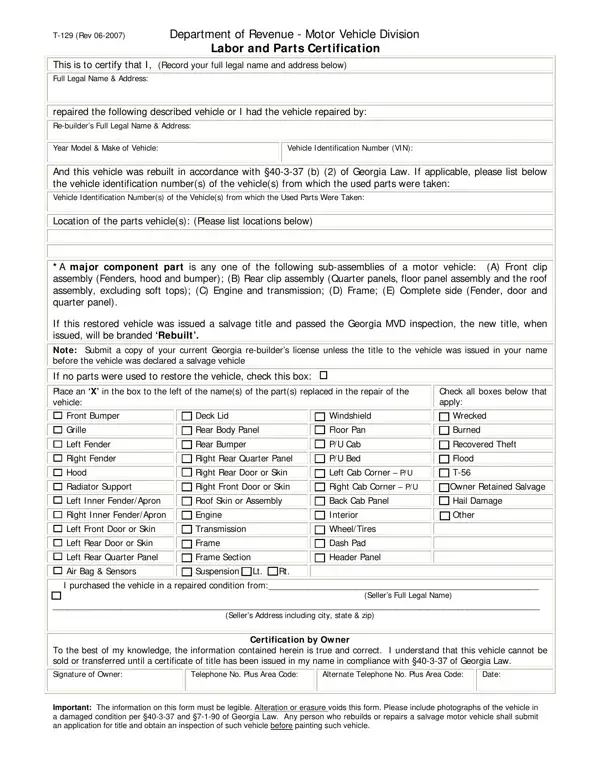
Understanding the T-129 form, issued by the Department of Revenue - Motor Vehicle Division, is an essential step for individuals in Georgia who have either repaired a vehicle on their own or have had their vehicle repaired by a professional re-builder. This form plays a pivotal role in certifying that the necessary labor and parts have been applied to a vehicle, ensuring it complies with Georgia Law §40-3-37 (b) (2), particularly for vehicles that have been rebuilt. It requires the owner to list full legal names and addresses, detail the year, model, and make of the vehicle, and provide the Vehicle Identification Number (VIN). Importantly, if the vehicle has been restored using parts from other vehicles, the VINs of those parts vehicles must also be provided. The form comprehensively covers the parts replaced or repaired, including major component parts such as the engine, transmission, and frame. Additionally, the form has provisions for vehicles that have undergone various types of damage, such as those that are wrecked, burned, or have suffered flood damage. Completion of this form is a crucial step in the process of having a salvage title updated to 'Rebuilt' status, following a successful inspection by the Georgia MVD. The T-129 form also demands a certification by the owner, attesting to the accuracy of the information provided and acknowledges the requirement that the vehicle cannot be sold or transferred until a title has been issued in compliance with state law. This certification underscores the importance of transparency and responsibility in the vehicle restoration process, ensuring that all restored vehicles meet safety and legal standards before they make their way back onto the road.

QuestionAnswer
Form NameT 129 Form
Form Length1 pages
Fillable?No
Fillable fields0
Avg. time to fill out15 sec
Other namesapplicable, erasure, MVD, T-129

How to Edit T 129 Form Online for Free

Working with PDF files online is certainly a piece of cake with our PDF tool. Anyone can fill in georgia department of motor vehicles form t 129 here and try out several other options we offer. To make our tool better and easier to work with, we continuously implement new features, taking into account suggestions coming from our users. With just a few basic steps, it is possible to start your PDF editing:

Step 1: First of all, open the editor by clicking the "Get Form Button" in the top section of this site.

Step 2: This editor enables you to work with nearly all PDF files in many different ways. Modify it by writing customized text, correct original content, and include a signature - all when you need it!

When it comes to blank fields of this specific document, here is what you want to do:

1. When submitting the georgia department of motor vehicles form t 129, make sure to complete all important blank fields in their corresponding form section. This will help hasten the work, making it possible for your details to be processed fast and accurately.

Filling in part 1 of T-56

2. Soon after finishing this part, go on to the next step and enter the necessary particulars in these blanks - Note Submit a copy of your current, Windshield Floor Pan P U Cab P, Check all boxes below that apply, Deck Lid Rear Body Panel Rear, Transmission Frame Frame, I purchased the vehicle in a, Sellers Address including city, and Certification by Ow ner.

Completing segment 2 in T-56

3. This next step is mostly about To the best of my knowledge the, Signature of Owner, Telephone No Plus Area Code, Alternate Telephone No Plus Area, Date, and Important The information on this - complete all of these blank fields.

T-56 conclusion process detailed (step 3)

People frequently make errors when filling in Signature of Owner in this part. Be sure you read again whatever you enter here.

Step 3: Reread what you have typed into the form fields and then press the "Done" button. After registering a7-day free trial account with us, it will be possible to download georgia department of motor vehicles form t 129 or send it via email right off. The file will also be accessible through your personal account menu with your every single change. We don't share or sell any information that you provide whenever dealing with forms at our website.