
Tc 569B Form PDF Details

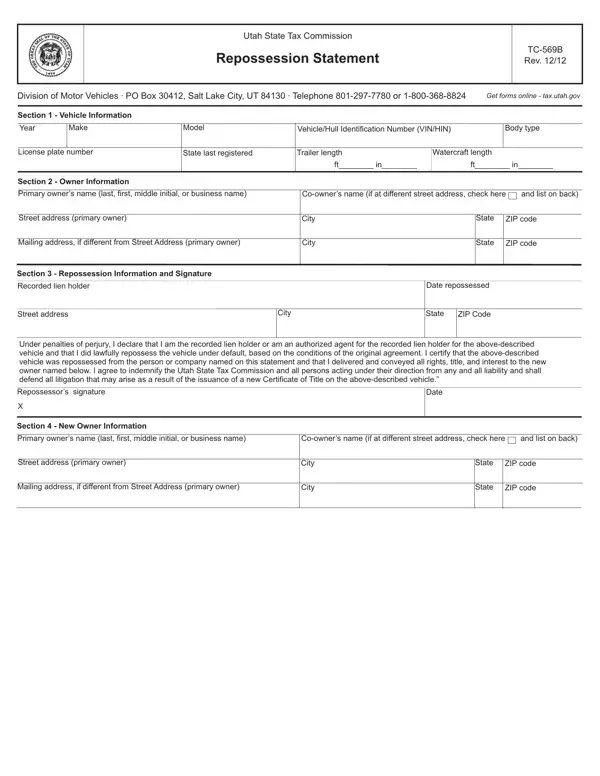
In the realm of vehicle ownership and financial agreements, the TC 569B form issued by the Utah State Tax Commission serves as a crucial document for documenting the repossession of a vehicle or watercraft due to the failure of the owner to meet the terms of their financing agreement. This comprehensive form, revised as of December 2012, facilitates the transition of rights, titles, and interests from the defaulting owner back to the lienholder or to a new owner, ensuring that all legal and state requirements are met in the process. It not only covers essential vehicle information, including year, make, model, and identification numbers but also delves into detailed owner information, providing spaces for both the primary and co-owners' details. The third section of the form is dedicated to repossession information, requiring the recorded lienholder to verify the lawful repossession of the vehicle under the stipulated agreement conditions. A distinctive feature of this form is the stipulation for the repossession agent to agree to indemnify the Utah State Tax Commission and all related parties from any potential legal liabilities arising from the repossession and title transfer process. Completing this form is a necessary step for recorded lienholders to officially declare the repossession of a vehicle or watercraft, and it plays a pivotal role in the transfer of ownership in the state of Utah.

QuestionAnswer
Form NameTc 569B Form
Form Length1 pages
Fillable?No
Fillable fields0
Avg. time to fill out15 sec
Other namesWatercraft, repossession statement utah, tc 569b, utah repossession statement

How to Edit Tc 569B Form Online for Free

You could fill in issuance easily in our online editor for PDFs. To make our tool better and more convenient to work with, we consistently design new features, taking into consideration suggestions coming from our users. For anyone who is seeking to begin, this is what it will require:

Step 1: Click on the "Get Form" button above on this webpage to get into our editor.

Step 2: When you launch the editor, there'll be the form made ready to be completed. Besides filling in various blanks, you may also do various other actions with the form, including adding custom textual content, editing the initial text, inserting graphics, putting your signature on the document, and a lot more.

With regards to the fields of this particular document, this is what you should do:

1. The issuance requires certain information to be inserted. Be sure that the following blanks are complete:

The best way to prepare repossession statement portion 1

2. Just after filling in this part, go on to the subsequent stage and fill out all required details in these blank fields - Section New Owner Information, Primary owners name last first, Coowners name if at different, and list on back, Street address primary owner, Mailing address if different from, City, City, State, ZIP code, State, and ZIP code.

Filling out part 2 in repossession statement

As to Street address primary owner and City, be certain you double-check them here. These are considered the most important fields in this form.

Step 3: Before finishing the document, make sure that blank fields are filled in the proper way. As soon as you establish that it is good, click on “Done." Find your issuance as soon as you subscribe to a free trial. Easily use the pdf form from your personal account, together with any edits and adjustments being automatically synced! We do not share the information that you use while dealing with forms at our website.