
Tc 721 Form PDF Details

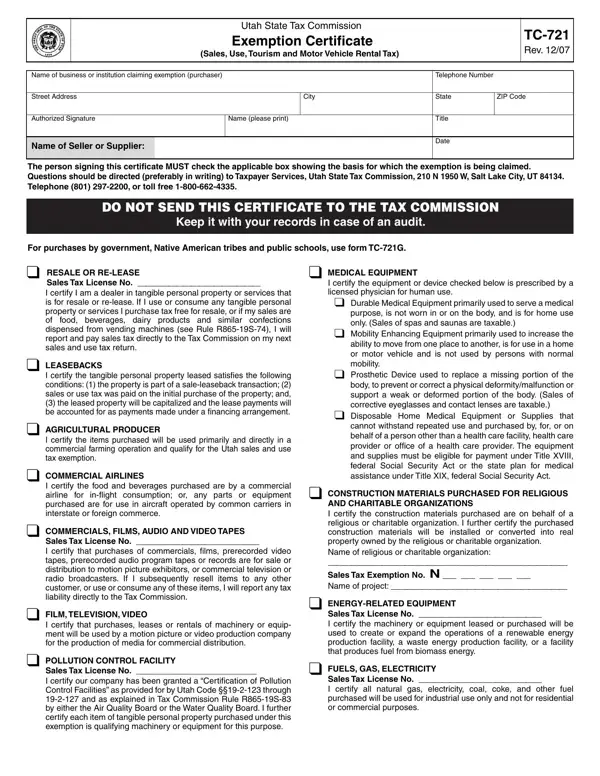
Understanding the Utah State Tax Commission Exemption Certificate, commonly referred to as the TC-721 form, is crucial for businesses and institutions aiming to navigate tax exemptions on purchases accurately. Revised in December 2007, this document serves a pivotal role in delineating the scope of sales, use, tourism, and motor vehicle rental tax exemptions available within the state. Entities seeking exemption must accurately complete and retain the form, furnishing details like the business or institution's name, address, and the nature of the exemption being claimed, among other specifics. The TC-721 enables a wide array of exemptions for different entities, ranging from resale or lease, agricultural producers, commercial airlines, and energy-related equipment purchasers to religious or charitable organizations and many others. Each exemption category requires the filer to provide justification and, in some cases, specific licensing or exemption numbers. This form is not only a testament to Utah’s tax exemption procedures but also a mandate for businesses to maintain accurate records for audit purposes. The complexities and nuances captured in the TC-721 form underscore the diversity and specificity of tax exemption regulations in Utah, highlighting the necessity for precise and informed filing by businesses and institutions to ensure compliance and optimize their tax benefits.

QuestionAnswer
Form NameTc 721 Form
Form Length2 pages
Fillable?No
Fillable fields0
Avg. time to fill out30 sec
Other namesTDD, utah tc 721g, LEASEBACKS, SEMICONDUCTOR

How to Edit Tc 721 Form Online for Free

Using PDF files online is definitely super easy with our PDF tool. You can fill out LEASEBACKS here without trouble. The editor is continually improved by our team, receiving awesome features and growing to be greater. It merely requires just a few easy steps:

Step 1: Hit the "Get Form" button at the top of this page to get into our tool.

Step 2: This editor will allow you to customize PDF files in various ways. Improve it by writing personalized text, correct what's originally in the PDF, and add a signature - all possible within minutes!

In order to complete this document, ensure you provide the information you need in each and every area:

1. When filling in the LEASEBACKS, ensure to incorporate all important blank fields within the corresponding part. This will help to expedite the process, allowing your information to be handled quickly and correctly.

2000 completion process detailed (stage 1)

2. Soon after filling out the previous part, go on to the subsequent stage and complete all required particulars in all these blanks - I certify the tangible personal, AGRICULTURAL PRODUCER, I certify the items purchased will, COMMERCIAL AIRLINES, I certify the food and beverages, COMMERCIALS FILMS AUDIO AND VIDEO, Sales Tax License No I certify, FILM TELEVISION VIDEO, I certify that purchases leases or, POLLUTION CONTROL FACILITY, Sales Tax License No I certify, Prosthetic Device used to replace, Disposable Home Medical Equipment, CONSTRUCTION MATERIALS PURCHASED, and AND CHARITABLE ORGANIZATIONS I.

2000 completion process detailed (part 2)

3. This third part should also be quite simple, MUNICIPAL ENERGY, SEMICONDUCTOR FABRICATING, Sales Tax License No I certify, STEEL MILL, Sales Tax License No I certify, RESEARCH AND DEVELOPMENT OF, SHALE AND TAR SANDS TECHNOLOGY, MAILING LISTS, Sales Tax License No I certify, MACHINERY AND EQUIPMENT AND, RESEARCH AND DEVELOPMENT MATERIAL, information, the, line of, and RELIGIOUS OR CHARITABLE - all these empty fields has to be completed here.

Stage number 3 in completing 2000

4. To move forward, this next form section involves filling out a couple of form blanks. Included in these are MACHINERY AND EQUIPMENT AND, I certify the motor vehicle being, TELECOMMUNICATIONS EQUIPMENT, SOFTWARE Sales Tax License No I, To be valid this certificate must, A sales tax license number is, and Please sign date and if applicable, which are fundamental to continuing with this particular process.

2000 writing process detailed (step 4)

You can certainly make a mistake while completing your Please sign date and if applicable, therefore you'll want to go through it again prior to when you finalize the form.

Step 3: Go through the details you have typed into the form fields and press the "Done" button. Join us right now and immediately gain access to LEASEBACKS, available for downloading. All modifications you make are kept , allowing you to modify the file at a later stage anytime. FormsPal is dedicated to the privacy of our users; we make sure all information handled by our tool remains secure.