Tdlr Form Vsf001 PDF Details

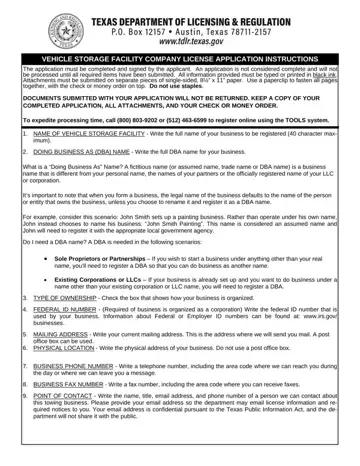
In the realm of automotive services, operating a vehicle storage facility requires meticulous adherence to state regulations and starting with the Texas Department of Licensing and Regulation (TDLR) VSF001 form is critical. This form is essentially the gateway for businesses seeking to enter the vehicle storage facility industry within Texas. Not only does the form demand comprehensive business information, including the legal name under which the business will operate, a Doing Business As (DBA) if applicable, and the type of ownership structure, but it also delves into the specifics of operational capacity and prerequisites such as insurance obligations tailored to the facility's storage capacity. By mandating a federal ID number, a clear address for both mailing and the physical location of the facility, and contact details, the form ensures that all operational facets of the business are transparent and traceable. Additionally, it underscores the importance of compliance with regulatory requirements like maintaining an adequate insurance policy based on the number of vehicles stored and adhering to a TDLR-approved drug testing policy. Furthermore, the application process is rigorous about the authenticity and accuracy of the information provided, warning of the consequences of falsification. The non-refundable application fee, coupled with the requirement for a criminal background check for all controlling persons of the company, highlights the seriousness with which the TDLR regards the licensing of vehicle storage facilities. This thorough approach ensures that only committed and compliant businesses can provide vehicle storage services, thereby protecting both the interests of consumers and the integrity of the industry.

QuestionAnswer
Form NameTdlr Form Vsf001
Form Length5 pages
Fillable?Yes
Fillable fields64
Avg. time to fill out14 min 3 sec
Other namesYYYY, TDLR, towforms, vsf form

How to Edit Tdlr Form Vsf001 Online for Free

It's a breeze to prepare the vsf form. Our software was built to be help you fill in any PDF promptly. These are the basic actions to follow:

Step 1: Look for the button "Get Form Here" on the following webpage and select it.

Step 2: As soon as you have accessed your vsf form edit page, you will notice all options you can use concerning your document at the top menu.

Feel free to enter the next information to create the vs, f form PDF:

completing htm stage 1

Type in the demanded details in City, Business, Phone, Number State, Zip, Code Business, FAX, Number Area, Code, Phone, Number Area, Code, Phone, Number Point, of, Contact, Print, name Name, Title Email, Address, Phone, Number Area, Code, Phone, Number Storage, Capacity, Check, one vehicles, or, fewer vehicles, vehicles, or, more T, DLR, Form, VS, F, rev, February and Page, of field.

htm CityBusinessPhoneNumber, State, ZipCode, BusinessFAXNumber, AreaCodePhoneNumber, AreaCodePhoneNumber, PointofContactPrintname, NameTitle, EmailAddressPhoneNumber, AreaCodePhoneNumber, StorageCapacityCheckone, vehiclesorfewer, vehiclesvehiclesormore, TDLRFormVSFrevFebruary, and Pageof fields to insert

In the I, amusing, T, DLR, s, Model, Drug, Testing, Policy consortium, phone, or STATEMENT, OF, APPLICANT Printed, Name Title, and Date, Signed box, describe the vital details.

part 3 to finishing htm

Describe the rights and responsibilities of the sides in the part Yes, Yes, Name, Last, First Middle, Initial Title, Ownership, Gender Male, Female, Name, Last, First Middle, Initial Title, Ownership, Gender Male, and Female.

Completing htm stage 4

Finalize by reading all of these fields and writing the pertinent details: Name, Last, First Middle, Initial Title, Ownership, Gender Male, Female, T, DLR, Form, VS, F, rev, February Page, of and Attach, additional, sheets, if, necessary

htm Name, LastFirst, MiddleInitial, TitleOwnershipGender, Male, Female, TDLRFormVSFrevFebruary, Pageof, and Attachadditionalsheetsifnecessary blanks to fill out

Step 3: Click the "Done" button. Now it's easy to transfer the PDF form to your electronic device. Besides, you'll be able to send it by email.

Step 4: To protect yourself from possible future concerns, ensure you get at least two duplicates of each and every document.

Watch Tdlr Form Vsf001 Video Instruction

Please rate Tdlr Form Vsf001

1 Votes
If you believe this page is infringing on your copyright, please familiarize yourself with and follow our DMCA notice and takedown process - click here to proceed .