
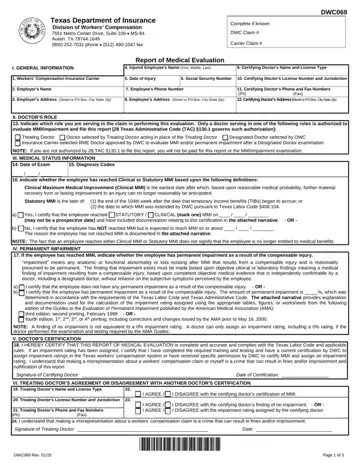
Form DWC069 at a glance
What it is: DWC069 is the Report of Medical Evaluation, which indicates whether the employee has reached Clinical or Statutory MMI and has permanent impairment as a result of the compensable injury.
Where and when to file: To file this form with DWC, fax to (512) 490-1047.
Treating Doctor: Doctor chosen by the employee who is primarily responsible for employee's injury-related health care.
Doctor Selected by Treating Doctor: Doctor selected by the treating doctor to evaluate permanent impairment and Maximum Medical Improvement (MMI). This doctor acts in the place of the treating doctor.
Designated Doctor: Doctor selected by the Texas Department of Insurance, Division of Workers' Compensation (DWC) to resolve a question over MMI or permanent impairment.
Insurance Carrier-Selected RME Doctor: Doctor selected by the insurance carrier to evaluate MMI and/or permanent impairment.
A filled-in Form DWC069 example: a treating doctor reports clinical MMI
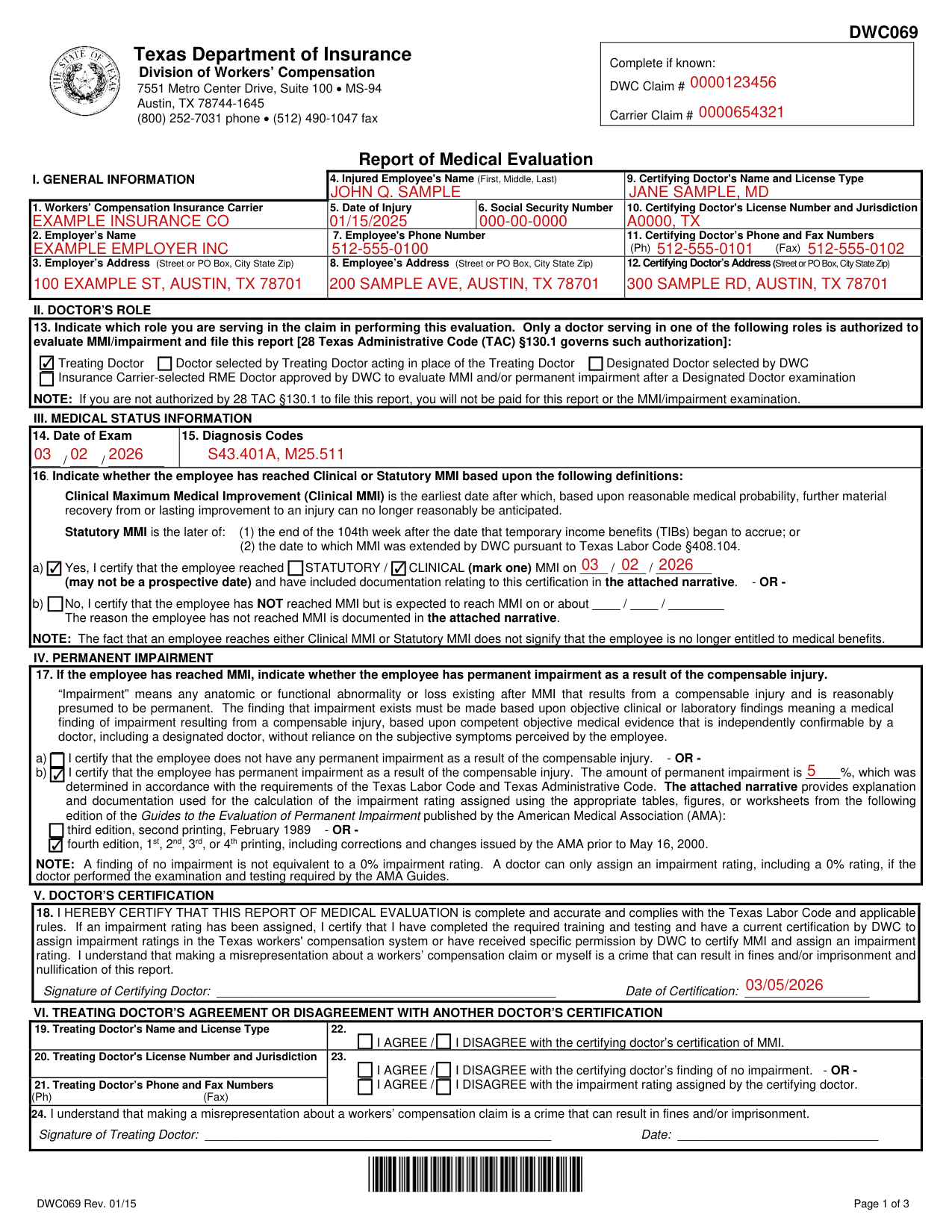
How to fill out Form DWC069, box by box
Boxes 1 to 12, the general information
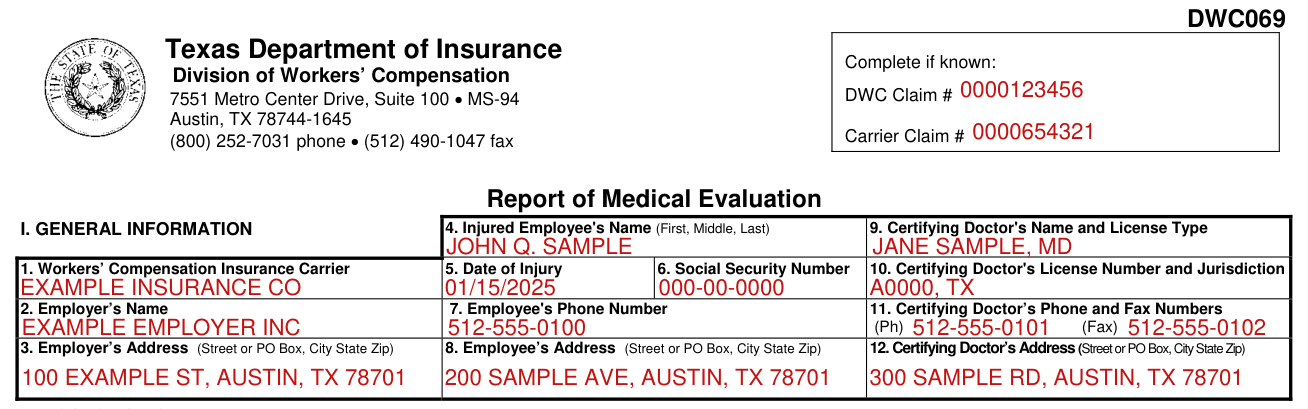
Complete if known: DWC Claim # and Carrier Claim #.
Box 1: Workers' Compensation Insurance Carrier. Box 4: Injured Employee's Name (First, Middle, Last). Box 5: Date of Injury. Box 6: Social Security Number. Box 9: Certifying Doctor's Name and License Type. Box 10: Certifying Doctor's License Number and Jurisdiction.
Box 2: Employer's Name. Box 3: Employer's Address (Street or PO Box, City State Zip). Box 7: Employee's Phone Number. Box 11: Certifying Doctor's Phone and Fax Numbers (Ph) (Fax).
Box 8: Employee's Address (Street or PO Box, City State Zip). Box 12: Certifying Doctor's Address (Street or PO Box, City State Zip).
Box 13, the doctor's role

Box 13: Indicate which role you are serving in the claim in performing this evaluation.
Only a doctor serving in one of the following roles is authorized to evaluate MMI/impairment and file this report (28 Texas Administrative Code (TAC) §130.1 governs such authorization): Treating Doctor; Doctor selected by Treating Doctor acting in the place of the Treating Doctor; Designated Doctor selected by DWC; Insurance Carrier-selected RME Doctor approved by DWC to evaluate MMI and/or permanent impairment after a Designated Doctor examination.
If you are not authorized by 28 TAC §130.1 to file this report, you will not be paid for this report or the MMI/impairment examination.
Boxes 14 and 15, the exam date and the diagnosis codes

Box 14: Date of Exam.
Box 15: Diagnosis Codes.
Box 16, clinical or statutory MMI

Box 16: Indicate whether the employee has reached Clinical or Statutory MMI based upon the following definitions.
Clinical Maximum Medical Improvement (Clinical MMI) is the earliest date after which, based upon reasonable medical probability, further material recovery from or lasting improvement to an injury can no longer reasonably be anticipated.
Statutory MMI is the later of: (1) the end of the 104th week after the date that temporary income benefits (TIBs) began to accrue; or (2) the date to which MMI was extended by DWC pursuant to Texas Labor Code §408.104.
a) Yes, I certify that the employee reached STATUTORY / CLINICAL (mark one) MMI on the date (may not be a prospective date) and have included documentation relating to this certification in the attached narrative.
b) No, I certify that the employee has NOT reached MMI but is expected to reach MMI on or about the date. The reason the employee has not reached MMI is documented in the attached narrative.
Box 17, permanent impairment
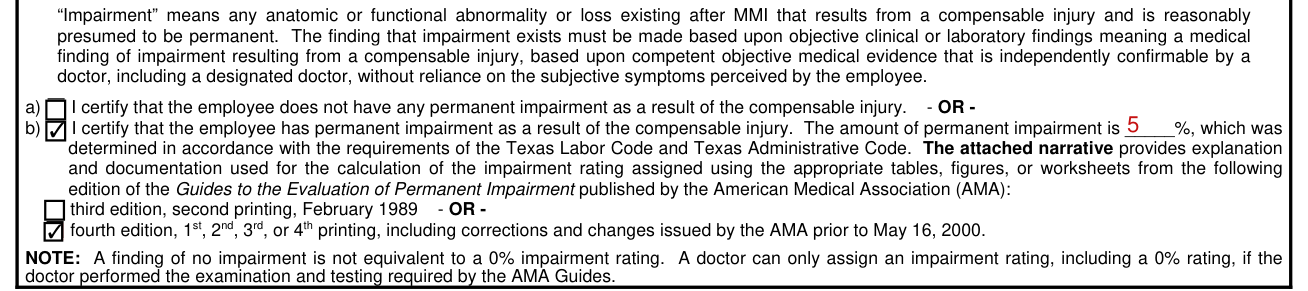
Box 17: If the employee has reached MMI, indicate whether the employee has permanent impairment as a result of the compensable injury.
"Impairment" means any anatomic or functional abnormality or loss existing after MMI that results from a compensable injury and is reasonably presumed to be permanent.
The finding that impairment exists must be made based upon objective clinical or laboratory findings meaning a medical finding of impairment resulting from a compensable injury, based upon competent objective medical evidence that is independently confirmable by a doctor, including a designated doctor, without reliance on the subjective symptoms perceived by the employee.
a) I certify that the employee does not have any permanent impairment as a result of the compensable injury.
b) I certify that the employee has permanent impairment as a result of the compensable injury. The amount of permanent impairment is _____%, which was determined in accordance with the requirements of the Texas Labor Code and Texas Administrative Code.
The attached narrative provides explanation and documentation used for the calculation of the impairment rating assigned using the appropriate tables, figures, or worksheets from the following edition of the Guides to the Evaluation of Permanent Impairment published by the American Medical Association (AMA): third edition, second printing, February 1989, or fourth edition, 1st, 2nd, 3rd, or 4th printing, including corrections and changes issued by the AMA prior to May 16, 2000.
A finding of no impairment is not equivalent to a 0% impairment rating. A doctor can only assign an impairment rating, including a 0% rating, if the doctor performed the examination and testing required by the AMA Guides.
Box 18, the doctor's certification

Box 18: "I hereby certify that this report of Medical Evaluation is complete and accurate and complies with the Texas Labor Code and applicable rules."
Box 18: Signature of Certifying Doctor and Date of Certification.
If an impairment rating has been assigned, I certify that I have completed the required training and testing and have a current certification by DWC to assign impairment ratings in the Texas workers' compensation system or have received specific permission by DWC to certify MMI and assign an impairment rating.
I understand that making a misrepresentation about a workers' compensation claim or myself is a crime that can result in fines and/or imprisonment and nullification of this report.
Boxes 19 to 24, the treating doctor's agreement or disagreement

Treating Doctor's Agreement or Disagreement with Another Doctor's Certification. Box 19: Treating Doctor's Name and License Type.
Box 20: Treating Doctor's License Number and Jurisdiction. Box 22: I AGREE / I DISAGREE with the certifying doctor's certification of MMI.
Box 23: I AGREE / I DISAGREE with the certifying doctor's finding of no impairment, or I AGREE / I DISAGREE with the impairment rating assigned by the certifying doctor. Box 21: Treating Doctor's Phone and Fax Numbers (Ph) (Fax).
Box 24: I understand that making a misrepresentation about a workers' compensation claim is a crime that can result in fines and/or imprisonment.
Signature of Treating Doctor and Date.
More rules for Form DWC069
If you have additional questions, call 1-800-372-7713, Option #3.
Other situations
The employee has permanent impairment
28 Texas Administrative Code §130.1 provides: Employee has permanent impairment: Only a doctor certified by DWC to assign impairment ratings or who receives specific permission by exception granted by DWC is authorized to certify MMI and to assign an impairment rating.
The employee does not have permanent impairment
Employee does not have permanent impairment: A doctor not certified or exempted from certification by DWC is only authorized to determine whether an employee has permanent impairment and, in the event that the employee has no impairment, certify MMI.
The employee has not reached MMI
Only a Designated Doctor is subject to the requirement to file the DWC Form-069 no later than the seventh working day if the employee has not reached MMI.
You may dispute the certification of MMI or the assigned impairment rating
If this is the first evaluation of your MMI and/or permanent impairment, you or your representative may dispute the certification of MMI and/or the assigned impairment rating.
To file the dispute, contact your local DWC field office or call 1-800-252-7031 to request the appointment of a designated doctor (DD), if one has not been appointed, or a Benefit Review Conference (BRC).
Your dispute must be filed within 90 days after the written notice is delivered to you or the certification of MMI and/or the assigned impairment rating may become final.
Common questions about Form DWC069
Is there a deadline?
If the employee has reached MMI, you must file the DWC Form-069 no later than the seventh working day after the later of: (a) date of the certifying examination; or (b) receipt of all medical information necessary to certify MMI.
Where do I file it?
The DWC Form-069 and required narrative shall be filed with: the insurance carrier; the treating doctor (if a doctor other than the treating doctor files the report); DWC; injured employee; and injured employee's representative (if any). The report must be filed by facsimile or electronic transmission unless an exception applies. To file this form with DWC, fax to (512) 490-1047.
When is this form not the right one?
Certification by a doctor who is not authorized is invalid.
Sources
[1] Form DWC069 (Rev. 01/15), Report of Medical Evaluation, Texas Department of Insurance, Division of Workers' Compensation (the Official source link on this page).
